Professional Photo Printers
cancel
Showing results for 
Show  only  | Search instead for 
Did you mean: 

Posts

Mastering Print Settings & Plug-Ins

How to Get the Most from Canon’s Software Tools for its Professional Inkjet Photo Printers Getting a print to match what you see on screen isn’t magic - it’s a process. And a big part of that process happens in the software. Whether you’re using the...

banner_featured.png featured.png
ccanada by Administrator
  • 2954 Views
  • 0 replies
  • 1 likes

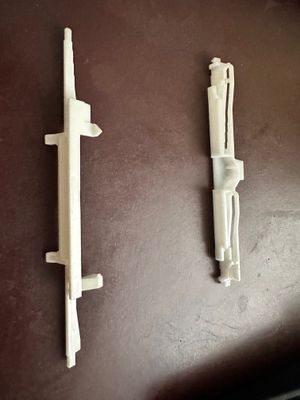
Found this rod in my PRO-1000. what is it?

I was changing out my ink and when I opened the door I found this pin or rod.  I added a picture where I found it.  I looked through the printer but could not find anything obvious.  Does not seem to affect operation.  Can anyone indentify it?  Your ...

unnamed.jpg 1000014907.jpg 1000014906.jpg

Black dots left on prints from Pixma Pro-200

Hi all, hoping someone here has seen this before because Canon support is stumped.My Pro 200 is producing a small black/gray dots in roughly the same position on every print — left of center, top surface of the paper. It looks like a pen touching pap...

IMG_2538.JPG

PIXMA PRO-200 Streaky prints

Neverending issues with Pixma Pro 200I am currently on my second printer, the Pixma Pro 200, as the first one malfunctioned while still under warranty. A replacement was provided, but unfortunately, I am now encountering the same problems with the se...

IMG-5291.jpg IMG-5292 (1).jpg
liffeypop by Contributor
  • 11802 Views
  • 7 replies
  • 1 likes

Pixma Pro-100 won't feed ANY paper.

Hey guys, I just bought a Pro-100 from a guy who'd had it for several years.  He printed two photos when I arrived to complete the deal, but now that I've gotten it home it won't feed paper from either the rear slot or manual feed slot.  The rollers ...

Getting started

New to the community? Here's some information to help you get acquainted:

Announcements