MF 8580 prints bold text improperly
All of a sudden bold print has changed. There is the normal text and a very faint grey text line just offset from the primary text as if it were a shadow effect but it's just supposed to be bold text.
Hello, Windows 10 64bit I've been trying to plot some drawings but have not been able to get the plotter to actually print. All i get is a hung up error with no indication or code to tell me what the problem is. I've uninstalled and reinstalled the ...
Hello,Someone in my office created a system manager ID and a PIN but he left and i have no idea what he put!! I don't think i can change that. Do I have to reset the printer to it's manufacture settings? If yes how do I do it? Thank you
my printer works fine. My printer is not scanning. Is there a free solution to this?
Hello our office has 4 D1350s which we have had good luck with. One of them has very poor print quality in the the is a "ghost" image or execisive lines on the printout. We replace the new toner cartridge which didn't help. Is there something the ...
I have a MF4570dn printer. I had a paper jam today. I took out the paper. However, I keep getting the paper jam message. I have triple checked and there is NO paper in the printer. I took the toner out numerous times. I've turned the printer of...
I have heard and read that once removed from a printer, the iB4020 series in particular, partially empty tanks may not be installed again. I recently replaced my 4020 with another one, but two of the OEM XL tanks were recently installed. I would hop...
every time I print a document on my MB2150 it prints out multiple times - sometimes only twice but more times usuallywhat am I doing wrong?Chris
Using a Canon color laser MF8380Cdw as a personal printer, it takes a very long time to start printing. Specs:Canon MF8380CdwPrint drivers downloaded from Canon and installed August 2017Connected via USB Windows 8.1 Pro8 core 4Ghz CPU32GB RAMSSD Exam...
I have a Canon ImageClass MF6160dw MFP that needs setup for Office 365. All the documentation I have states that I need to change the SMTP settings, but I am unable to locate where the settings are in the Remote UI interface. I need to change the S...
Our Imageclass throws a paperjam error everytime the feeder is used for scanning or copying. I have yet to find a feeder paperjam. I can't figure out what is going on but it is incredible frustrating and time consuming. I have lifted and cleaned e...
I need help setting up my printer lost tge disc that came with it to set up to my laptop
My scan option isn't working. It says "please wait awhile" and then after a few seconds goes back to original screen.
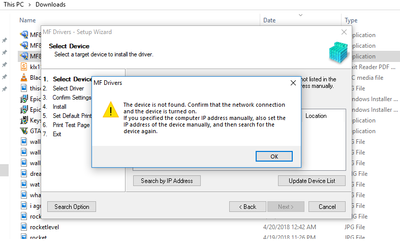
Hi all I was trying to install the the driver to printer E471 but all the time I find this message: what I did: 1.- I validate the network connection . Result : Doesnt work2.- I eliminate the windows firewall . Result : Does...
Hello, My workplace have Canon image runner advange photocopier. I cannot figure out how to scan several seperate documents to my email adress registered under the adress book without constantly going through and selecting my email adress after scann...
| Subject | Author | Posted |
|---|---|---|
| 11-13-2025 09:40 AM | ||
| 11-12-2025 07:50 PM | ||
| 11-12-2025 04:46 PM | ||
| 11-12-2025 03:00 PM | ||
| 11-10-2025 12:47 PM |
New to the community? Here's some information to help you get acquainted:
10/15/2025: New firmware updates are available.
Speedlite EL-5 - Version 1.2.0
Speedlite EL-1 - Version 1.1.0
Speedlite Transmitter ST-E10 - Version 1.2.0
07/24/2025: New firmware updates are available.
EOS R5 Mark II - Version 1.1.1
07/23/2025: New firmware updates are available.
7/17/2025: New firmware updates are available.
EOS R6 Mark II - Version 1.6.0
02/20/2025: New firmware updates are available.
RF70-200mm F2.8 L IS USM Z - Version 1.0.6
RF24-105mm F2.8 L IS USM Z - Version 1.0.9
RF100-300mm F2.8 L IS USM - Version 1.0.8
RF50mm F1.4 L VCM - Version 1.0.2
RF24mm F1.4 L VCM - Version 1.0.3
Canon U.S.A Inc. All Rights Reserved. Reproduction in whole or part without permission is prohibited.