Professional Photo Printers
cancel
Showing results for 
Show  only  | Search instead for 
Did you mean: 

Posts

Mastering Print Settings & Plug-Ins

How to Get the Most from Canon’s Software Tools for its Professional Inkjet Photo Printers Getting a print to match what you see on screen isn’t magic - it’s a process. And a big part of that process happens in the software. Whether you’re using the...

banner_featured.png featured.png
ccanada by Administrator
  • 2257 Views
  • 0 replies
  • 1 likes

Print studo Pro and Photoshop 2019

Can anyone help me, i recently updated my photoshop and i lost my Print studio that was once under the Automate option, I keep trying to do the PLUG IN for photoshop but when i select the photoshop option all it lets me do is "exit" not select NEXT. ...

e04joey by Apprentice
  • 1558 Views
  • 1 replies
  • 0 likes

Pixma Pro 100 Not Printing Cyan

 Hello, I'm having an issue with my Pixma Pro 100 printing the color cyan. I've tried deep cleaning, bottom plate cleaning and physically unclogging the printer heads to no use. When I do a print test, the Cyan color will show up, but only very faint...

IMG_5474.jpg

canon pixma pro 100 clicking sound

My canon pixma pro 100 makes a clicking sound towards the end of the printing process. Just wondering about the possible cause of this. I would be immensely grateful for any help on this topic. Thank you 

bil12343 by Contributor
  • 2179 Views
  • 1 replies
  • 0 likes

iPF8100 blue is printing green

Hi i have an issue with an iPF8100 suddenly printing the blue not blue but green. I have already replaced the right print head and the blue ink cartridge but still the same. Any ideas are very welcome? Kind regards Heinz 

blue problem.jpg

Resolved! PIXMA PRO-100 How to print 13" x 19"

I'm embarrassed even having to ask because I'm sure it's so simple, but I want to print a 13x19 photo from my printer (which appears to be the A+ open) but when I go into the paper size I don't find that option. I do see A, but not my size. Can you h...

1nan by Contributor
  • 5489 Views
  • 11 replies
  • 0 likes

"paper has run out" when I do have paper!

I bought a Canon imageprograf 1000 a few weeks ago and am trying to print heavyweight fine art paper (72 lb). It printed fine a few times, but now it says "paper has run out" every other sheet of paper, even when I have 10 sheets of paper in the rear...

Pro-100 prints warm vs ts8300

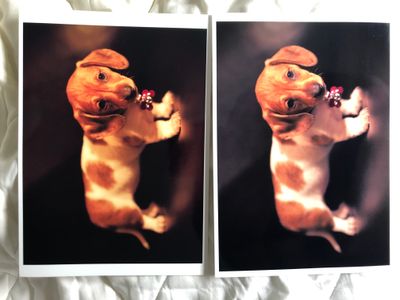
I just printed the exact same image with the canon print app on my phone. It’s a brown and white dog.The pro 100 is slightly more sharp, but the canon ts8300 has more accurate color. The pro100 is most definitely warm as the white fur is more yellow/...

i9900 and Mac Catalina 10.15 upgrade

I see that Canon has stopped supporting its own "professional" printers on Mac operating systems. Is Canon planning to create a driver for Mac OS Catalina 10.15, or is Canon no longer compatible with Mac products for professional applications?

Random Smudging - Please help!

 Hi there,I'm struggling to work out why this awful smudge across the bottom of my prints is happening.. I'm using Canon photo paper, the majority come out perfect but keep getting this happen too. Wasting a lot of time, ink & paper... how do I stop ...

20191031_202619[3769].jpg

Resolved! Pixma Pro-1000 missing print settings

Two days ago I had the full printer menu options in Print Settings when printing from Ps (Print, Printer: Canon PRO-100 Series selected, Clicking on Print Settings...), however now I only have Media & Qualilty, Layout, Paper Handing, Cover Page, Wate...

kate4 by Apprentice
  • 6087 Views
  • 4 replies
  • 0 likes
Getting started

New to the community? Here's some information to help you get acquainted:

Announcements