Turn on suggestions
Auto-suggest helps you quickly narrow down your search results by suggesting possible matches as you type.
- Canon Community
- Discussions & Help
- Printer
- Professional Photo Printers
- Re: Catalina 10.15.4 shifting colors for you?
Options
- Subscribe to RSS Feed
- Mark Topic as New
- Mark Topic as Read
- Float this Topic for Current User
- Bookmark
- Subscribe
- Mute
- Printer Friendly Page
Catalina 10.15.4 shifting colors for you?

Options
- Mark as New
- Bookmark
- Subscribe
- Mute
- Subscribe to RSS Feed
- Permalink
- Report Inappropriate Content
04-05-2020 07:09 PM - edited 04-05-2020 07:12 PM
When I upgraded to Catalina back in November it screwed up my colors and created a magenta cast on my prints. Similar to what this user reported (I'm using the same brand as them, too!). https://community.usa.canon.com/t5/Professional-Photo-Printers/Pixma-Pro-100-Magenta-Cast-on-Mac-Cat...
After several hours of banging my head against the wall I discovered my driver was outdated. Once I updated that my problems were solved and I was back to printing accurate colors.
Fast forward to today, I'm again seeing some color shifts. Specifically, the colors are not as accurate as they have been before. I have the latest version of the firmware and driver (which is same as the last time I updated). In the last week I updated Catalina with some updates so I'm now on 10.15.4.
Is anyone else having this issue?
Here's what I've done so far to troubleshoot:
- I checked my firmware and driver against the Canon site. I'm current.
- Lightroom and Photoshop are both current.
- I deleted and added the printer again. It's using the Canon software.
- I've even downloaded the paper profiles again and overwritten the previous versions (there was no difference)
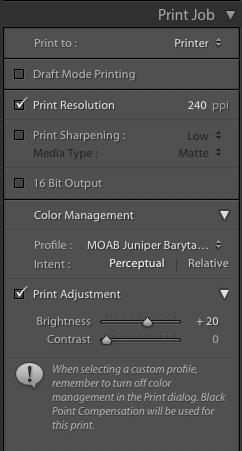
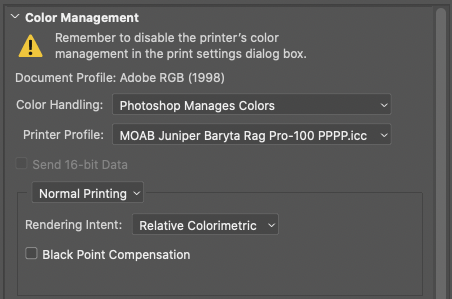
- I've checked and double-checked my settings in Lr and Ps. (attached for reference)
Any other ideas? Thanks in advance.
Print dialog settings...
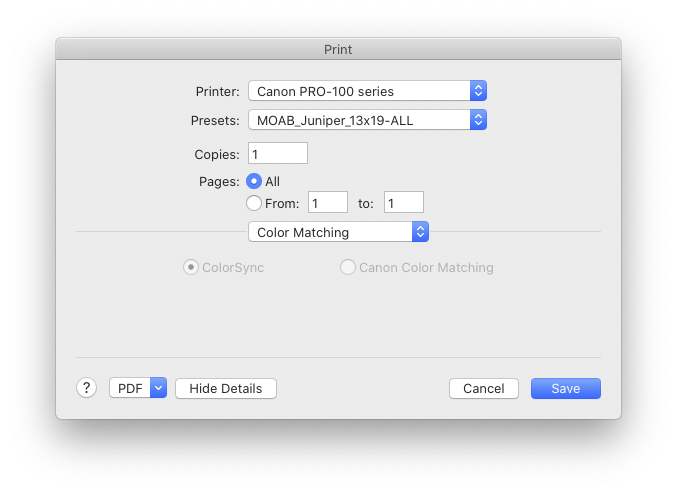
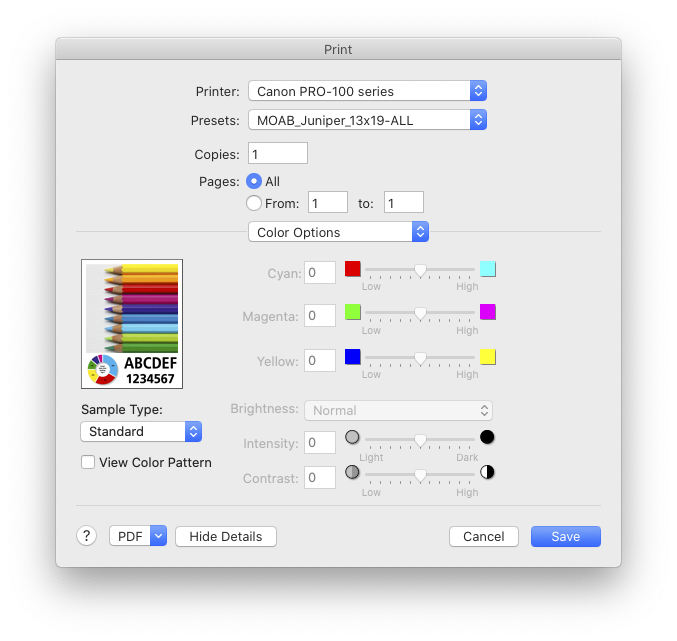
Lightroom print settings...
Photoshop print settings...
19 REPLIES 19
Options
- Mark as New
- Bookmark
- Subscribe
- Mute
- Subscribe to RSS Feed
- Permalink
- Report Inappropriate Content
05-28-2020 11:59 AM
Yeah, I think the grayscale ball had a slight pink tint as well.
1. You meant the yellow/orange clear tape? yes, I did this yesterday after seeing some suggestion from one of the posts.
2. I'm now out of gray ink after all these test prints. I need to order a new set and will let you know if the new ink set help.
thanks again for your help.


Options
- Mark as New
- Bookmark
- Subscribe
- Mute
- Subscribe to RSS Feed
- Permalink
- Report Inappropriate Content
05-28-2020 01:13 PM
How many prints have you made? If you run a nozzle check it will tell you.
That seems awfully quick to use up gray ink. What are the levels of the other inks?
John Hoffman
Conway, NH
R6 Mark III, M200 (converted to infrared), RF lenses, Pixma PRO-100, Pixma TR8620a, Lr Classic
Conway, NH
R6 Mark III, M200 (converted to infrared), RF lenses, Pixma PRO-100, Pixma TR8620a, Lr Classic
Options
- Mark as New
- Bookmark
- Subscribe
- Mute
- Subscribe to RSS Feed
- Permalink
- Report Inappropriate Content
05-28-2020 01:34 PM - edited 05-28-2020 01:38 PM
I printed about 30 on 8.5x11 test prints on other photos which has more gray colors. I did 3 cleanning cycles and 2 deep cleaning cycles, 2 nozzle checks. This is a brand new printer so it consumed some initial inks to setup as well. LGrey is about 20%, other colors has 40-70% left.


Options
- Mark as New
- Bookmark
- Subscribe
- Mute
- Subscribe to RSS Feed
- Permalink
- Report Inappropriate Content
05-28-2020 01:41 PM
We recommend reaching out to support for one-on-one help with this. They'll be able to help you nail down what's going on, and help you determine if there's a fault with the printer. At their descretion, they may also be able to send you a replacement cartridge, depending on what's going on. You'll want to log into your My Canon Account for your personalized support options - here's a shortcut: canon.us/account
Options
- Mark as New
- Bookmark
- Subscribe
- Mute
- Subscribe to RSS Feed
- Permalink
- Report Inappropriate Content
05-28-2020 02:34 PM
thank you John, I called the canon technical support but they said I need to replace the ink first to resolve the out of ink error before they can help trouble shoot. I will provide an update once I get the ink replaced.
Options
- Mark as New
- Bookmark
- Subscribe
- Mute
- Subscribe to RSS Feed
- Permalink
- Report Inappropriate Content
06-02-2020 09:13 AM
Yes and it's driving me crazy!
I did the same thing. I redownloaded the drivers and still get a color shift. Apple upgraded to 10.15.5 but the problem wasn't solved.
I hope this gets fixed soon!
Good luck.
Options
- Mark as New
- Bookmark
- Subscribe
- Mute
- Subscribe to RSS Feed
- Permalink
- Report Inappropriate Content
06-02-2020 09:15 AM
I have the exact same problem but I have a different model (prograf-1000). It's driving me crazy!
Options
- Mark as New
- Bookmark
- Subscribe
- Mute
- Subscribe to RSS Feed
- Permalink
- Report Inappropriate Content
06-02-2020 03:07 PM - edited 06-02-2020 04:34 PM
My issue with magenta cast was resolved! I called Canon technical support yesterday and they diagnosed it to the print head issue. They sent me a new print head and I can happily confirm that the new print head fixed my magenta cast issue.
Options
- Mark as New
- Bookmark
- Subscribe
- Mute
- Subscribe to RSS Feed
- Permalink
- Report Inappropriate Content
06-02-2020 04:16 PM
Gfeat news.
And thank you for posting the resolution. It may help others.
John Hoffman
Conway, NH
R6 Mark III, M200 (converted to infrared), RF lenses, Pixma PRO-100, Pixma TR8620a, Lr Classic
Conway, NH
R6 Mark III, M200 (converted to infrared), RF lenses, Pixma PRO-100, Pixma TR8620a, Lr Classic
Options
- Mark as New
- Bookmark
- Subscribe
- Mute
- Subscribe to RSS Feed
- Permalink
- Report Inappropriate Content
06-02-2020 04:39 PM - edited 06-02-2020 04:40 PM
To isolate the software related issues, Canon techical support asked me to download the Canon Print app for iPhone and print the test photo from there. If it prints correctly from iPhone via Canon Print app, then it is more likely the software/setup related issues on MAC. In my case, Canon Print app produced the same results as printing from LR on Mac.

- « Previous
-
- 1
- 2
- Next »
- « Previous
-
- 1
- 2
- Next »

Announcements
05/13/2026: New firmware updates are available.
EOS R5 Mark II - Version 1.3.0
EOS R6 Mark II - Version 1.7.0
04/28/2026: Service Notice: Caution Concerning use of Lithium Batteries
03/17/2026: New firmware updates are available.
SELPHY CP1500 - Version 1.0.7.0
02/23/2026: New firmware update is available for EOS C50- Version 1.0.3.1
01/23/2026: New firmware update is available for RF 24-105mm F4 IS USM- Version 2.0.7
01/20/2026: New firmware updates are available.
12/22/2025: New firmware update is available for EOS R6 Mark III- Version 1.0.2
10/21/2025: Service Notice: To Users of the Compact Digital Camera PowerShot V1
10/15/2025: New firmware updates are available.
Speedlite EL-5 - Version 1.2.0
Speedlite EL-1 - Version 1.1.0
Speedlite Transmitter ST-E10 - Version 1.2.0
07/28/2025: Notice of Free Repair Service for the Mirrorless Camera EOS R50 (Black)
05/21/2025: New firmware update available for EOS C500 Mark II - Version 1.1.5.1
Related Content
- imageRUNNER ADVANCE C5235 Color Shifting Across Page in Production Printing
- No color options available for Pixma G2270 running under macOS Catalina 10.15.7 in Desktop Inkjet Printers
- Recommendation for an inkjet printer that uses printer driver and not Apple AirPrint in Desktop Inkjet Printers
- No Driver for TR8620 Means No Color Matching in Desktop Inkjet Printers
- Canon Pro-10 Magenta Cast in Professional Photo Printers

Ⓒ 2026
Canon U.S.A Inc. All Rights Reserved. Reproduction in whole or part without permission is prohibited.
