HOW TO RESET MF244dw CANON SCANER
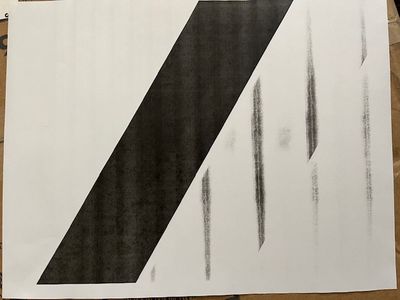
Scan is not clear
Scan is not clear
Hello we have several MF743Cdw printers and all but 1 is able to print multiple copies. I have checked and rechecked and it looks like all the settings are the same. Yet 1 printer when you select 2 copies from the print screen it just won’t print 2 o...
It sounded like a mouse snapped a mouse trap. It was the middle of the night, but there are no mouse traps set here. The next morning I found that the operation panel of my printer was sitting cockeyed, with the left side raised 1/3" higher than th...
I have a imageCLASS MF269dw. The printer has indicated no toner left for months. Toner level is at 0%. Drum Cartridge is at 70%. Yet, the print quality is fine. I didn't plan to change the cartridge until the print quality is truly bad. I'm on my 2n...
I have two Canon scanners (MF4770n and 8800F) and suddenly BOTH are not working. (I'm assuming it's some sort of Microsoft update, ugh). I have tried installing the new driver for the MF4770n - nothing. Both scanners are not showing on my computer as...
Hello,Can anyone tell me why my printer is printing like this? I have tried everything I can think of. I cropped the top off on purpose to not show my clients information but you get the idea how it is printing. 8DBD716E-6968-4716-92BE-1A3AABA6674C.j...

good morning can someone help me i have problems when i want to print envelopes from the STAMPS page. The printer cancels the first 3 letters of the sender of the envelope.The envelope is configured for envelope numbe#10
Hello, my printer is not sending my scanned documents to my email. Instead it is printing a TX report saying "TX image set not to display" I am unaware of how to fix this.
I need help resetting my canon mf230 manager pin. I have forgotten my existing pin.
Seems I have what they call ghosting on my canon imageClass D1350 b&w laser. I can see faint text of other parts of a document where they should not be. My toner is pretty old I assume as I never remember changing it to so put a new toner in. Then...
HI, My MF624CW was doing fine but lately the scan utility had some issues. So I reinstalled the latest printer driver and the scan utility. Now the printer can print, but scan utility gives error message saying there is no printer driver. Interestin...
It states specifically the Y toner. I have removed it, replaced it and still get the same msg. There is nothing to really do but drop the cartridge in the slot. So what to do now? I originally had the M cartridge spewing ink on paper so i removed the...
so ive been trying to print some stuff on my internship, and there was no problem at all but one day when i try to print something the queue just stays empty.
I have a color imageclass desktop printer and the fromt cover was detached when replacing the toner. There are two metal brackets that are in place but when attaching the cover back to the printer, the cover won’t close. It keeps popping back open an...
| Subject | Author | Posted |
|---|---|---|
| 09-07-2026 05:46 PM | ||
| 09-07-2026 08:36 AM | ||
| 09-05-2026 09:18 PM | ||
| 08-30-2026 06:53 PM | ||
| 08-30-2026 04:05 PM |
New to the community? Here's some information to help you get acquainted:
07/22/2026: New firmware updates are available.
EOS R6 Mark III - Version 1.1.0
05/13/2026: New firmware updates are available.
EOS R5 Mark II - Version 1.3.0
EOS R6 Mark II - Version 1.7.0
03/17/2026: New firmware updates are available.
SELPHY CP1500 - Version 1.0.7.0
01/20/2026: New firmware updates are available.
10/15/2025: New firmware updates are available.
Speedlite EL-5 - Version 1.2.0
Speedlite EL-1 - Version 1.1.0
Speedlite Transmitter ST-E10 - Version 1.2.0
Canon U.S.A Inc. All Rights Reserved. Reproduction in whole or part without permission is prohibited.

