Turn on suggestions
Auto-suggest helps you quickly narrow down your search results by suggesting possible matches as you type.
- Canon Community
- Discussions & Help
- Printer
- Professional Photo Printers
- Re: "Filter failed" message with Mojave OS
Options
- Subscribe to RSS Feed
- Mark Topic as New
- Mark Topic as Read
- Float this Topic for Current User
- Bookmark
- Subscribe
- Mute
- Printer Friendly Page
"Filter failed" message with Mojave OS

Options
- Mark as New
- Bookmark
- Subscribe
- Mute
- Subscribe to RSS Feed
- Permalink
- Report Inappropriate Content
01-11-2022 11:06 PM
I recently upgraded my Mac OS to Mojave.
After I did that, my Pro 9000 Mark II printer stopped working and now gives me a "Filter failed" message every time I try to print.
I read somewhere that it's because Canon retired the Pro 9000 Mark II in 2017. Is that true?
6 REPLIES 6


Options
- Mark as New
- Bookmark
- Subscribe
- Mute
- Subscribe to RSS Feed
- Permalink
- Report Inappropriate Content
01-12-2022 07:48 AM
This thread discusses what someone did to get the printer functioning with Catalina. It might help you.
John Hoffman
Conway, NH
R6 Mark III, M200 (converted to infrared), RF lenses, Pixma PRO-100, Pixma TR8620a, Lr Classic
Conway, NH
R6 Mark III, M200 (converted to infrared), RF lenses, Pixma PRO-100, Pixma TR8620a, Lr Classic
Options
- Mark as New
- Bookmark
- Subscribe
- Mute
- Subscribe to RSS Feed
- Permalink
- Report Inappropriate Content
01-13-2022 03:43 AM
Thanks for your response.
The solution in the thread doesn't work for me, though. I am printing through Photoshop and I just keep getting the same message.
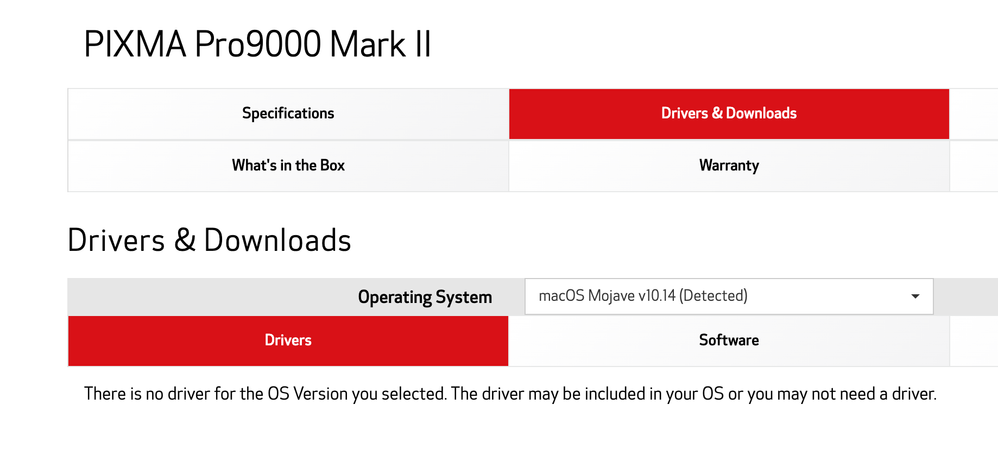
I went to the Canon website, and that's what it gives me:
"The driver may be included in your OS or you may not need a driver."
That doesn't make much sense, since Mojave doesn't have a driver included for it, and I indeed do need one.
So, it really does look like Canon has dropped the ball on this one. Which really sucks because I liked that Pro 9000, it did a great job, and it was still in perfect functioning order. Not to mention my replacement ink cartridges. What a waste.
Thanks for your response, nonetheless, I appreciate.
Options
- Mark as New
- Bookmark
- Subscribe
- Mute
- Subscribe to RSS Feed
- Permalink
- Report Inappropriate Content
01-13-2022 06:29 AM
You are caught in the unanswerable question of how long should a company support a product.
The Pro-9000 Mk II was released in March 2009 (almost 13 years ago). It stopped being sold (i.e. income stopped) when the Pro-100 was released in 2013 9 years ago (which is now also no longer sold by Canon).
Operating system upgrades are always a balance - what do I gain and what potential software/hardware problems do I create?
Since i am assuming it worked OK before the upgrade can you create a dual boot disk to use when you want to print?
John Hoffman
Conway, NH
R6 Mark III, M200 (converted to infrared), RF lenses, Pixma PRO-100, Pixma TR8620a, Lr Classic
Conway, NH
R6 Mark III, M200 (converted to infrared), RF lenses, Pixma PRO-100, Pixma TR8620a, Lr Classic
Options
- Mark as New
- Bookmark
- Subscribe
- Mute
- Subscribe to RSS Feed
- Permalink
- Report Inappropriate Content
01-14-2022 05:59 PM
Yeah, that's a good point, John. I hadn't realized they had stopped selling it that long ago (AND the Pro-100 too, which is good info, since I was thinking of buying one. So, thank you for that too).
The idea of a dual boot disk is interesting, but maybe just a bit too much hassle just for printing, since I don't need high quality images that often (I have another smaller printer for all the quick and easy printing that doesn't necessitate quality).
I am contemplating buying another good quality one, in the same quality range and size. Been looking at Epson too, since I had a good Epson in the past. But I am open to any other brand, as long as it's quality.
Would you have any recommendation?
Options
- Mark as New
- Bookmark
- Subscribe
- Mute
- Subscribe to RSS Feed
- Permalink
- Report Inappropriate Content
01-19-2022 10:23 AM
Hi, I had the same issue a while ago. I haven't updated my computer for that reason.
I've had some troubles printing in the past because of the driver but it past.
At the moment I have MacOS Mojave 10.14.6 and my printer (the same as yours) still works. (fingers crossed).
I am aware that it wont last but still; it works!
Options
- Mark as New
- Bookmark
- Subscribe
- Mute
- Subscribe to RSS Feed
- Permalink
- Report Inappropriate Content
01-20-2022 03:05 AM
Oh that's interesting. I have the same OS but my printer has stopped working.
Well, good for you, I hope it stays this way.


Announcements
07/22/2026: New firmware updates are available.
EOS R6 Mark III - Version 1.1.0
05/13/2026: New firmware updates are available.
EOS R5 Mark II - Version 1.3.0
EOS R6 Mark II - Version 1.7.0
04/28/2026: Service Notice: Caution Concerning use of Lithium Batteries
03/17/2026: New firmware updates are available.
SELPHY CP1500 - Version 1.0.7.0
02/23/2026: New firmware update is available for EOS C50- Version 1.0.3.1
01/23/2026: New firmware update is available for RF 24-105mm F4 IS USM- Version 2.0.7
01/20/2026: New firmware updates are available.
10/21/2025: Service Notice: To Users of the Compact Digital Camera PowerShot V1
10/15/2025: New firmware updates are available.
Speedlite EL-5 - Version 1.2.0
Speedlite EL-1 - Version 1.1.0
Speedlite Transmitter ST-E10 - Version 1.2.0
07/28/2025: Notice of Free Repair Service for the Mirrorless Camera EOS R50 (Black)
05/21/2025: New firmware update available for EOS C500 Mark II - Version 1.1.5.1
Related Content
- paper width error message persistantly showing up canon pro 300 and ejecting my print order. in Professional Photo Printers
- Ink absorber almost full error code 1700 on my PIXMA TS8220 in Desktop Inkjet Printers
- imageCLASS MF249dw ;the proccessing/data continues to flash green light . I cannot receive in Printer Software & Networking
- Professional Print and Layout won't print in Printer Software & Networking
- PIXMA MG3620 unresponsive in Desktop Inkjet Printers

Ⓒ 2026
Canon U.S.A Inc. All Rights Reserved. Reproduction in whole or part without permission is prohibited.
