Turn on suggestions
Auto-suggest helps you quickly narrow down your search results by suggesting possible matches as you type.
- Canon Community
- Discussions & Help
- Printer
- Professional Photo Printers
- Re: imagePROGRAF PRO-1000 Avoiding AirPrint Instal...
Options
- Subscribe to RSS Feed
- Mark Topic as New
- Mark Topic as Read
- Float this Topic for Current User
- Bookmark
- Subscribe
- Mute
- Printer Friendly Page
imagePROGRAF PRO-1000 Avoiding AirPrint Installation

Options
- Mark as New
- Bookmark
- Subscribe
- Mute
- Subscribe to RSS Feed
- Permalink
- Report Inappropriate Content
05-20-2023
09:28 AM
- last edited on
05-20-2023
09:30 AM
by
 Danny
Danny
I have a Canon Pro-1000 setup as a network printer. I'm trying to install it on a Macbook Pro M1 running Ventura, and every single time it installs as Airprint. On previous machines I've been able to choose network install that is NOT airprint, but on this one I cannot figure out how to choose another option. How do I force this to not be airprint during installation?
8 REPLIES 8


Options
- Mark as New
- Bookmark
- Subscribe
- Mute
- Subscribe to RSS Feed
- Permalink
- Report Inappropriate Content
05-20-2023 02:48 PM
While I don't have the Pro-1000 I have other Canon printers.
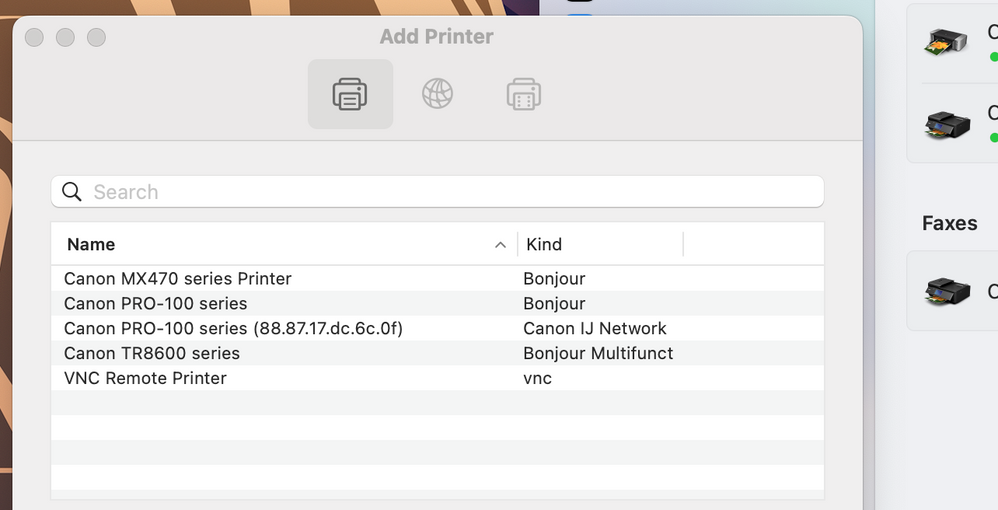
I have observed that it can take a while (sometimes several minutes) for the Canon IJ Series driver to appear when adding a printer.
If that fails you could give Canon a call at 1-800-OK-CANON for assistance.
John Hoffman
Conway, NH
R6 Mark III, M200 (converted to infrared), RF lenses, Pixma PRO-100, Pixma TR8620a, Lr Classic
Conway, NH
R6 Mark III, M200 (converted to infrared), RF lenses, Pixma PRO-100, Pixma TR8620a, Lr Classic
Options
- Mark as New
- Bookmark
- Subscribe
- Mute
- Subscribe to RSS Feed
- Permalink
- Report Inappropriate Content
05-20-2023 03:29 PM
It appears, but then at no point is there an option to choose anything. Once installed, it says "air print" was installed. I do remember before I could choose in the process, but now there's no option,.
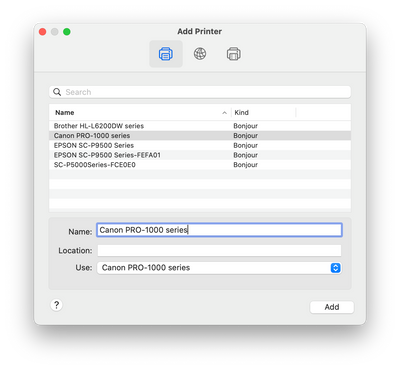
After this, click add, and it's added as air print. No choice.
Options
- Mark as New
- Bookmark
- Subscribe
- Mute
- Subscribe to RSS Feed
- Permalink
- Report Inappropriate Content
05-20-2023 03:32 PM
The IJ Series isn’t on the list. Bonjour is AirPrint.
I can’t explain why it’s not appearing if you downloaded and installed the Canon CUPS driver. Canon should be able to assist.
John Hoffman
Conway, NH
R6 Mark III, M200 (converted to infrared), RF lenses, Pixma PRO-100, Pixma TR8620a, Lr Classic
Conway, NH
R6 Mark III, M200 (converted to infrared), RF lenses, Pixma PRO-100, Pixma TR8620a, Lr Classic
Options
- Mark as New
- Bookmark
- Subscribe
- Mute
- Subscribe to RSS Feed
- Permalink
- Report Inappropriate Content
05-20-2023 03:38 PM
My printer is WiFi connected, you can see that it says "Canon"
John Hoffman
Conway, NH
R6 Mark III, M200 (converted to infrared), RF lenses, Pixma PRO-100, Pixma TR8620a, Lr Classic
Conway, NH
R6 Mark III, M200 (converted to infrared), RF lenses, Pixma PRO-100, Pixma TR8620a, Lr Classic
Options
- Mark as New
- Bookmark
- Subscribe
- Mute
- Subscribe to RSS Feed
- Permalink
- Report Inappropriate Content
05-20-2023 05:17 PM
thanks so much. I get it now. I see. For some reason I'm not getting the IP option on the Canon at all with Ventura. But you pointed me in the right direction. That may be the root of other issues with PSP as well. I'll work on it.


Options
- Mark as New
- Bookmark
- Subscribe
- Mute
- Subscribe to RSS Feed
- Permalink
- Report Inappropriate Content
05-20-2023 05:27 PM - edited 05-20-2023 05:29 PM
Could well be related to the PSP issues. PSP works with the Canon driver.
You can see that there is a Bonjour and native version driver for your Epson printers.
John Hoffman
Conway, NH
R6 Mark III, M200 (converted to infrared), RF lenses, Pixma PRO-100, Pixma TR8620a, Lr Classic
Conway, NH
R6 Mark III, M200 (converted to infrared), RF lenses, Pixma PRO-100, Pixma TR8620a, Lr Classic
Options
- Mark as New
- Bookmark
- Subscribe
- Mute
- Subscribe to RSS Feed
- Permalink
- Report Inappropriate Content
05-20-2023 05:49 PM
I forced an IP installation. I have the router set for a fixed IP on all the printers. It installed. It no longer says "bonjour", but after reinstalling PSP nothing has changed. I can print directly from PS and it works through my RIP.
Sometimes we like PSP though. It's a nice to have but we'll deal without it. Thanks for all your help. I have other little things to iron out now as I make upgrades.

Options
- Mark as New
- Bookmark
- Subscribe
- Mute
- Subscribe to RSS Feed
- Permalink
- Report Inappropriate Content
05-20-2023 08:21 PM - edited 05-20-2023 08:22 PM
The following should work. After the CUPS driver is installed, open printers and scanners. Remove the Pro-1000 (minus) -, then add (+), select the Globe and re-add as an IP printer. Enter the IP address and use the drop down to select the previously installed CUPS driver.
~Rick
Bay Area - CA
~R5 C (1.1.3.1), ~RF Trinity, ~RF 100 Macro, ~RF 100~400, ~RF 100~500, ~RF 200-800, ~RF 1.4x TC, BG-R10, 430EX III-RT ~DxO PhotoLab Elite ~DaVinci Resolve Studio ~ImageClass MF644Cdw MF656Cdw ~Pixel 10 ~CarePaks Are Worth It


Announcements
07/22/2026: New firmware updates are available.
EOS R6 Mark III - Version 1.1.0
05/13/2026: New firmware updates are available.
EOS R5 Mark II - Version 1.3.0
EOS R6 Mark II - Version 1.7.0
04/28/2026: Service Notice: Caution Concerning use of Lithium Batteries
03/17/2026: New firmware updates are available.
SELPHY CP1500 - Version 1.0.7.0
02/23/2026: New firmware update is available for EOS C50- Version 1.0.3.1
01/23/2026: New firmware update is available for RF 24-105mm F4 IS USM- Version 2.0.7
01/20/2026: New firmware updates are available.
10/21/2025: Service Notice: To Users of the Compact Digital Camera PowerShot V1
10/15/2025: New firmware updates are available.
Speedlite EL-5 - Version 1.2.0
Speedlite EL-1 - Version 1.1.0
Speedlite Transmitter ST-E10 - Version 1.2.0
07/28/2025: Notice of Free Repair Service for the Mirrorless Camera EOS R50 (Black)
05/21/2025: New firmware update available for EOS C500 Mark II - Version 1.1.5.1
Related Content
- imageCLASS MFC743Cdw - No scan, no print, not working and can't reach Canon support after months. in Office Printers
- Installing imageProGRAF Pro-310 bad experience. Need comprehensive installation guide in Professional Photo Printers
- imagePROGRAF TX-3100 Driver not installing Windows 11 Dell Laptop in Printer Software & Networking
- PIXMA TS9521C No settings on macOS Tahoe when I select "page setup" before printing in Printer Software & Networking
- Imageprograf Pro 1100 set up issue-ink cartridge not recognized by printer in Professional Photo Printers

Ⓒ 2026
Canon U.S.A Inc. All Rights Reserved. Reproduction in whole or part without permission is prohibited.
