Turn on suggestions
Auto-suggest helps you quickly narrow down your search results by suggesting possible matches as you type.
- Canon Community
- Discussions & Help
- Printer
- Professional Photo Printers
- Re: Pro-300 - Marks in Border
Options
- Subscribe to RSS Feed
- Mark Topic as New
- Mark Topic as Read
- Float this Topic for Current User
- Bookmark
- Subscribe
- Mute
- Printer Friendly Page
Pro-300 - Marks in Border

Options
- Mark as New
- Bookmark
- Subscribe
- Mute
- Subscribe to RSS Feed
- Permalink
- Report Inappropriate Content
04-10-2023 10:14 AM
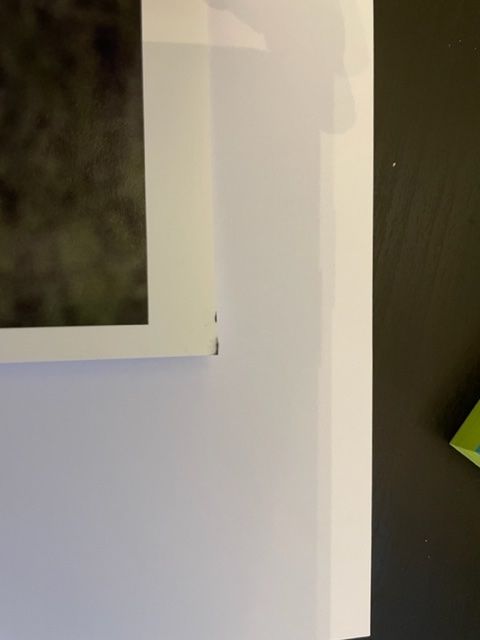
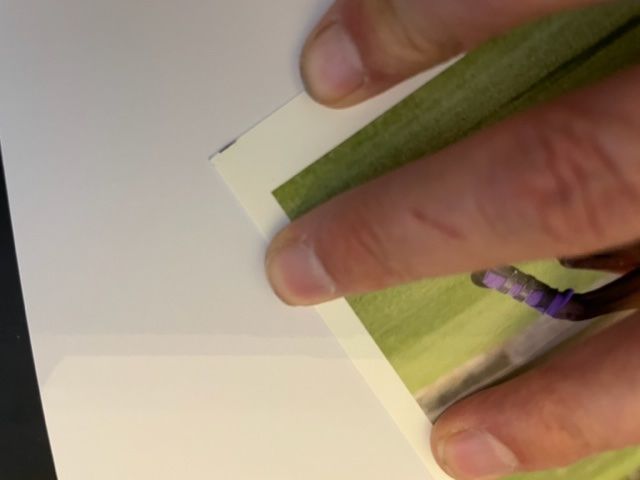
I have started getting black marks in the borders of my prints from my Pro-300. The printer also makes a strange 'clunking' sound when it is getting to the end of an A4 print.
I've just recently changed the Black Ink Cartridge (with genuine Canon Cartridge).
See attached photos re: the black marks.
Image_1 is on the leading edge of the print and is the most obvious. Images_2 and 3 are on the edge that comes out of the printer last.
Any suggestions as to the cause and how to fix this?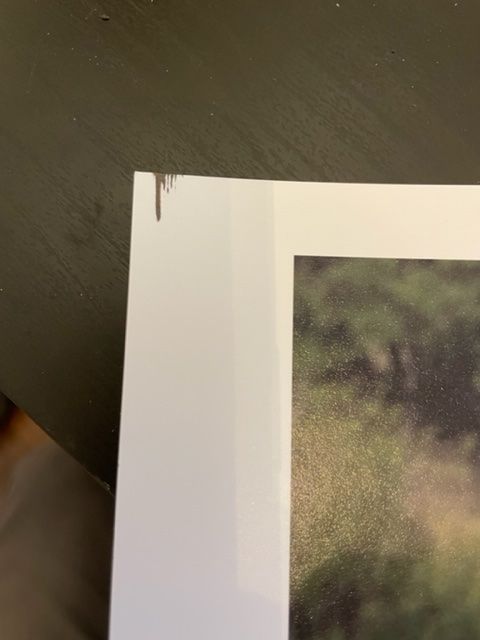
7 REPLIES 7


Options
- Mark as New
- Bookmark
- Subscribe
- Mute
- Subscribe to RSS Feed
- Permalink
- Report Inappropriate Content
04-13-2023 03:05 PM
Hi,
You can try turning off the printers paper abrasion setting. Please follow the steps below:
Select Various settings on the printer's HOME screen, select Printer settings, Print settings, and then set Prevent paper abrasion to OFF.
Did this answer your question? Please click the Accept as Solution button so that others may find the answer as well.
Options
- Mark as New
- Bookmark
- Subscribe
- Mute
- Subscribe to RSS Feed
- Permalink
- Report Inappropriate Content
04-21-2023 11:33 AM
That seems to have helped. Only appear to get the problem via the Manual Rear Feed.
Will monitor the situation to check it does not reoccure.
Thanks

Options
- Mark as New
- Bookmark
- Subscribe
- Mute
- Subscribe to RSS Feed
- Permalink
- Report Inappropriate Content
04-21-2023 12:29 PM
Are you using a thicker fine art type paper?
John Hoffman
Conway, NH
R6 Mark III, M200 (converted to infrared), RF lenses, Pixma PRO-100, Pixma TR8620a, Lr Classic
Conway, NH
R6 Mark III, M200 (converted to infrared), RF lenses, Pixma PRO-100, Pixma TR8620a, Lr Classic
Options
- Mark as New
- Bookmark
- Subscribe
- Mute
- Subscribe to RSS Feed
- Permalink
- Report Inappropriate Content
04-21-2023 12:44 PM
I'm using FB Pearl 300 from Permajet, and using the ICC profiles for that paper downloaded from their website.

Options
- Mark as New
- Bookmark
- Subscribe
- Mute
- Subscribe to RSS Feed
- Permalink
- Report Inappropriate Content
04-21-2023 02:48 PM
What Canon media type do they recommend selecting?
John Hoffman
Conway, NH
R6 Mark III, M200 (converted to infrared), RF lenses, Pixma PRO-100, Pixma TR8620a, Lr Classic
Conway, NH
R6 Mark III, M200 (converted to infrared), RF lenses, Pixma PRO-100, Pixma TR8620a, Lr Classic
Options
- Mark as New
- Bookmark
- Subscribe
- Mute
- Subscribe to RSS Feed
- Permalink
- Report Inappropriate Content
04-21-2023 02:49 PM
Photo Paper Pro Platinum
Options
- Mark as New
- Bookmark
- Subscribe
- Mute
- Subscribe to RSS Feed
- Permalink
- Report Inappropriate Content
04-21-2023 02:51 PM
Thanks. Then they don’t consider the paper a heavyweight paper.
John Hoffman
Conway, NH
R6 Mark III, M200 (converted to infrared), RF lenses, Pixma PRO-100, Pixma TR8620a, Lr Classic
Conway, NH
R6 Mark III, M200 (converted to infrared), RF lenses, Pixma PRO-100, Pixma TR8620a, Lr Classic


Announcements
07/22/2026: New firmware updates are available.
EOS R6 Mark III - Version 1.1.0
05/13/2026: New firmware updates are available.
EOS R5 Mark II - Version 1.3.0
EOS R6 Mark II - Version 1.7.0
04/28/2026: Service Notice: Caution Concerning use of Lithium Batteries
03/17/2026: New firmware updates are available.
SELPHY CP1500 - Version 1.0.7.0
02/23/2026: New firmware update is available for EOS C50- Version 1.0.3.1
01/23/2026: New firmware update is available for RF 24-105mm F4 IS USM- Version 2.0.7
01/20/2026: New firmware updates are available.
10/21/2025: Service Notice: To Users of the Compact Digital Camera PowerShot V1
10/15/2025: New firmware updates are available.
Speedlite EL-5 - Version 1.2.0
Speedlite EL-1 - Version 1.1.0
Speedlite Transmitter ST-E10 - Version 1.2.0
07/28/2025: Notice of Free Repair Service for the Mirrorless Camera EOS R50 (Black)
05/21/2025: New firmware update available for EOS C500 Mark II - Version 1.1.5.1
Related Content
- imagePROGRAF PRO-300 Violet ghosting with blue prints and black smudge marks in Professional Photo Printers
- PIXMA PRO-200 Can't view printable area in Prof Print & Layout / Images being shifted in Printer Software & Networking
- Pro-300 - Marks in Border in Professional Photo Printers
- Canon Pro-100 Problem end of paper in Professional Photo Printers

Ⓒ 2026
Canon U.S.A Inc. All Rights Reserved. Reproduction in whole or part without permission is prohibited.
