Turn on suggestions
Auto-suggest helps you quickly narrow down your search results by suggesting possible matches as you type.
- Canon Community
- Discussions & Help
- Camera
- Camera Software
- Preview not opening R6 mark ii CR3 RAW files in ma...
Options
- Subscribe to RSS Feed
- Mark Topic as New
- Mark Topic as Read
- Float this Topic for Current User
- Bookmark
- Subscribe
- Mute
- Printer Friendly Page
Preview not opening R6 mark ii CR3 RAW files in macOS

Options
- Mark as New
- Bookmark
- Subscribe
- Mute
- Subscribe to RSS Feed
- Permalink
- Report Inappropriate Content
12-28-2022 01:30 PM
Hello,
I am not able to open CR3 files using the Preview in Mac OS. The pictures were taken by my Canon R6 mark ii. I get the error message that
"The file “MyFile.CR3” could not be opened. Preview currently does not support this raw file format"
I have macOS 13.1 Ventura, but previously I was using 12.6 Monterey and got the same message. It looks like the mark ii is not a supported camera by apple, but I'm not sure how that impacts the ability to open CR3 files.
https://support.apple.com/en-us/HT213267
Is anyone else having the same issue?
thanks.
7 REPLIES 7


Options
- Mark as New
- Bookmark
- Subscribe
- Mute
- Subscribe to RSS Feed
- Permalink
- Report Inappropriate Content
12-28-2022 03:15 PM
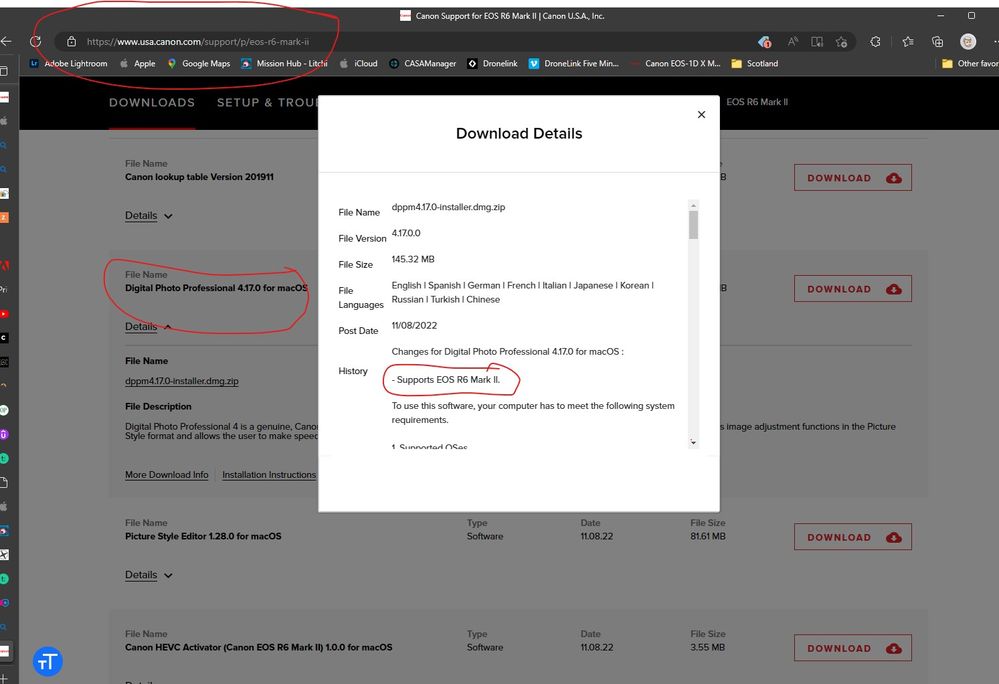
It can take a while for the OS to be updated for a new camera. You can download the free canon DPP4 from the canon support site; it will open your files.
John Hoffman
Conway, NH
R6 Mark III, M200 (converted to infrared), RF lenses, Pixma PRO-100, Pixma TR8620a, Lr Classic
Conway, NH
R6 Mark III, M200 (converted to infrared), RF lenses, Pixma PRO-100, Pixma TR8620a, Lr Classic
Options
- Mark as New
- Bookmark
- Subscribe
- Mute
- Subscribe to RSS Feed
- Permalink
- Report Inappropriate Content
12-28-2022 03:27 PM
Thanks John. I was hoping to be able to view the photos within Finder in order to, for example, quickly figure out which photos I can delete off of my memory card. I already use Lightroom for managing and editing my photos, so I can use it for the same purpose, but it requires more clicks. Sounds like I will have to wait for macOS to support the R6m2
Options
- Mark as New
- Bookmark
- Subscribe
- Mute
- Subscribe to RSS Feed
- Permalink
- Report Inappropriate Content
12-30-2022 11:41 AM
I would like to view my images in BRIDGE. This is the system I use and my workflow did you find a way to make this work?
Options
- Mark as New
- Bookmark
- Subscribe
- Mute
- Subscribe to RSS Feed
- Permalink
- Report Inappropriate Content
12-30-2022 11:41 AM
will this allow them to be used in bridge too?
Options
- Mark as New
- Bookmark
- Subscribe
- Mute
- Subscribe to RSS Feed
- Permalink
- Report Inappropriate Content
01-11-2023 02:12 AM
It looks like Preview is now opening the CR3 files. I am not sure what changed, but it's possible that I installed an update that enabled Preview to do so.
Options
- Mark as New
- Bookmark
- Subscribe
- Mute
- Subscribe to RSS Feed
- Permalink
- Report Inappropriate Content
05-21-2023 01:23 PM
Hey there! I have the r6ii as well. I edit on my iPad. I originally couldn’t preview the files then out of nowhere it worked for months. Then last week it won’t alllw me to preview them again! 😩 any advice!? Thanks!!
Options
- Mark as New
- Bookmark
- Subscribe
- Mute
- Subscribe to RSS Feed
- Permalink
- Report Inappropriate Content
05-21-2023 04:15 PM - edited 05-21-2023 04:18 PM
Try force rebooting the iPad.
https://support.apple.com/en-us/HT210631
John Hoffman
Conway, NH
R6 Mark III, M200 (converted to infrared), RF lenses, Pixma PRO-100, Pixma TR8620a, Lr Classic
Conway, NH
R6 Mark III, M200 (converted to infrared), RF lenses, Pixma PRO-100, Pixma TR8620a, Lr Classic


Announcements
07/22/2026: New firmware updates are available.
EOS R6 Mark III - Version 1.1.0
05/13/2026: New firmware updates are available.
EOS R5 Mark II - Version 1.3.0
EOS R6 Mark II - Version 1.7.0
04/28/2026: Service Notice: Caution Concerning use of Lithium Batteries
03/17/2026: New firmware updates are available.
SELPHY CP1500 - Version 1.0.7.0
02/23/2026: New firmware update is available for EOS C50- Version 1.0.3.1
01/23/2026: New firmware update is available for RF 24-105mm F4 IS USM- Version 2.0.7
01/20/2026: New firmware updates are available.
10/21/2025: Service Notice: To Users of the Compact Digital Camera PowerShot V1
10/15/2025: New firmware updates are available.
Speedlite EL-5 - Version 1.2.0
Speedlite EL-1 - Version 1.1.0
Speedlite Transmitter ST-E10 - Version 1.2.0
07/28/2025: Notice of Free Repair Service for the Mirrorless Camera EOS R50 (Black)
05/21/2025: New firmware update available for EOS C500 Mark II - Version 1.1.5.1
Related Content
- CR3 files from Canon R6 Mark II - Can't preview in macOS Monterey in Camera Software
- EOS Utility 3.19.0.12 - Universalinstaller quit unexpectedly after extracting files in Camera Software
- Preview Canon RAW Video in macOS Finder? in Camera Software
- EOS Utility 3 won't open on macOS Sequoia, help! in Camera Software
- Corrupted images on my EOS 250D in EOS DSLR & Mirrorless Cameras

Ⓒ 2026
Canon U.S.A Inc. All Rights Reserved. Reproduction in whole or part without permission is prohibited.
