Turn on suggestions
Auto-suggest helps you quickly narrow down your search results by suggesting possible matches as you type.
- Canon Community
- Discussions & Help
- Camera
- Camera Software
- Re: Mac Ventura Eos 3
Options
- Subscribe to RSS Feed
- Mark Topic as New
- Mark Topic as Read
- Float this Topic for Current User
- Bookmark
- Subscribe
- Mute
- Printer Friendly Page

Options
- Mark as New
- Bookmark
- Subscribe
- Mute
- Subscribe to RSS Feed
- Permalink
- Report Inappropriate Content
02-15-2023
05:51 PM
- last edited on
02-16-2023
09:00 AM
by
 Danny
Danny
M1 Mac Ventura T7 EOS Utility 3 started out working fine. Now it only works once after a restart. After that first use when booted there is a flash window, Black/White lettering, 1/2 second, too fast to read, then the regular start downloading window with the lettering dimmed. No functions. Restart and you get one shot at it again.
Solved! Go to Solution.
1 ACCEPTED SOLUTION
Accepted Solutions

Options
- Mark as New
- Bookmark
- Subscribe
- Mute
- Subscribe to RSS Feed
- Permalink
- Report Inappropriate Content
02-16-2023 05:42 PM
Sorry. I can’t help. Extremely difficult to diagnose issues when it works on one device but not another and the basic parameters seem the same. You could give Canon a call at (866) 261-9362.
John Hoffman
Conway, NH
R6 Mark III, M200 (converted to infrared), RF lenses, Pixma PRO-100, Pixma TR8620a, Lr Classic
Conway, NH
R6 Mark III, M200 (converted to infrared), RF lenses, Pixma PRO-100, Pixma TR8620a, Lr Classic
12 REPLIES 12

Options
- Mark as New
- Bookmark
- Subscribe
- Mute
- Subscribe to RSS Feed
- Permalink
- Report Inappropriate Content
02-15-2023 07:45 PM
MaBook Air M2 with Ventura 13.2.
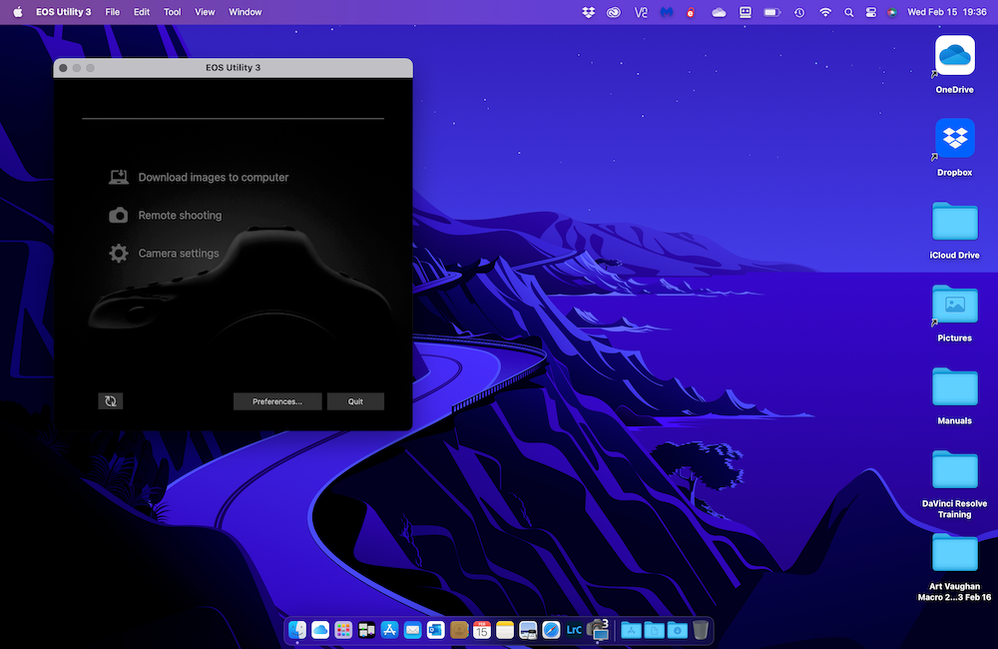
Verify that you are running the EOSU3 file and not the unnumbered EOS Utility loader file.

Verify that you have granted the required Files & Folders permissions.
John Hoffman
Conway, NH
R6 Mark III, M200 (converted to infrared), RF lenses, Pixma PRO-100, Pixma TR8620a, Lr Classic
Conway, NH
R6 Mark III, M200 (converted to infrared), RF lenses, Pixma PRO-100, Pixma TR8620a, Lr Classic
Options
- Mark as New
- Bookmark
- Subscribe
- Mute
- Subscribe to RSS Feed
- Permalink
- Report Inappropriate Content
02-16-2023 12:55 PM
EOS Utility 3, Vrs 3.15.20(3.16.20.4) Yes, you show the same window I am seeing. Although I have been a MAC user since the 512 days I have rarely had to deal with "Files & Folders permissions". I know, I should know all this apparently. So, what am I looking for? If I should be looking at Settings: Camera-I see only Skype. Am I looking for Camera? If it is not there, How do I get it there? What is missing? Note: this all works the first time EOS is opened after a restart... so something has to be right in the setup. When I disconnect the camera from the iMac it will not reconnect without a restart. I have never seen a reference to EOSU3
Options
- Mark as New
- Bookmark
- Subscribe
- Mute
- Subscribe to RSS Feed
- Permalink
- Report Inappropriate Content
02-16-2023 04:49 PM
I started with an Apple II.
System Settings->Privacy & Security->Files and Folders is the path.
You can find the EOSU3 app in Applications->Canon Utilities->EOS Utility.
John Hoffman
Conway, NH
R6 Mark III, M200 (converted to infrared), RF lenses, Pixma PRO-100, Pixma TR8620a, Lr Classic
Conway, NH
R6 Mark III, M200 (converted to infrared), RF lenses, Pixma PRO-100, Pixma TR8620a, Lr Classic
Options
- Mark as New
- Bookmark
- Subscribe
- Mute
- Subscribe to RSS Feed
- Permalink
- Report Inappropriate Content
02-16-2023 05:38 PM
In Applicaations:
Canon Utilities Folder> EOS Utility Folder>EOS Utility is the EOS Utility Launcher for Pairing over Wi-Fi/Lan... do not see how this applies.
Canon Utilities Folder> EOS Utility Folder> EU3> EOS Utility 3 is the App I am using.
Options
- Mark as New
- Bookmark
- Subscribe
- Mute
- Subscribe to RSS Feed
- Permalink
- Report Inappropriate Content
02-16-2023 05:42 PM
Sorry. I can’t help. Extremely difficult to diagnose issues when it works on one device but not another and the basic parameters seem the same. You could give Canon a call at (866) 261-9362.
John Hoffman
Conway, NH
R6 Mark III, M200 (converted to infrared), RF lenses, Pixma PRO-100, Pixma TR8620a, Lr Classic
Conway, NH
R6 Mark III, M200 (converted to infrared), RF lenses, Pixma PRO-100, Pixma TR8620a, Lr Classic
Options
- Mark as New
- Bookmark
- Subscribe
- Mute
- Subscribe to RSS Feed
- Permalink
- Report Inappropriate Content
02-16-2023 06:28 PM
Thanks for the effort. What I will do for now is change the way I shoot and process. I will take multiple shots and transfer all in one go once a day.
Options
- Mark as New
- Bookmark
- Subscribe
- Mute
- Subscribe to RSS Feed
- Permalink
- Report Inappropriate Content
02-16-2023 06:39 PM
If you are just transferring images try using Apple Image Capture.
John Hoffman
Conway, NH
R6 Mark III, M200 (converted to infrared), RF lenses, Pixma PRO-100, Pixma TR8620a, Lr Classic
Conway, NH
R6 Mark III, M200 (converted to infrared), RF lenses, Pixma PRO-100, Pixma TR8620a, Lr Classic
Options
- Mark as New
- Bookmark
- Subscribe
- Mute
- Subscribe to RSS Feed
- Permalink
- Report Inappropriate Content
05-18-2023 09:39 PM
I have the T7i and same issue after upgrading to Ventura. It only works after a reboot and once I close the app or turn off camera it won't start the EOS Utility 3 app any more. Any fix yet?
Options
- Mark as New
- Bookmark
- Subscribe
- Mute
- Subscribe to RSS Feed
- Permalink
- Report Inappropriate Content
05-18-2023 09:46 PM
Are you using EOSU 3.16.12?
John Hoffman
Conway, NH
R6 Mark III, M200 (converted to infrared), RF lenses, Pixma PRO-100, Pixma TR8620a, Lr Classic
Conway, NH
R6 Mark III, M200 (converted to infrared), RF lenses, Pixma PRO-100, Pixma TR8620a, Lr Classic


Announcements
07/22/2026: New firmware updates are available.
EOS R6 Mark III - Version 1.1.0
05/13/2026: New firmware updates are available.
EOS R5 Mark II - Version 1.3.0
EOS R6 Mark II - Version 1.7.0
04/28/2026: Service Notice: Caution Concerning use of Lithium Batteries
03/17/2026: New firmware updates are available.
SELPHY CP1500 - Version 1.0.7.0
02/23/2026: New firmware update is available for EOS C50- Version 1.0.3.1
01/23/2026: New firmware update is available for RF 24-105mm F4 IS USM- Version 2.0.7
01/20/2026: New firmware updates are available.
10/21/2025: Service Notice: To Users of the Compact Digital Camera PowerShot V1
10/15/2025: New firmware updates are available.
Speedlite EL-5 - Version 1.2.0
Speedlite EL-1 - Version 1.1.0
Speedlite Transmitter ST-E10 - Version 1.2.0
07/28/2025: Notice of Free Repair Service for the Mirrorless Camera EOS R50 (Black)
05/21/2025: New firmware update available for EOS C500 Mark II - Version 1.1.5.1
Related Content
- Content creating software doesn't recognize my camera in Camera Software
- DPP 4.19.31 Installation Issue on macOS Sonoma (macOS 15.1) in Camera Software
- DPP 4.19.10 crashes on Mac OS 13.6.9 Ventura in Camera Software
- DPP won't complete installation on macOS v14 (Sonoma) in Camera Software
- EOS-1D X Mark III USB-C port is not functioning properly in EOS DSLR & Mirrorless Cameras

Ⓒ 2026
Canon U.S.A Inc. All Rights Reserved. Reproduction in whole or part without permission is prohibited.
