Turn on suggestions
Auto-suggest helps you quickly narrow down your search results by suggesting possible matches as you type.
- Canon Community
- Discussions & Help
- Printer
- Professional Photo Printers
- Re: Print Stdio Pro: image not loading into app!
Options
- Subscribe to RSS Feed
- Mark Topic as New
- Mark Topic as Read
- Float this Topic for Current User
- Bookmark
- Subscribe
- Mute
- Printer Friendly Page

Options
- Mark as New
- Bookmark
- Subscribe
- Mute
- Subscribe to RSS Feed
- Permalink
- Report Inappropriate Content
12-12-2016 07:22 AM
Hi,
I'm new to the app, as well as to the Canon Pixma printer.
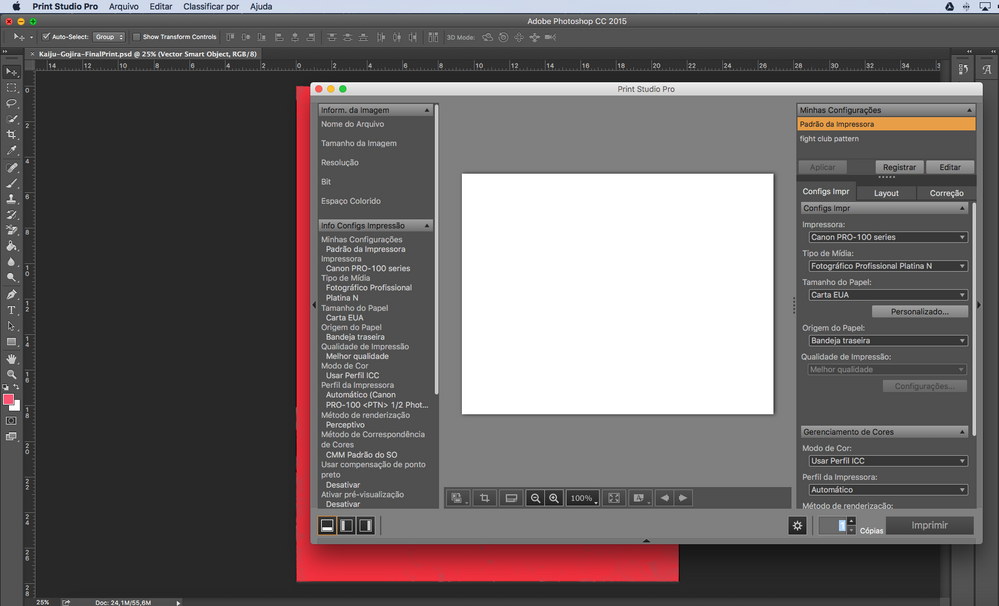
I'm having problems loading an image to the Print Studio Pro on Photoshop CC 2015 (Mac).
With the image open in Photoshop, when I click to open the Print Studio Pro, the image simply doesn't load, and I always got a blank "canvas" in the app!
Is there something that I need to do before trying to print from the Print Studio, please? Can someone help me?
Thanks
.
Alex Bobeda
Designer ~ (kind of) Illustrator ~ Copywriter
Pixma Pro-100
Rio, Brazil
Designer ~ (kind of) Illustrator ~ Copywriter
Pixma Pro-100
Rio, Brazil
Solved! Go to Solution.
1 ACCEPTED SOLUTION
Accepted Solutions
Options
- Mark as New
- Bookmark
- Subscribe
- Mute
- Subscribe to RSS Feed
- Permalink
- Report Inappropriate Content
12-12-2016 07:34 AM
I've found a solution: I was trying to print from a PSD file.
So, I exported a JPEG version an opened it with Photoshop. This way, when I open the PSP, the image is "seen" by the app and loads onto it completely!
Alex Bobeda
Designer ~ (kind of) Illustrator ~ Copywriter
Pixma Pro-100
Rio, Brazil
Designer ~ (kind of) Illustrator ~ Copywriter
Pixma Pro-100
Rio, Brazil
9 REPLIES 9
Options
- Mark as New
- Bookmark
- Subscribe
- Mute
- Subscribe to RSS Feed
- Permalink
- Report Inappropriate Content
12-12-2016 07:34 AM
I've found a solution: I was trying to print from a PSD file.
So, I exported a JPEG version an opened it with Photoshop. This way, when I open the PSP, the image is "seen" by the app and loads onto it completely!
Alex Bobeda
Designer ~ (kind of) Illustrator ~ Copywriter
Pixma Pro-100
Rio, Brazil
Designer ~ (kind of) Illustrator ~ Copywriter
Pixma Pro-100
Rio, Brazil


Options
- Mark as New
- Bookmark
- Subscribe
- Mute
- Subscribe to RSS Feed
- Permalink
- Report Inappropriate Content
12-12-2016 12:58 PM
What version of PSP are you running?

John Hoffman
Conway, NH
R6 Mark III, M200 (converted to infrared), RF lenses, Pixma PRO-100, Pixma TR8620a, Lr Classic
Conway, NH
R6 Mark III, M200 (converted to infrared), RF lenses, Pixma PRO-100, Pixma TR8620a, Lr Classic
Options
- Mark as New
- Bookmark
- Subscribe
- Mute
- Subscribe to RSS Feed
- Permalink
- Report Inappropriate Content
12-12-2016 01:21 PM
It's the 2.1.0.
Alex Bobeda
Designer ~ (kind of) Illustrator ~ Copywriter
Pixma Pro-100
Rio, Brazil
Designer ~ (kind of) Illustrator ~ Copywriter
Pixma Pro-100
Rio, Brazil
Options
- Mark as New
- Bookmark
- Subscribe
- Mute
- Subscribe to RSS Feed
- Permalink
- Report Inappropriate Content
12-12-2016 01:27 PM
If it's on Windows I suggest deleting it and installing 2.0.2. On my W7 machine 2.1.0 doesn't load images. I don't even get a blank white screen. I haven't tried JPEG. I was working with CR2 files.
John Hoffman
Conway, NH
R6 Mark III, M200 (converted to infrared), RF lenses, Pixma PRO-100, Pixma TR8620a, Lr Classic
Conway, NH
R6 Mark III, M200 (converted to infrared), RF lenses, Pixma PRO-100, Pixma TR8620a, Lr Classic
Options
- Mark as New
- Bookmark
- Subscribe
- Mute
- Subscribe to RSS Feed
- Permalink
- Report Inappropriate Content
12-12-2016 01:31 PM - edited 12-12-2016 01:31 PM
Hi, John,
It's on Mac.
Actually, it seems the 2.0.1 is the only available version for OSX at this moment...
I don't like printing from a JPEG, but if it's a 300 dpi file, I think the differences are minimal.
Thank you!
Alex Bobeda
Designer ~ (kind of) Illustrator ~ Copywriter
Pixma Pro-100
Rio, Brazil
Designer ~ (kind of) Illustrator ~ Copywriter
Pixma Pro-100
Rio, Brazil
Options
- Mark as New
- Bookmark
- Subscribe
- Mute
- Subscribe to RSS Feed
- Permalink
- Report Inappropriate Content
12-12-2016 02:22 PM
Hi Alex. PS CC2017 and PSP 2.1.0 and macOS Sierra works OK.

John Hoffman
Conway, NH
R6 Mark III, M200 (converted to infrared), RF lenses, Pixma PRO-100, Pixma TR8620a, Lr Classic
Conway, NH
R6 Mark III, M200 (converted to infrared), RF lenses, Pixma PRO-100, Pixma TR8620a, Lr Classic
Options
- Mark as New
- Bookmark
- Subscribe
- Mute
- Subscribe to RSS Feed
- Permalink
- Report Inappropriate Content
12-12-2016 02:38 PM
Hi, John!
Oh... That's weird!
I'm also on a macOS with Sierra, but my PS CC is the 2015. I don't know if that's the problem, but with my psd files all that I got is a blank "white canvas". By now, I think I'll be printing from a JPEG file — or even a downgrade in the Print Studio app...
Thank you, John!
Alex Bobeda
Designer ~ (kind of) Illustrator ~ Copywriter
Pixma Pro-100
Rio, Brazil
Designer ~ (kind of) Illustrator ~ Copywriter
Pixma Pro-100
Rio, Brazil
Options
- Mark as New
- Bookmark
- Subscribe
- Mute
- Subscribe to RSS Feed
- Permalink
- Report Inappropriate Content
12-12-2016 02:41 PM
If you have PSCC 2015 aren't you eligible for cc2017?
John Hoffman
Conway, NH
R6 Mark III, M200 (converted to infrared), RF lenses, Pixma PRO-100, Pixma TR8620a, Lr Classic
Conway, NH
R6 Mark III, M200 (converted to infrared), RF lenses, Pixma PRO-100, Pixma TR8620a, Lr Classic
Options
- Mark as New
- Bookmark
- Subscribe
- Mute
- Subscribe to RSS Feed
- Permalink
- Report Inappropriate Content
12-12-2016 02:45 PM
I think so.
I have to check it, but I'm used to my PS.
I have to check it, but I'm used to my PS.
Alex Bobeda
Designer ~ (kind of) Illustrator ~ Copywriter
Pixma Pro-100
Rio, Brazil
Designer ~ (kind of) Illustrator ~ Copywriter
Pixma Pro-100
Rio, Brazil


Announcements
07/22/2026: New firmware updates are available.
EOS R6 Mark III - Version 1.1.0
05/13/2026: New firmware updates are available.
EOS R5 Mark II - Version 1.3.0
EOS R6 Mark II - Version 1.7.0
04/28/2026: Service Notice: Caution Concerning use of Lithium Batteries
03/17/2026: New firmware updates are available.
SELPHY CP1500 - Version 1.0.7.0
02/23/2026: New firmware update is available for EOS C50- Version 1.0.3.1
01/23/2026: New firmware update is available for RF 24-105mm F4 IS USM- Version 2.0.7
01/20/2026: New firmware updates are available.
10/21/2025: Service Notice: To Users of the Compact Digital Camera PowerShot V1
10/15/2025: New firmware updates are available.
Speedlite EL-5 - Version 1.2.0
Speedlite EL-1 - Version 1.1.0
Speedlite Transmitter ST-E10 - Version 1.2.0
07/28/2025: Notice of Free Repair Service for the Mirrorless Camera EOS R50 (Black)
05/21/2025: New firmware update available for EOS C500 Mark II - Version 1.1.5.1
Related Content
- imagePROGRAF PRO-310 skews paper near end of printing in Professional Photo Printers
- Canon Pro2100 won't detect clear film "paper size" in Production Printing
- Loading an image in Prof. Print & Layout - imagePROGRAF PRO-300 in Printer Software & Networking
- My Image Garden upgrade or replacement availability in Printer Software & Networking
- How to Disable Canon Image Garden During Scanning in Printer Software & Networking

Ⓒ 2026
Canon U.S.A Inc. All Rights Reserved. Reproduction in whole or part without permission is prohibited.
