Turn on suggestions
Auto-suggest helps you quickly narrow down your search results by suggesting possible matches as you type.
- Canon Community
- Discussions & Help
- Printer
- Professional Photo Printers
- Re: Premium Fine Art Smooth Paper not Showing in C...
Options
- Subscribe to RSS Feed
- Mark Topic as New
- Mark Topic as Read
- Float this Topic for Current User
- Bookmark
- Subscribe
- Mute
- Printer Friendly Page

Options
- Mark as New
- Bookmark
- Subscribe
- Mute
- Subscribe to RSS Feed
- Permalink
- Report Inappropriate Content
01-14-2020 08:26 AM
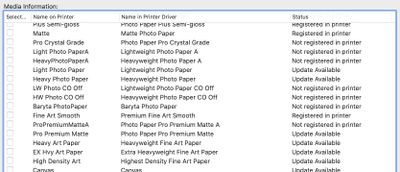
The Premium Fine Art Smooth profile shows as "registered in printer" in the media configuration tool, but when I physically look for the Premium Fine Art Smooth profile on the physical printer, it is not there.
However, the Premium Fine Art Smooth profile does show up in the driver in the printer settings when I want to print in Photoshop.
Will the driver overwrite the printer?
Does anyone know why I can't find the profile in the physical printer? Do I need to find it if it shows in the driver?
Thanks
Below is a screenshot showing the profile appears to be properly loaded in the printer.
.
Solved! Go to Solution.
32 REPLIES 32
Options
- Mark as New
- Bookmark
- Subscribe
- Mute
- Subscribe to RSS Feed
- Permalink
- Report Inappropriate Content
02-05-2020 11:19 AM
I know exactly what you are talking about and I've gotten there with no luck. If I go any harder the paper becomes damaged.
Options
- Mark as New
- Bookmark
- Subscribe
- Mute
- Subscribe to RSS Feed
- Permalink
- Report Inappropriate Content
02-05-2020 11:22 AM
Try to close first the other tray.
What size is the paper?
What size is the paper?
Options
- Mark as New
- Bookmark
- Subscribe
- Mute
- Subscribe to RSS Feed
- Permalink
- Report Inappropriate Content
02-05-2020 11:36 AM
I'm using 17x22. I tried opening and shutting different compartments and nothing changes. I did, however, go into the printer settings on the actual printer and set the manual feed paper setting to fine art smooth. I had to do it manually because it wouldn't let me do it after inserting the paper. I'm hoping this works. But of course the main lcd screen still shows my top feed status so who knows.
Options
- Mark as New
- Bookmark
- Subscribe
- Mute
- Subscribe to RSS Feed
- Permalink
- Report Inappropriate Content
02-05-2020 11:51 AM
Mine also shows the top feed by default even when I’m sending the file to print on the paper loaded on the manual feed tray.
It only changes to the options of the manual feed tray when detects the paper loaded there.
Options
- Mark as New
- Bookmark
- Subscribe
- Mute
- Subscribe to RSS Feed
- Permalink
- Report Inappropriate Content
02-05-2020 11:59 AM
Okay. Thanks for all your help!
Yea I'm hoping that since I've registered Fine Art Pro as the paper in the manual feed tray, the printer will know what to do when I print. I did a test print and it looks pretty good, but until the printer detects that I'm using the manual tray, I'll always have my doubts, which sucks.
Hopefully someone from Cannon will chime in with some sort of affirmation with all the info we've shared.
Options
- Mark as New
- Bookmark
- Subscribe
- Mute
- Subscribe to RSS Feed
- Permalink
- Report Inappropriate Content
02-05-2020 06:28 PM
Hi Jx and Yukon819.
The PRO-1000's Top Tray was designed to be the main tray, for printing the most common photo paper sizes. The Manual Feed Tray takes over when using papers too large for the Top Tray, when specifically selected in print options, or when the Top Tray is empty and the matching paper is in the Manual Feed Tray.
If you're at all unsure, you may disable paper mismatch in the printe's menus (Various Settings >> Paper Feed Settings) and only load paper in the tray you wish to use. I hope this info helps clear up the situation.
Options
- Mark as New
- Bookmark
- Subscribe
- Mute
- Subscribe to RSS Feed
- Permalink
- Report Inappropriate Content
02-05-2020 08:58 PM
Hi Darius!
Can you please answer this one question:
When I insert a single piece of fine art paper in the manual feed tray (in the back of the printer), should the lcd display on the printer ask me to select the paper loaded in the MANUAL feed tray?


Options
- Mark as New
- Bookmark
- Subscribe
- Mute
- Subscribe to RSS Feed
- Permalink
- Report Inappropriate Content
02-07-2020 04:04 PM
Hi yukon819,
When loading paper in the manual feed, the LCD will not prompt you to select the paper size/type. This only occurs when paper is loaded in the top feed.
Options
- Mark as New
- Bookmark
- Subscribe
- Mute
- Subscribe to RSS Feed
- Permalink
- Report Inappropriate Content
02-07-2020 04:09 PM
Thank you Patrick!
So I guess my final question is how do I tell the printer what kind of paper I am using when using the manual feed tray? If my driver is all set correctly, will that be all I need to do? I guess it's just confusing that the top feed asks for input but the manual feed tray does not.
Options
- Mark as New
- Bookmark
- Subscribe
- Mute
- Subscribe to RSS Feed
- Permalink
- Report Inappropriate Content
02-07-2020 06:21 PM
Hi Patrick,
Are you sure?
That was not my experience, I was fighting with the same problem and decided to load the paper on the manual feed tray.
I’m very positive that at that moment the LCD panel changed and prompt me asking to select the paper size/type.
I'm pretty convinced of it, but I may have been fooled by something else...
I’m not at the office now but tomorrow I will check that on my printer.

Announcements
07/22/2026: New firmware updates are available.
EOS R6 Mark III - Version 1.1.0
05/13/2026: New firmware updates are available.
EOS R5 Mark II - Version 1.3.0
EOS R6 Mark II - Version 1.7.0
04/28/2026: Service Notice: Caution Concerning use of Lithium Batteries
03/17/2026: New firmware updates are available.
SELPHY CP1500 - Version 1.0.7.0
02/23/2026: New firmware update is available for EOS C50- Version 1.0.3.1
01/23/2026: New firmware update is available for RF 24-105mm F4 IS USM- Version 2.0.7
01/20/2026: New firmware updates are available.
10/21/2025: Service Notice: To Users of the Compact Digital Camera PowerShot V1
10/15/2025: New firmware updates are available.
Speedlite EL-5 - Version 1.2.0
Speedlite EL-1 - Version 1.1.0
Speedlite Transmitter ST-E10 - Version 1.2.0
07/28/2025: Notice of Free Repair Service for the Mirrorless Camera EOS R50 (Black)
05/21/2025: New firmware update available for EOS C500 Mark II - Version 1.1.5.1
Related Content
- PIXMA G3670 Printer pausing and unable to delete queue in Desktop Inkjet Printers
- Can't get AirPrint to work on a new PIXMA TS6520 in Printer Software & Networking
- PIXMA TS9521Ca-Can't upload most Problematic Receipt to Register AND Scan print white paper as gray in Desktop Inkjet Printers
- PIXMA TR8622a connected to new modem and router but shows as offline in Printer Software & Networking
- PIXMA MG3620 printer is not printing in Desktop Inkjet Printers

Ⓒ 2026
Canon U.S.A Inc. All Rights Reserved. Reproduction in whole or part without permission is prohibited.
