Turn on suggestions
Auto-suggest helps you quickly narrow down your search results by suggesting possible matches as you type.
- Canon Community
- Discussions & Help
- Printer
- Printer Software & Networking
- Re: How to copy layout and other settings to anoth...
Options
- Subscribe to RSS Feed
- Mark Topic as New
- Mark Topic as Read
- Float this Topic for Current User
- Bookmark
- Subscribe
- Mute
- Printer Friendly Page

Options
- Mark as New
- Bookmark
- Subscribe
- Mute
- Subscribe to RSS Feed
- Permalink
- Report Inappropriate Content
08-21-2023
08:37 AM
- last edited on
08-22-2023
09:28 AM
by
 Danny
Danny
My laptop died that I use to print from Professional Print & Layout.
I can access the hold hard drive as a USB drive and am trying to figure out where to find all my customized settings so I can move them to the new laptop.
Help is greatly appreciated!
Tim
Solved! Go to Solution.
1 ACCEPTED SOLUTION
Accepted Solutions


Options
- Mark as New
- Bookmark
- Subscribe
- Mute
- Subscribe to RSS Feed
- Permalink
- Report Inappropriate Content
08-21-2023 10:35 AM
@tpayne10 wrote:My laptop died that I use to print from Professional Print & Layout.
I can access the hold hard drive as a USB drive and am trying to figure out where to find all my customized settings so I can move them to the new laptop.
Help is greatly appreciated!
Tim
I downloaded and installed PP&L before I realized it won't work with my printer.
You could look here (need to show hidden folders):
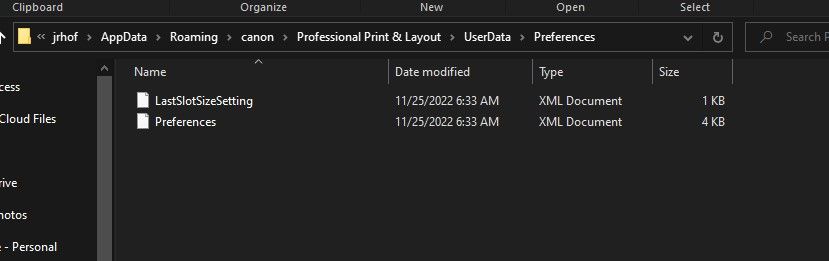
A similar path works for me with PSP.
John Hoffman
Conway, NH
R6 Mark III, M200 (converted to infrared), RF lenses, Pixma PRO-100, Pixma TR8620a, Lr Classic
Conway, NH
R6 Mark III, M200 (converted to infrared), RF lenses, Pixma PRO-100, Pixma TR8620a, Lr Classic
5 REPLIES 5

Options
- Mark as New
- Bookmark
- Subscribe
- Mute
- Subscribe to RSS Feed
- Permalink
- Report Inappropriate Content
08-21-2023 08:58 AM
Are you using a Mac or Windows PC? For a Mac, always best to use Migration Assistant which should preserve all settings from one computer to the next.
--
Ricky
Camera: EOS R5 II, RF 50mm f/1.2L, RF 135mm f/1.8L
Lighting: Profoto Lights & Modifiers
Ricky
Camera: EOS R5 II, RF 50mm f/1.2L, RF 135mm f/1.8L
Lighting: Profoto Lights & Modifiers
Options
- Mark as New
- Bookmark
- Subscribe
- Mute
- Subscribe to RSS Feed
- Permalink
- Report Inappropriate Content
08-21-2023 09:06 AM
old laptop was Win10, new laptop is Win11
What is Migration Assistant and will it work for my particular issue?
Options
- Mark as New
- Bookmark
- Subscribe
- Mute
- Subscribe to RSS Feed
- Permalink
- Report Inappropriate Content
08-21-2023 09:34 AM
That's only if you have a Mac, which you don't. Migration Assistant is a special application Apple created to make moving from one Mac to the next a seamless process. I'm not familiar if there's any equivalent for Windows PCs.
--
Ricky
Camera: EOS R5 II, RF 50mm f/1.2L, RF 135mm f/1.8L
Lighting: Profoto Lights & Modifiers
Ricky
Camera: EOS R5 II, RF 50mm f/1.2L, RF 135mm f/1.8L
Lighting: Profoto Lights & Modifiers
Options
- Mark as New
- Bookmark
- Subscribe
- Mute
- Subscribe to RSS Feed
- Permalink
- Report Inappropriate Content
08-21-2023 10:35 AM
@tpayne10 wrote:My laptop died that I use to print from Professional Print & Layout.
I can access the hold hard drive as a USB drive and am trying to figure out where to find all my customized settings so I can move them to the new laptop.
Help is greatly appreciated!
Tim
I downloaded and installed PP&L before I realized it won't work with my printer.
You could look here (need to show hidden folders):
A similar path works for me with PSP.
John Hoffman
Conway, NH
R6 Mark III, M200 (converted to infrared), RF lenses, Pixma PRO-100, Pixma TR8620a, Lr Classic
Conway, NH
R6 Mark III, M200 (converted to infrared), RF lenses, Pixma PRO-100, Pixma TR8620a, Lr Classic
Options
- Mark as New
- Bookmark
- Subscribe
- Mute
- Subscribe to RSS Feed
- Permalink
- Report Inappropriate Content
08-21-2023 10:45 AM
I did copy the folder you referenced. However, after going back into the app, I had to do a little setup to be able to see layouts. I had to change the Layout Mode from Single Image to Multiple Images. Thanks!


Announcements
05/13/2026: New firmware updates are available.
EOS R5 Mark II - Version 1.3.0
EOS R6 Mark II - Version 1.7.0
04/28/2026: Service Notice: Caution Concerning use of Lithium Batteries
03/17/2026: New firmware updates are available.
SELPHY CP1500 - Version 1.0.7.0
02/23/2026: New firmware update is available for EOS C50- Version 1.0.3.1
01/23/2026: New firmware update is available for RF 24-105mm F4 IS USM- Version 2.0.7
01/20/2026: New firmware updates are available.
12/22/2025: New firmware update is available for EOS R6 Mark III- Version 1.0.2
10/21/2025: Service Notice: To Users of the Compact Digital Camera PowerShot V1
10/15/2025: New firmware updates are available.
Speedlite EL-5 - Version 1.2.0
Speedlite EL-1 - Version 1.1.0
Speedlite Transmitter ST-E10 - Version 1.2.0
07/28/2025: Notice of Free Repair Service for the Mirrorless Camera EOS R50 (Black)
05/21/2025: New firmware update available for EOS C500 Mark II - Version 1.1.5.1
Related Content
- Canon Pixma MG3620 flashing lights in Desktop Inkjet Printers
- imageCLASS MF232w new router communication issue, Wi-Fi light flashing in Printer Software & Networking
- Easy PhotoPrint Editor: How to transfer my items to new computer in Printer Software & Networking
- Imageclass #MF665Cdw scan FROM machine gets "Connect Computer" in Office Printers
- Free Layout Plus - Running from or with a print server in Printer Software & Networking

Ⓒ 2026
Canon U.S.A Inc. All Rights Reserved. Reproduction in whole or part without permission is prohibited.
