ImageCLASS MF634Cdw - "Canon Genuine" Mode
Does this specfic model printer not have the 'Canon Genuine Mode' setting? I can't seem to find it. Thank you!!
Does this specfic model printer not have the 'Canon Genuine Mode' setting? I can't seem to find it. Thank you!!
I have been getting these colored lines on the left edge of all of my prints. Any suggestions on how to correct this issue? Thanks in advance. MF735Cdw IMG_0001.jpg

Hello everyone and thank you for accepting me in this community! I need a little help! I have a Canon i-SENSYS MF4320d printer, which worked flawlessly until a few months ago. Here's what happens: Regardless of whether I print from the computer or di...
Hello, my MF656cdw printer is great. However, the printer is currently flashing an error (orange light) and stuck on the paper menu. I can't get it to go to the main menu as none of the buttons are working. I can manipulate through the printer screen...
I have a Canon Imageclass LBP622Cdw. I want to print some 5X7 cards, but the drop-down menu does not give me that option.
My imageCLASS LBP6230dw wireless lan mode won't turn off even though I've turned the printer on and off multiple times and even clicked the reset on the back in-between the USB and Ethernet ports. Idk what to do. The light is a stable blue no blinkin...
Our office just purchased a new printer and when we first plugged it in and connected the fax line we received a fax instantly. After that first fax we have not been able to receive anything other then a report stating that the fax is OK but no actua...
My printer (above model) keeps dropping the connection to my computer. I have used the scanner connection successfully numerous times, but now I get this error message frequently "Connect the computer". To make it worse (for me), I can't figure out ...
model: imgeCLASS MF264dwserial number: removed per forum guidelinesSKU: 3056XXXI connected the printer to my computer via USB and everything seemed to work fine. A few days ago the printer stopped working showing on its con...
Hello,I have recently purchased the Canon ImageClass MF653Cdw to use for my university work. The printer in terms of printing has gone fine, however when I attempt to scan with it, it initially would work, but after a few times would stop scanning. I...
Hi everyone,I’m hoping someone can help me with an issue I’ve been experiencing with my Canon printer (purchased in 2019).Every time I try to print a document, the printer does the following:It prints the first page normally.Then, an error message ap...
power surge changed my tray. searched and cannot find how to change it. New computer is not helping. i have to manually press to print on tray 2. help
newly purchased mf236n printer, when attempting to scan it takes me to the confirm destination screen but does not allow me to chose an option followed by "an error occurred message" a minute later
I cannot use the scanner function on my MB2350. I am running Mac OS Sequoia 15.5 on a Mac 24 with M1 chip. I have redownloaded and installed IJ Scan 2 but I think the drivers are not supported. I am USB connected. Can anyone help?
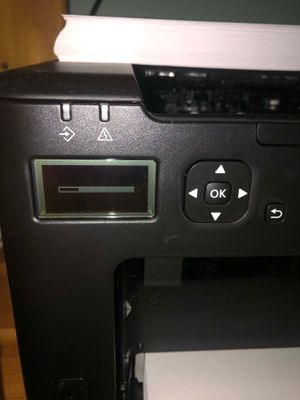
What does this image on the printer's screen mean? It's on my ImageClass LBP122dw and it won't print or let me go to any other screen. I've tried rebooting.IMG_4319.jpg
| Subject | Author | Posted |
|---|---|---|
| 09-08-2026 06:01 PM | ||
| 09-07-2026 05:46 PM | ||
| 09-07-2026 08:36 AM | ||
| 09-05-2026 09:18 PM | ||
| 08-30-2026 06:53 PM |
New to the community? Here's some information to help you get acquainted:
07/22/2026: New firmware updates are available.
EOS R6 Mark III - Version 1.1.0
05/13/2026: New firmware updates are available.
EOS R5 Mark II - Version 1.3.0
EOS R6 Mark II - Version 1.7.0
03/17/2026: New firmware updates are available.
SELPHY CP1500 - Version 1.0.7.0
01/20/2026: New firmware updates are available.
10/15/2025: New firmware updates are available.
Speedlite EL-5 - Version 1.2.0
Speedlite EL-1 - Version 1.1.0
Speedlite Transmitter ST-E10 - Version 1.2.0
Canon U.S.A Inc. All Rights Reserved. Reproduction in whole or part without permission is prohibited.

