Turn on suggestions
Auto-suggest helps you quickly narrow down your search results by suggesting possible matches as you type.
- Canon Community
- Discussions & Help
- Printer
- Office Printers
- Maxify MB2720 skipping lines
Options
- Subscribe to RSS Feed
- Mark Topic as New
- Mark Topic as Read
- Float this Topic for Current User
- Bookmark
- Subscribe
- Mute
- Printer Friendly Page
Maxify MB2720 skipping lines

Options
- Mark as New
- Bookmark
- Subscribe
- Mute
- Subscribe to RSS Feed
- Permalink
- Report Inappropriate Content
11-20-2018
02:27 PM
- last edited on
11-20-2018
02:36 PM
by
 Danny
Danny
I have a Maxify MB2720 that starting skipping lines in MS Office 2013 products (outlook, excel and word) will print with other programs. ANY HELP?????
20 REPLIES 20

Options
- Mark as New
- Bookmark
- Subscribe
- Mute
- Subscribe to RSS Feed
- Permalink
- Report Inappropriate Content
11-26-2018 09:27 AM
Hi jen121361,
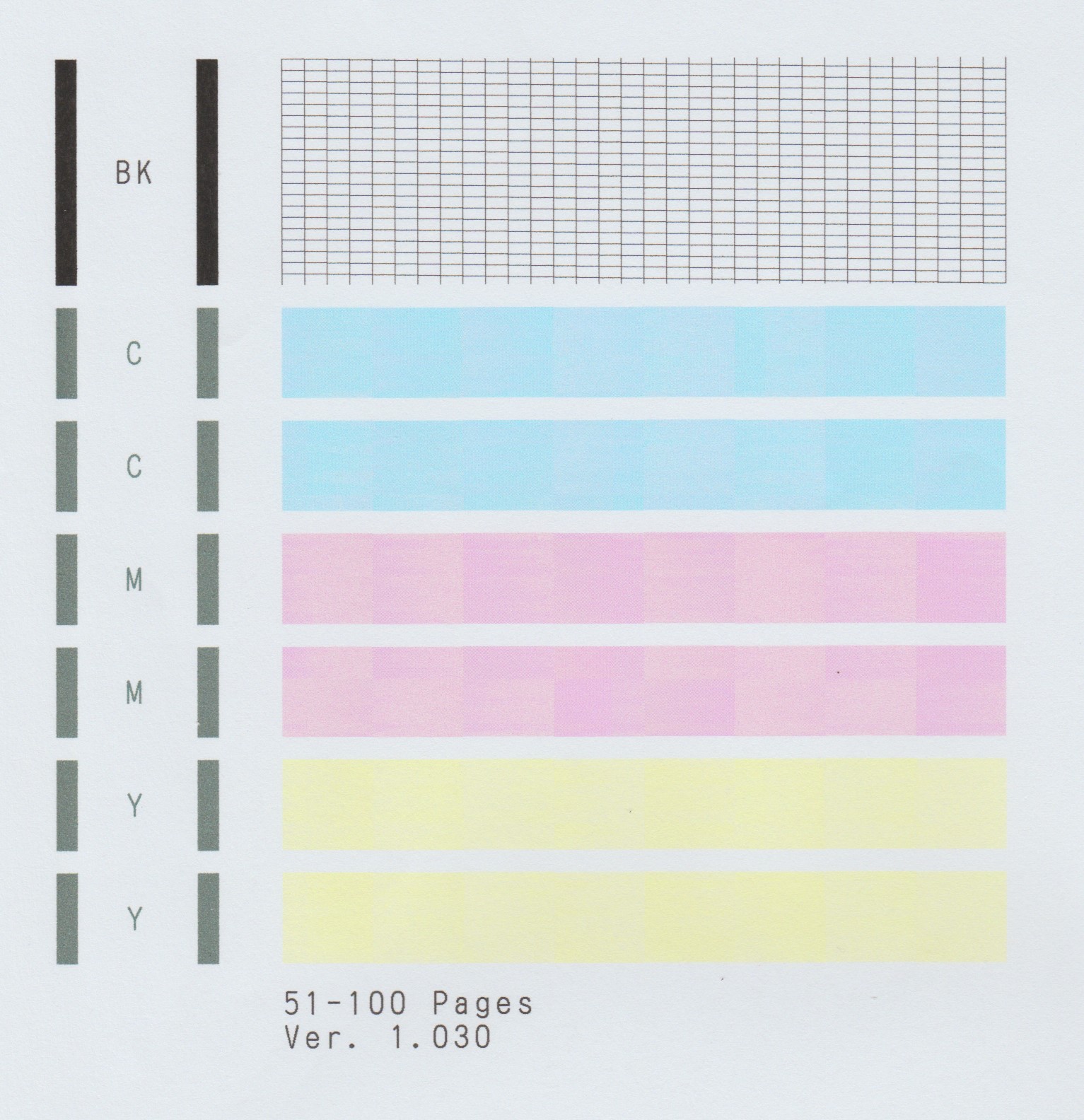
A test of your MAXIFY MB2720 should be performed. This will tell us if the printer is working correctly. To do this, please load letter-sized paper in the MAXIFY MB2720 and follow these steps:
1. Swipe the HOME screen and then tap Setup on your MAXIFY MB2720.
2. Tap Maintenance.
3. Tap Print nozzle check pattern.
4. Tap Yes.
The Nozzle Check will print. Please compare your printout to the example that has been attached to the bottom of this post. If they differ, please perform a few printhead cleanings.
To perform cleanings, please follow these steps:
1. Swipe the HOME screen and then tap Setup on your MAXIFY MB2720.
2. Tap Maintenance.
3. Tap Cleaning.
4. Tap Yes to clean the printhead.
5. Tap Yes to print another Nozzle Check.
Does the Nozzle Check print correctly? If not, please contact our support group using the following link:
http://Canon.us/ContactLI
Options
- Mark as New
- Bookmark
- Subscribe
- Mute
- Subscribe to RSS Feed
- Permalink
- Report Inappropriate Content
12-06-2018 09:05 AM
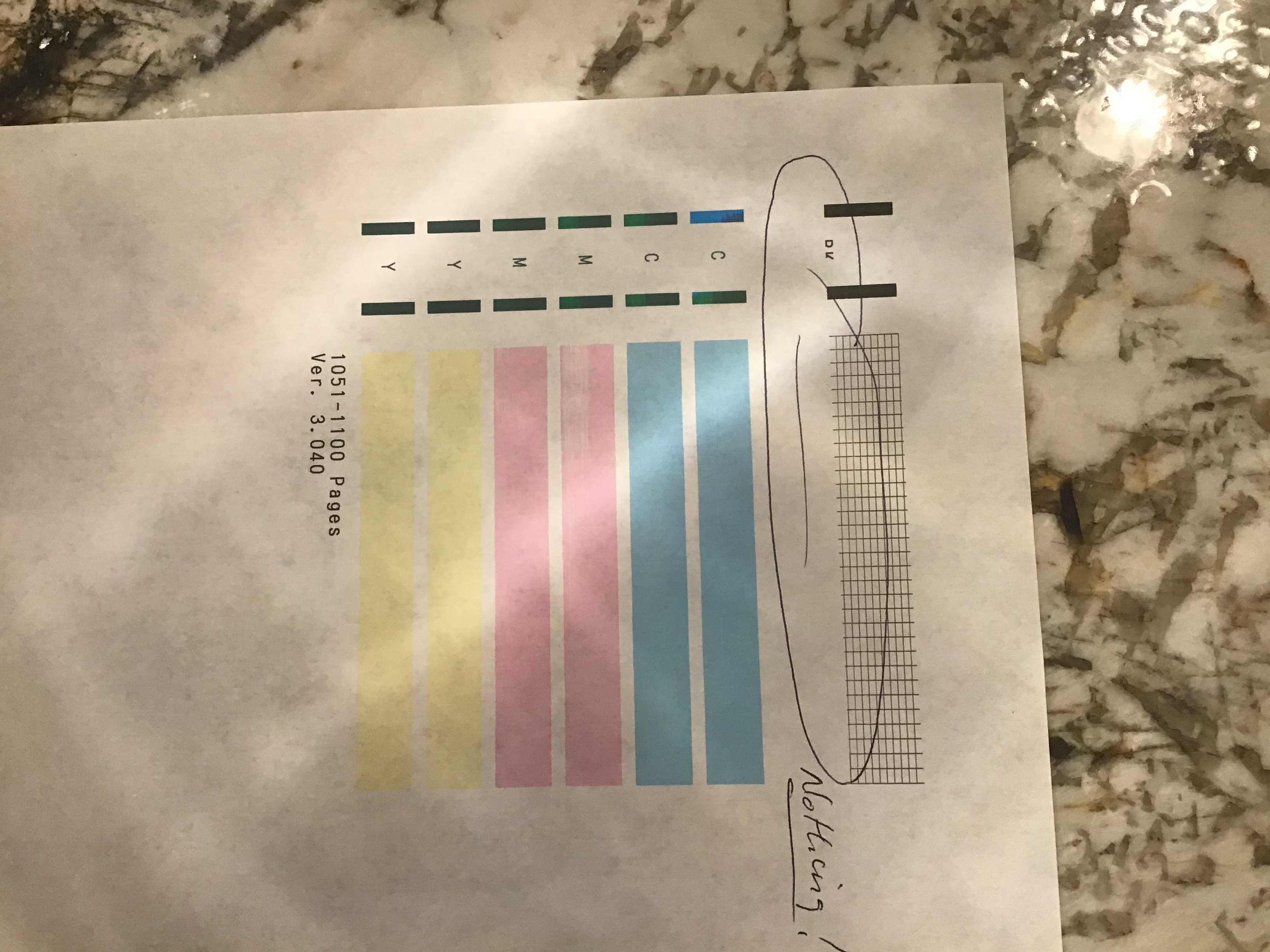
The print pattern is missing half of the black and I deep cleaned it and still no change.

Options
- Mark as New
- Bookmark
- Subscribe
- Mute
- Subscribe to RSS Feed
- Permalink
- Report Inappropriate Content
12-13-2018 11:17 AM - last edited on 12-13-2018 11:22 AM by Porcha
Hi Jen121361,
Since the deep cleaning did not resolve the issues and half of the black is missing, we will need to check the ink levels.
Please click HERE and follow the steps to check your ink levels.
Once that is done, please let us know what level the BK is at.
We look forward to your reply.
Options
- Mark as New
- Bookmark
- Subscribe
- Mute
- Subscribe to RSS Feed
- Permalink
- Report Inappropriate Content
01-22-2020 09:05 PM
Mine is doing this!
Options
- Mark as New
- Bookmark
- Subscribe
- Mute
- Subscribe to RSS Feed
- Permalink
- Report Inappropriate Content
01-22-2020 09:07 PM
Canon please help. I have done deep cleaning several times.
Options
- Mark as New
- Bookmark
- Subscribe
- Mute
- Subscribe to RSS Feed
- Permalink
- Report Inappropriate Content
01-24-2020 01:36 PM
Hi Rgramza10,
Because performing multiple cleanings did not get black to print, please contact our support group using the following link:
http://Canon.us/ContactLI
Options
- Mark as New
- Bookmark
- Subscribe
- Mute
- Subscribe to RSS Feed
- Permalink
- Report Inappropriate Content
06-06-2020 06:21 PM
Did you get a response / resolution on this? Mine is doing the same thing!
Options
- Mark as New
- Bookmark
- Subscribe
- Mute
- Subscribe to RSS Feed
- Permalink
- Report Inappropriate Content
06-10-2020 03:13 PM
Hi gambitgerm,
Cleaning the encoder should resolve this issue. To do this, please follow the steps in this Knowledgebase Article:
https://support.usa.canon.com/kb/index?page=content&id=ART168472
Options
- Mark as New
- Bookmark
- Subscribe
- Mute
- Subscribe to RSS Feed
- Permalink
- Report Inappropriate Content
07-11-2020 01:40 PM
Following....mine is doing the same thing!!

Announcements
07/22/2026: New firmware updates are available.
EOS R6 Mark III - Version 1.1.0
05/13/2026: New firmware updates are available.
EOS R5 Mark II - Version 1.3.0
EOS R6 Mark II - Version 1.7.0
04/28/2026: Service Notice: Caution Concerning use of Lithium Batteries
03/17/2026: New firmware updates are available.
SELPHY CP1500 - Version 1.0.7.0
02/23/2026: New firmware update is available for EOS C50- Version 1.0.3.1
01/23/2026: New firmware update is available for RF 24-105mm F4 IS USM- Version 2.0.7
01/20/2026: New firmware updates are available.
10/21/2025: Service Notice: To Users of the Compact Digital Camera PowerShot V1
10/15/2025: New firmware updates are available.
Speedlite EL-5 - Version 1.2.0
Speedlite EL-1 - Version 1.1.0
Speedlite Transmitter ST-E10 - Version 1.2.0
07/28/2025: Notice of Free Repair Service for the Mirrorless Camera EOS R50 (Black)
05/21/2025: New firmware update available for EOS C500 Mark II - Version 1.1.5.1
Related Content
- I bought a MAXIFY MB2720 it will not print with my Android. Its a new printer. in Printer Software & Networking
- MAXIFY MB2720, change OLD ink cartridge that still shows ink, but its probably dried up. in Office Printers
- MAXIFY MB2720 error code 5205 in Office Printers
- MAXIFY MB2720 Printer Error 5040 in Office Printers
- MAXIFY MB2720 Scan to folder errors out each time in Office Printers

Ⓒ 2026
Canon U.S.A Inc. All Rights Reserved. Reproduction in whole or part without permission is prohibited.
