Turn on suggestions
Auto-suggest helps you quickly narrow down your search results by suggesting possible matches as you type.
- Canon Community
- Discussions & Help
- Camera
- EOS DSLR & Mirrorless Cameras
- Re: Canon EOS M200
Options
- Subscribe to RSS Feed
- Mark Topic as New
- Mark Topic as Read
- Float this Topic for Current User
- Bookmark
- Subscribe
- Mute
- Printer Friendly Page
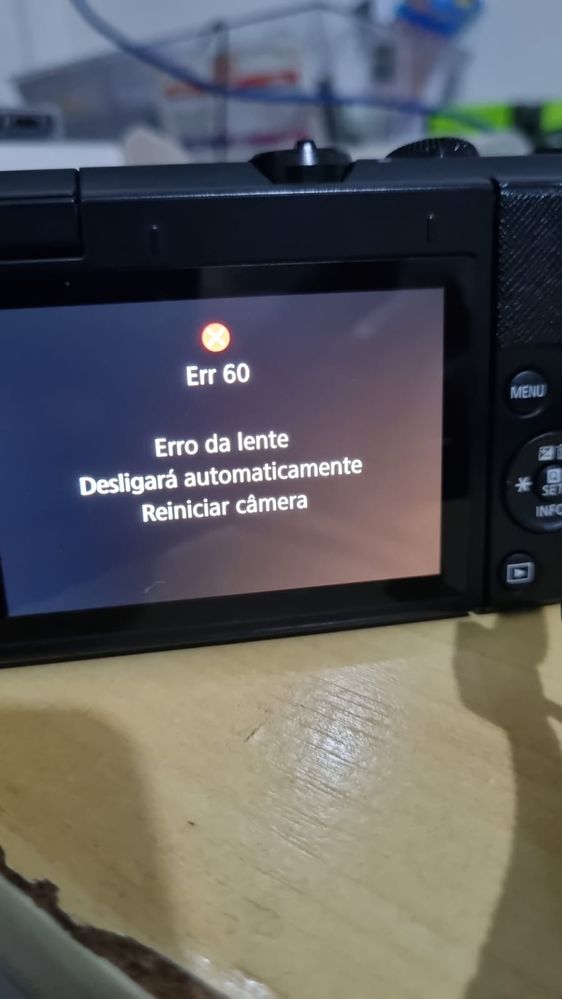
EOS M200 Error 60

Options
- Mark as New
- Bookmark
- Subscribe
- Mute
- Subscribe to RSS Feed
- Permalink
- Report Inappropriate Content
12-10-2024
05:06 AM
- last edited on
12-12-2024
09:19 AM
by
 Danny
Danny
I turned on my canon eos m200 and the error appeared "ERR 60 lens error, it will automatically shut down and restart the camera" I tested it with another lens and it is working normally, so the problem is with the camera's original lens, I have already tried cleaning the connectors between the camera and lens to see if it's a bad contact, but it didn't work, what could it be and what can I do?
 IMG-20241208-WA0138.jpg
 Jonatan_0-1733825006318.png
6 REPLIES 6


Options
- Mark as New
- Bookmark
- Subscribe
- Mute
- Subscribe to RSS Feed
- Permalink
- Report Inappropriate Content
12-10-2024 06:18 AM
@Jonatan wrote:
I turned on my canon eos m200 and the error appeared "ERR 60 lens error, it will automatically shut down and restart the camera" I tested it with another lens and it is working normally, so the problem is with the camera's original lens, I have already tried cleaning the connectors between the camera and lens to see if it's a bad contact, but it didn't work, what could it be and what can I do?
Which lens is it?
John Hoffman
Conway, NH
R6 Mark III, M200 (converted to infrared), RF lenses, Pixma PRO-100, Pixma TR8620a, Lr Classic
Conway, NH
R6 Mark III, M200 (converted to infrared), RF lenses, Pixma PRO-100, Pixma TR8620a, Lr Classic
Options
- Mark as New
- Bookmark
- Subscribe
- Mute
- Subscribe to RSS Feed
- Permalink
- Report Inappropriate Content
12-12-2024 06:14 PM
It is the camera's original lens, the one that comes with the camera, the model is Canon-EF-M 15-45mm
Options
- Mark as New
- Bookmark
- Subscribe
- Mute
- Subscribe to RSS Feed
- Permalink
- Report Inappropriate Content
12-12-2024 07:01 PM
@Jonatan wrote:
It is the camera's original lens, the one that comes with the camera, the model is Canon-EF-M 15-45mm
Maybe the locking switch is sticking. Cycle the switch and then push switch towards front of lens and rotate lens till the 15mm position is at the white dot (the unlocked position). If the switch won't snap back manually move it. My switch sometimes sticks (but I don’t get an error message).
John Hoffman
Conway, NH
R6 Mark III, M200 (converted to infrared), RF lenses, Pixma PRO-100, Pixma TR8620a, Lr Classic
Conway, NH
R6 Mark III, M200 (converted to infrared), RF lenses, Pixma PRO-100, Pixma TR8620a, Lr Classic
Options
- Mark as New
- Bookmark
- Subscribe
- Mute
- Subscribe to RSS Feed
- Permalink
- Report Inappropriate Content
12-18-2024 06:04 AM
didn't work, i've tried everything.
Options
- Mark as New
- Bookmark
- Subscribe
- Mute
- Subscribe to RSS Feed
- Permalink
- Report Inappropriate Content
12-18-2024 06:06 AM
Could it be a camera firmware error? that has become incompatible with the lens?
Options
- Mark as New
- Bookmark
- Subscribe
- Mute
- Subscribe to RSS Feed
- Permalink
- Report Inappropriate Content
12-18-2024 07:11 AM - edited 12-18-2024 08:40 AM
@Jonatan wrote:
Could it be a camera firmware error? that has become incompatible with the lens?
I never heard of that happening. If you reset camera to factory settings and that didn’t resolve the lens may have failed. You said other lenses work OK.
John Hoffman
Conway, NH
R6 Mark III, M200 (converted to infrared), RF lenses, Pixma PRO-100, Pixma TR8620a, Lr Classic
Conway, NH
R6 Mark III, M200 (converted to infrared), RF lenses, Pixma PRO-100, Pixma TR8620a, Lr Classic

Announcements
07/22/2026: New firmware updates are available.
EOS R6 Mark III - Version 1.1.0
05/13/2026: New firmware updates are available.
EOS R5 Mark II - Version 1.3.0
EOS R6 Mark II - Version 1.7.0
04/28/2026: Service Notice: Caution Concerning use of Lithium Batteries
03/17/2026: New firmware updates are available.
SELPHY CP1500 - Version 1.0.7.0
02/23/2026: New firmware update is available for EOS C50- Version 1.0.3.1
01/23/2026: New firmware update is available for RF 24-105mm F4 IS USM- Version 2.0.7
01/20/2026: New firmware updates are available.
10/21/2025: Service Notice: To Users of the Compact Digital Camera PowerShot V1
10/15/2025: New firmware updates are available.
Speedlite EL-5 - Version 1.2.0
Speedlite EL-1 - Version 1.1.0
Speedlite Transmitter ST-E10 - Version 1.2.0
07/28/2025: Notice of Free Repair Service for the Mirrorless Camera EOS R50 (Black)
05/21/2025: New firmware update available for EOS C500 Mark II - Version 1.1.5.1
Related Content
- Trying to estimate the Manufacture Date for the Canon R5 Mark II camera in EOS DSLR & Mirrorless Cameras
- EOS Rebel T7 shows "Busy" icon and runs slow, especially with flash in EOS DSLR & Mirrorless Cameras
- PowerShot V1 file name numbers? in Point & Shoot Digital Cameras
- Full Leather Camera Case needed for a Canon A1 in Camera Accessories
- EOS R5 Mark II How and Why to Use Picture Style settings and In-Camera Sharpening in EOS DSLR & Mirrorless Cameras

Ⓒ 2026
Canon U.S.A Inc. All Rights Reserved. Reproduction in whole or part without permission is prohibited.
