Turn on suggestions
Auto-suggest helps you quickly narrow down your search results by suggesting possible matches as you type.
- Canon Community
- Discussions & Help
- Camera
- Camera Software
- Canon R8 not connecting via wifi connecting to Go...
Options
- Subscribe to RSS Feed
- Mark Topic as New
- Mark Topic as Read
- Float this Topic for Current User
- Bookmark
- Subscribe
- Mute
- Printer Friendly Page
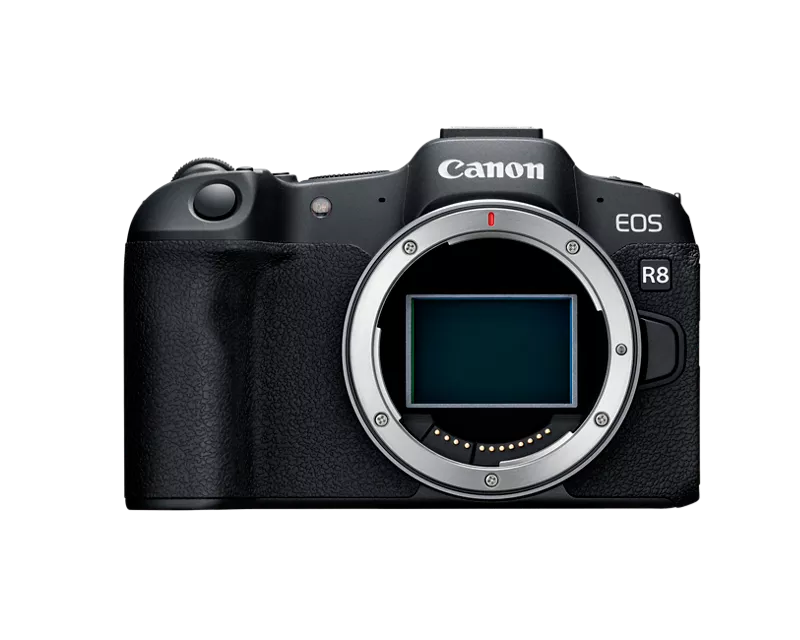
Canon R8 not connecting via wifi connecting to Google Pixel Pro Fold

Options
- Mark as New
- Bookmark
- Subscribe
- Mute
- Subscribe to RSS Feed
- Permalink
- Report Inappropriate Content
08-06-2025
05:11 PM
- last edited on
08-07-2025
09:31 AM
by
 Danny
Danny

under the newest update for the for the canon connect app im unable to connect my camera to my google pixel pro fold. ive tried removing all connections from both my phone and camera, uninstalled and reinstalled the app on my phone, ive registered my camera to my account but i have been unable to access the camera wirelessly.
15 REPLIES 15


Options
- Mark as New
- Bookmark
- Subscribe
- Mute
- Subscribe to RSS Feed
- Permalink
- Report Inappropriate Content
08-06-2025 08:44 PM
Greetings,
By chance are you using Google 1 VPN? If so disable it and try again.
~Rick
Bay Area - CA
~R5 C (1.1.3.1), ~RF Trinity, ~RF 100 Macro, ~RF 100~400, ~RF 100~500, ~RF 200-800, ~RF 1.4x TC, BG-R10, 430EX III-RT ~DxO PhotoLab Elite ~DaVinci Resolve Studio ~ImageClass MF644Cdw MF656Cdw ~Pixel 10 ~CarePaks Are Worth It
Options
- Mark as New
- Bookmark
- Subscribe
- Mute
- Subscribe to RSS Feed
- Permalink
- Report Inappropriate Content
08-06-2025 08:45 PM - edited 08-06-2025 08:46 PM
No VPN doesn't work on any security settings in the Canon connect app either.
Options
- Mark as New
- Bookmark
- Subscribe
- Mute
- Subscribe to RSS Feed
- Permalink
- Report Inappropriate Content
08-06-2025 09:01 PM - edited 08-06-2025 09:02 PM
I have a pixel 8 and Samsung tablet. Both run latest Android available, and I'm running the latest Canon Connect App also.
I have an R5C and an R50v. The R5C uses the older wireless connection model. The R50v uses the new wireless connection model. Unfortunately I can't reproduce the issue you're experiencing. Both of my devices connect immediately.
Your R8 uses the new wireless connection model.
https://cam.start.canon/en/C013/manual/html/UG-07_Network_0120.html
I'll do some more research and see if I can dig anything new up.
~Rick
Bay Area - CA
~R5 C (1.1.3.1), ~RF Trinity, ~RF 100 Macro, ~RF 100~400, ~RF 100~500, ~RF 200-800, ~RF 1.4x TC, BG-R10, 430EX III-RT ~DxO PhotoLab Elite ~DaVinci Resolve Studio ~ImageClass MF644Cdw MF656Cdw ~Pixel 10 ~CarePaks Are Worth It
Options
- Mark as New
- Bookmark
- Subscribe
- Mute
- Subscribe to RSS Feed
- Permalink
- Report Inappropriate Content
08-06-2025 09:11 PM
you would think it would work but idk why its not it just says connection failed try again later. been trying for week :C
Options
- Mark as New
- Bookmark
- Subscribe
- Mute
- Subscribe to RSS Feed
- Permalink
- Report Inappropriate Content
08-06-2025 09:13 PM - edited 08-06-2025 09:15 PM
One other thing, I advise against using camera nicknames. Just leave it with whatever the default is EOS_R8_ last digits of of its MAC address.
I assume you're logged into Canon ID too in the App, right?
~Rick
Bay Area - CA
~R5 C (1.1.3.1), ~RF Trinity, ~RF 100 Macro, ~RF 100~400, ~RF 100~500, ~RF 200-800, ~RF 1.4x TC, BG-R10, 430EX III-RT ~DxO PhotoLab Elite ~DaVinci Resolve Studio ~ImageClass MF644Cdw MF656Cdw ~Pixel 10 ~CarePaks Are Worth It
Options
- Mark as New
- Bookmark
- Subscribe
- Mute
- Subscribe to RSS Feed
- Permalink
- Report Inappropriate Content
08-06-2025 09:15 PM
ive left it alone, looking at the mac address on my camera its the same as the designation in the app.
Options
- Mark as New
- Bookmark
- Subscribe
- Mute
- Subscribe to RSS Feed
- Permalink
- Report Inappropriate Content
08-06-2025 10:52 PM
Hi,
The Pro fold uses the Samsung Exynos Modem 5300 for cellular, wireless and bluetooth. Searching AI and reddit, I haven't found anything definitive on compatibility issues for its wireless.
~Rick
Bay Area - CA
~R5 C (1.1.3.1), ~RF Trinity, ~RF 100 Macro, ~RF 100~400, ~RF 100~500, ~RF 200-800, ~RF 1.4x TC, BG-R10, 430EX III-RT ~DxO PhotoLab Elite ~DaVinci Resolve Studio ~ImageClass MF644Cdw MF656Cdw ~Pixel 10 ~CarePaks Are Worth It
Options
- Mark as New
- Bookmark
- Subscribe
- Mute
- Subscribe to RSS Feed
- Permalink
- Report Inappropriate Content
08-06-2025 11:45 PM
Well idk what's going on. I've went back 2 generations of apps and it's not working. I should not have to consider using a different or older phone just to get an app working . My Canon selphy app works fine my Canon ivy works fine but Christ on a cracker I can't get my pictures to my phone without having to plug in a cable and to me that's unacceptable. It's a feature that's promoted on the sales page so one would think it would be a functional part of using it.
Options
- Mark as New
- Bookmark
- Subscribe
- Mute
- Subscribe to RSS Feed
- Permalink
- Report Inappropriate Content
08-17-2025 11:20 PM
has anything come to light as to whats going on? still trying to figure something out myself and the lack of being able to use this feature has been a rather annyoing issue. trying to connect with a cable has been preety spotty, it keeps connecting to the bluetooth while having the cable in and trying to import it trys to connect to the wifi which doesnt work. id love any insight into this issue and maybe someone properly troubleshooting with me to try and figure this out. maybe i need to update some setting on my phone itself but im not sure as to what i would need to change to have any potentional effect.

Announcements
07/22/2026: New firmware updates are available.
EOS R6 Mark III - Version 1.1.0
05/13/2026: New firmware updates are available.
EOS R5 Mark II - Version 1.3.0
EOS R6 Mark II - Version 1.7.0
04/28/2026: Service Notice: Caution Concerning use of Lithium Batteries
03/17/2026: New firmware updates are available.
SELPHY CP1500 - Version 1.0.7.0
02/23/2026: New firmware update is available for EOS C50- Version 1.0.3.1
01/23/2026: New firmware update is available for RF 24-105mm F4 IS USM- Version 2.0.7
01/20/2026: New firmware updates are available.
10/21/2025: Service Notice: To Users of the Compact Digital Camera PowerShot V1
10/15/2025: New firmware updates are available.
Speedlite EL-5 - Version 1.2.0
Speedlite EL-1 - Version 1.1.0
Speedlite Transmitter ST-E10 - Version 1.2.0
07/28/2025: Notice of Free Repair Service for the Mirrorless Camera EOS R50 (Black)
05/21/2025: New firmware update available for EOS C500 Mark II - Version 1.1.5.1
Related Content
- Cannot batch-select / select all photos by date in Camera Connect App (IXUS 255 HS & iPhone 12) in Camera Software
- R6 Mark II WiFi Connectivity Issues when pushing to SFTP in EOS DSLR & Mirrorless Cameras
- Camera Connect won't connect to PowerShot SX720 HS after app update in Camera Software
- Canon Connect no longer working in Camera Software
- R7 Problem connecting to iOS via Camera Connect, but Android Works in Camera Software

Ⓒ 2026
Canon U.S.A Inc. All Rights Reserved. Reproduction in whole or part without permission is prohibited.
