Turn on suggestions
Auto-suggest helps you quickly narrow down your search results by suggesting possible matches as you type.
- Canon Community
- Discussions & Help
- Video
- Camcorders
- Re: Exposure problems
Options
- Subscribe to RSS Feed
- Mark Topic as New
- Mark Topic as Read
- Float this Topic for Current User
- Bookmark
- Subscribe
- Mute
- Printer Friendly Page
Exposure problems

Options
- Mark as New
- Bookmark
- Subscribe
- Mute
- Subscribe to RSS Feed
- Permalink
- Report Inappropriate Content
11-05-2020 10:01 PM
Is there any way to set the sensitivity of the camera so that it doesn't burn out the white highlights? I bought the camera because of rave reviews about its ability to preserve image and color info but I'm not impressed at all. The other day I was shooting a guy in auto mode wearing a white hardhat under a sunny overcast sky.The hard hat shows up solid white in the clip. I've tried to edit the image in post but there is no image information to work with on the hard hat. Using the Lumetri tool in Adobe Premiere I can change the curves all I want but the hard hat is still blank white while the rest of the image can go almost black. On the same day I used my old Panasonic HD camcorder and the image info was well preserved. The hardhat showed good gradations in color.
I suppose I should shoot in manual mode but this is far from easy. On a bright sunny day it's all I can do to see the screen let alone the microscopic adjustment tools. As an old SLR user I'm used to twirling physical knobs and watching the exposure canges through the viewfinder. My retailler will not take the camera back because it's more than a month old, so I guess I'll have to live with it..
2 REPLIES 2


Options
- Mark as New
- Bookmark
- Subscribe
- Mute
- Subscribe to RSS Feed
- Permalink
- Report Inappropriate Content
11-06-2020 02:04 PM
Hi, graphicsgeezer!
So that the Community can help you better, we need to know exactly which Canon camera model you're using. That, and any other details you'd like to give will help the Community better understand your issue!
If this is a time-sensitive matter, click HERE search our knowledge base or find additional support options HERE.
Thanks and have a great day!
Options
- Mark as New
- Bookmark
- Subscribe
- Mute
- Subscribe to RSS Feed
- Permalink
- Report Inappropriate Content
11-06-2020 03:48 PM
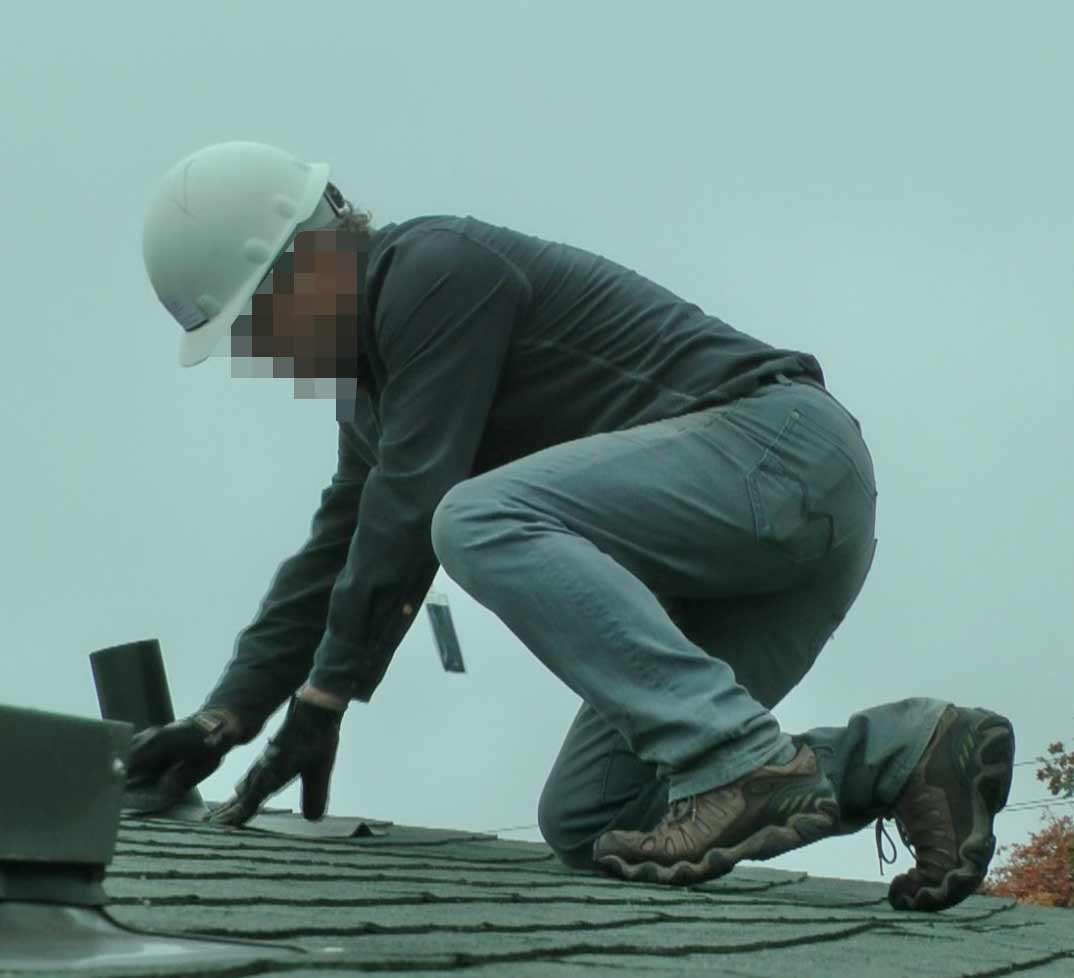
Thanks for your reply. The camcorder is a Vixia HF G50. The still image of the man standing is taken from a raw clip shot in full automatic mode under a bright, overcast sky. There's nothing I can do to reveal surface gradations in the hard hat. Compare that to the smaller image of the same man on a roof. It was shot with 10-year-old Panasonic HDC TM 900, in full auto mode. Same sky about half an hour later. Obviously the image has a greenish tint but its otherwise much easier to correct than the Vixia one.


Announcements
07/22/2026: New firmware updates are available.
EOS R6 Mark III - Version 1.1.0
05/13/2026: New firmware updates are available.
EOS R5 Mark II - Version 1.3.0
EOS R6 Mark II - Version 1.7.0
04/28/2026: Service Notice: Caution Concerning use of Lithium Batteries
03/17/2026: New firmware updates are available.
SELPHY CP1500 - Version 1.0.7.0
02/23/2026: New firmware update is available for EOS C50- Version 1.0.3.1
01/23/2026: New firmware update is available for RF 24-105mm F4 IS USM- Version 2.0.7
01/20/2026: New firmware updates are available.
10/21/2025: Service Notice: To Users of the Compact Digital Camera PowerShot V1
10/15/2025: New firmware updates are available.
Speedlite EL-5 - Version 1.2.0
Speedlite EL-1 - Version 1.1.0
Speedlite Transmitter ST-E10 - Version 1.2.0
07/28/2025: Notice of Free Repair Service for the Mirrorless Camera EOS R50 (Black)
05/21/2025: New firmware update available for EOS C500 Mark II - Version 1.1.5.1
Related Content
- The EOS C50 older EF lenses only work in photo mode in Professional Video
- RC-IP1000 problems: random reboots, overnight lockups in Video Accessories
- XA75 How to manually reproduce Sports exposure settings in Professional Video
- XF605 FTP issues since last firmware update in Professional Video
- LEGRIA HF G25 Video not recording to SD card in Camcorders

Ⓒ 2026
Canon U.S.A Inc. All Rights Reserved. Reproduction in whole or part without permission is prohibited.
