Turn on suggestions
Auto-suggest helps you quickly narrow down your search results by suggesting possible matches as you type.
- Canon Community
- Discussions & Help
- Printer
- Scanners
- Re: Canoscan LiDe 400 will not print from ijscan u...
Options
- Subscribe to RSS Feed
- Mark Topic as New
- Mark Topic as Read
- Float this Topic for Current User
- Bookmark
- Subscribe
- Mute
- Printer Friendly Page

Options
- Mark as New
- Bookmark
- Subscribe
- Mute
- Subscribe to RSS Feed
- Permalink
- Report Inappropriate Content
04-30-2022 09:28 PM
If I press the Copy button on the scanner, a copy prints directly.
When I want multiple copies, the ijscan utility will not send to the printer.
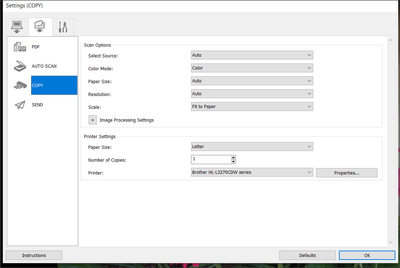
I set up as shown and the hit "OK" and then "Auto." Is that the right thing to do?
Solved! Go to Solution.
1 ACCEPTED SOLUTION
Accepted Solutions


Options
- Mark as New
- Bookmark
- Subscribe
- Mute
- Subscribe to RSS Feed
- Permalink
- Report Inappropriate Content
05-02-2022 03:45 PM
Hi mangurian,
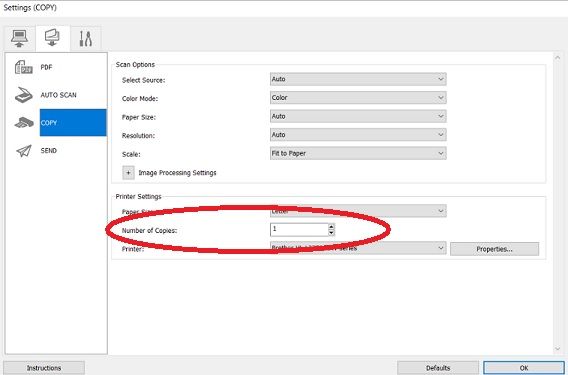
In Settings, please click COPY on the left side.
On the right side, increase the number next to "Number of copies" from 1 to your desired number of copies that you wish to make.
Once set, click OK.
To perform the copy function, press the COPY button on your scanner.
More information can be viewed here:
https://ij.manual.canon/ij/webmanual/ScanUtility/All/LiDE%20400/1.0/EN/SU/su-505.html
1 REPLY 1
Options
- Mark as New
- Bookmark
- Subscribe
- Mute
- Subscribe to RSS Feed
- Permalink
- Report Inappropriate Content
05-02-2022 03:45 PM
Hi mangurian,
In Settings, please click COPY on the left side.
On the right side, increase the number next to "Number of copies" from 1 to your desired number of copies that you wish to make.
Once set, click OK.
To perform the copy function, press the COPY button on your scanner.
More information can be viewed here:
https://ij.manual.canon/ij/webmanual/ScanUtility/All/LiDE%20400/1.0/EN/SU/su-505.html


Announcements
12/18/2025: New firmware updates are available.
12/15/2025: New firmware update available for EOS C50 - Version 1.0.1.1
11/20/2025: New firmware updates are available.
EOS R6 Mark III - Version 1.0.1
EOS R5 Mark II - Version 1.2.0
PowerShot G7 X Mark III - Version 1.4.0
PowerShot SX740 HS - Version 1.0.2
10/21/2025: Service Notice: To Users of the Compact Digital Camera PowerShot V1
10/15/2025: New firmware updates are available.
Speedlite EL-5 - Version 1.2.0
Speedlite EL-1 - Version 1.1.0
Speedlite Transmitter ST-E10 - Version 1.2.0
07/28/2025: Notice of Free Repair Service for the Mirrorless Camera EOS R50 (Black)
7/17/2025: New firmware updates are available.
05/21/2025: New firmware update available for EOS C500 Mark II - Version 1.1.5.1
02/20/2025: New firmware updates are available.
RF70-200mm F2.8 L IS USM Z - Version 1.0.6
RF24-105mm F2.8 L IS USM Z - Version 1.0.9
RF100-300mm F2.8 L IS USM - Version 1.0.8
RF50mm F1.4 L VCM - Version 1.0.2
RF24mm F1.4 L VCM - Version 1.0.3
01/22/2024: Canon Supports Disaster Relief Efforts in California
01/14/2025: Steps to resolve still image problem when using certain SanDisk SD cards with the Canon EOS R5 Mark II
Related Content
- Issue installing Canon CanoScan LiDE 400 software on MacAir 2025 MacOS Sequoia 15.7.1 in Scanners
- New CanoScan Lide 400, Win 11 Home, ScanGear. Scans, but never outputs file, hangs in Scanners
- CanoScan LIDE 300 LJ scan utility does not appear in Windows 11 in Scanners
- CanoScan LiDE 400 works with Image Capture but "Cannot Communicate with Scanner" in Scanners
- Cannot communicate with scanner Error with CanoScan LiDE 300 in Scanners

Ⓒ 2025
Canon U.S.A Inc. All Rights Reserved. Reproduction in whole or part without permission is prohibited.
