Turn on suggestions
Auto-suggest helps you quickly narrow down your search results by suggesting possible matches as you type.
- Canon Community
- Discussions & Help
- Video
- Professional Video
- Re: C70 HDMI Timecode Delay with external recorder...
Options
- Subscribe to RSS Feed
- Mark Topic as New
- Mark Topic as Read
- Float this Topic for Current User
- Bookmark
- Subscribe
- Mute
- Printer Friendly Page
C70 HDMI Timecode Delay with external recorder.

Options
- Mark as New
- Bookmark
- Subscribe
- Mute
- Subscribe to RSS Feed
- Permalink
- Report Inappropriate Content
01-14-2026 09:05 AM
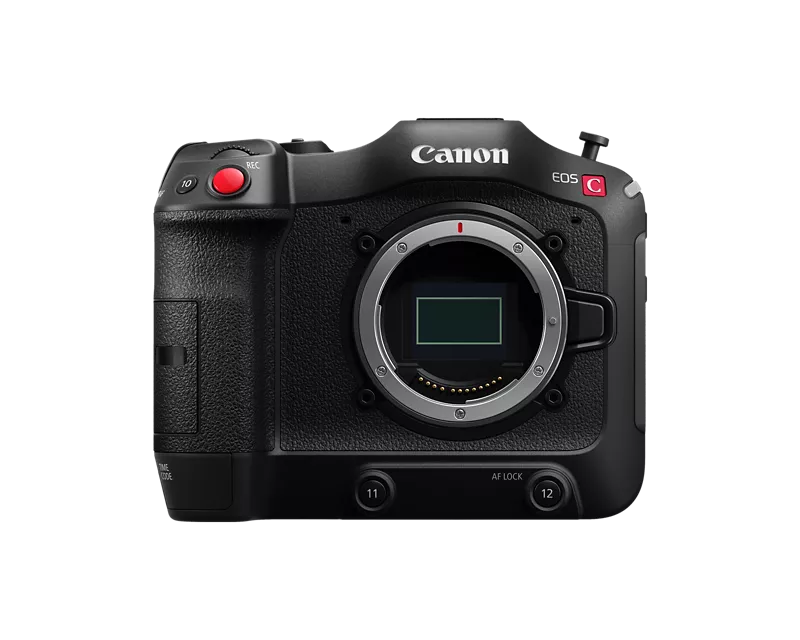
Hello, I noticed a minor technical inaccuracy with my EOS C70 and wanted to know if this error occurs with other models in the C series. I connected an Atomos Ninja V to my camera and recorded the HDMI image via the Ninja V in addition to the internal RAW recording. I want to use the Ninja V recordings as notes and for logging the settings. I also have the camera's HUD on the Atomos recording. I synchronised the recordings in Premiere using timecode. I noticed that there is a timecode offset of 1 frame between the internal recording and the Atomos recording. Since I also recorded the camera's HUD, this offset can also be seen when comparing the timecode in the image with the timecode of the file. I thought it might be due to the Atomos and tested the same setup on my 5Dmkv and XF205. I don't have this problem with either of these cameras. Now, out of curiosity, I would like to know whether this error occurs with other models in the C series
8 REPLIES 8


Options
- Mark as New
- Bookmark
- Subscribe
- Mute
- Subscribe to RSS Feed
- Permalink
- Report Inappropriate Content
01-16-2026 05:11 PM
Hi Elwoodjblues1,
The timecode output from our C cameras should match the timecode from the camera itself. There is a setting to double check with an issue like this. Go into the camera menu, go to the System Setup section, select HDMI Scan Mode, and make sure it is not set to PsF (Forced 1080i. When the HDMI scan mode is set to that it does change how the frames are counted in the output and that could potentially cause a desync.
Options
- Mark as New
- Bookmark
- Subscribe
- Mute
- Subscribe to RSS Feed
- Permalink
- Report Inappropriate Content
01-16-2026 05:19 PM
The HDMI Scan Modus was on P not on PsF.

Options
- Mark as New
- Bookmark
- Subscribe
- Mute
- Subscribe to RSS Feed
- Permalink
- Report Inappropriate Content
01-21-2026 07:33 AM - edited 01-21-2026 07:35 AM
I tested a AJA Ki Pro Mini with a Canon C300 MK I a while ago and similar to your tests, the time codes are slightly out of sync. Think I was using SDI at the time, which should be better. Yeah, it's a bummer and why I did not go that route at the time. I think in general, people who use the external recorders will treat that recording as their master and then work out the time code offset and apply that in your editing software if you need reference back to the internally recorded footage. Regards, Charles
PS: Are there any option to offset the time code in your Ninja?
Options
- Mark as New
- Bookmark
- Subscribe
- Mute
- Subscribe to RSS Feed
- Permalink
- Report Inappropriate Content
01-21-2026 11:35 AM
HI, Thanks for your feedback. As far as I know, there is no timecode offset setting on the Atomos.
Options
- Mark as New
- Bookmark
- Subscribe
- Mute
- Subscribe to RSS Feed
- Permalink
- Report Inappropriate Content
01-21-2026 01:00 PM
This looks promising, from manual? TC Offset.

Options
- Mark as New
- Bookmark
- Subscribe
- Mute
- Subscribe to RSS Feed
- Permalink
- Report Inappropriate Content
01-21-2026 01:15 PM
OK, i don't have an AtomX Sznc Module or Atomos Connect. That would be a good workaround, but I would like to find the root cause of the problem. Could you check for me whether the problem still exists with your C300 and, if so, please let me know the specifics of your setup? Thank you.
Options
- Mark as New
- Bookmark
- Subscribe
- Mute
- Subscribe to RSS Feed
- Permalink
- Report Inappropriate Content
01-21-2026 01:53 PM
Yeah, but it looks like you might be able to adjust the time code without the AtomX Sznc Module or Atomos Connect.
Options
- Mark as New
- Bookmark
- Subscribe
- Mute
- Subscribe to RSS Feed
- Permalink
- Report Inappropriate Content
01-21-2026 01:56 PM
The timecode menu without the extension does not show me an offset option.


Announcements
07/22/2026: New firmware updates are available.
EOS R6 Mark III - Version 1.1.0
05/13/2026: New firmware updates are available.
EOS R5 Mark II - Version 1.3.0
EOS R6 Mark II - Version 1.7.0
04/28/2026: Service Notice: Caution Concerning use of Lithium Batteries
03/17/2026: New firmware updates are available.
SELPHY CP1500 - Version 1.0.7.0
02/23/2026: New firmware update is available for EOS C50- Version 1.0.3.1
01/23/2026: New firmware update is available for RF 24-105mm F4 IS USM- Version 2.0.7
01/20/2026: New firmware updates are available.
10/21/2025: Service Notice: To Users of the Compact Digital Camera PowerShot V1
10/15/2025: New firmware updates are available.
Speedlite EL-5 - Version 1.2.0
Speedlite EL-1 - Version 1.1.0
Speedlite Transmitter ST-E10 - Version 1.2.0
07/28/2025: Notice of Free Repair Service for the Mirrorless Camera EOS R50 (Black)
05/21/2025: New firmware update available for EOS C500 Mark II - Version 1.1.5.1
Related Content
- C70 HDMI Timecode Delay with external recorder. in Professional Video
- EOS C70 External Recording in Professional Video
- XA70 Questions on how to record external audio using 3.5mm mic terminal in Professional Video
- LEGRIA HF G70 external microphone recommendations in Video Accessories
- HDMI RAW Output Not Available on Canon C80 (Firmware v1.0.2.1)o in Professional Video

Ⓒ 2026
Canon U.S.A Inc. All Rights Reserved. Reproduction in whole or part without permission is prohibited.
