Turn on suggestions
Auto-suggest helps you quickly narrow down your search results by suggesting possible matches as you type.
- Canon Community
- Discussions & Help
- Printer
- Professional Photo Printers
- Re: Premium Fine Art Smooth Paper not Showing in C...
Options
- Subscribe to RSS Feed
- Mark Topic as New
- Mark Topic as Read
- Float this Topic for Current User
- Bookmark
- Subscribe
- Mute
- Printer Friendly Page

Options
- Mark as New
- Bookmark
- Subscribe
- Mute
- Subscribe to RSS Feed
- Permalink
- Report Inappropriate Content
01-14-2020 08:26 AM
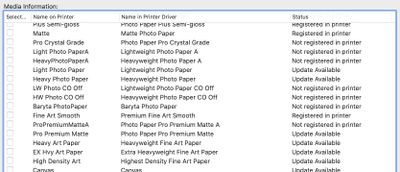
The Premium Fine Art Smooth profile shows as "registered in printer" in the media configuration tool, but when I physically look for the Premium Fine Art Smooth profile on the physical printer, it is not there.
However, the Premium Fine Art Smooth profile does show up in the driver in the printer settings when I want to print in Photoshop.
Will the driver overwrite the printer?
Does anyone know why I can't find the profile in the physical printer? Do I need to find it if it shows in the driver?
Thanks
Below is a screenshot showing the profile appears to be properly loaded in the printer.
.
Solved! Go to Solution.
32 REPLIES 32
Options
- Mark as New
- Bookmark
- Subscribe
- Mute
- Subscribe to RSS Feed
- Permalink
- Report Inappropriate Content
02-08-2020
06:21 AM
- last edited on
02-08-2020
08:24 AM
by
 Tiffany
Hi,
I can confirm that on my printer the LCD did changes and prompt asking the paper size/type when detects paper inserted on the manual feed tray.
I did a very short video but couldn't upload it… you can check it here:
<Removed per forum guidelines>
Hope it helps.
Options
- Mark as New
- Bookmark
- Subscribe
- Mute
- Subscribe to RSS Feed
- Permalink
- Report Inappropriate Content
02-08-2020 09:56 AM
Hy Jx,
Just in case we're talking about two different printers, I am using the Canon Pro-1000. Is that the same one you are using?
Options
- Mark as New
- Bookmark
- Subscribe
- Mute
- Subscribe to RSS Feed
- Permalink
- Report Inappropriate Content
02-08-2020 10:38 AM
Yes, same printer.

- « Previous
- Next »
- « Previous
- Next »

Announcements
05/13/2026: New firmware updates are available.
EOS R5 Mark II - Version 1.3.0
EOS R6 Mark II - Version 1.7.0
04/28/2026: Service Notice: Caution Concerning use of Lithium Batteries
03/17/2026: New firmware updates are available.
SELPHY CP1500 - Version 1.0.7.0
02/23/2026: New firmware update is available for EOS C50- Version 1.0.3.1
01/23/2026: New firmware update is available for RF 24-105mm F4 IS USM- Version 2.0.7
01/20/2026: New firmware updates are available.
12/22/2025: New firmware update is available for EOS R6 Mark III- Version 1.0.2
10/21/2025: Service Notice: To Users of the Compact Digital Camera PowerShot V1
10/15/2025: New firmware updates are available.
Speedlite EL-5 - Version 1.2.0
Speedlite EL-1 - Version 1.1.0
Speedlite Transmitter ST-E10 - Version 1.2.0
07/28/2025: Notice of Free Repair Service for the Mirrorless Camera EOS R50 (Black)
05/21/2025: New firmware update available for EOS C500 Mark II - Version 1.1.5.1
Related Content
- : TR4520 "printer not responding". Settings show "idle", WIFI connected. Unplugged, replugged. in Desktop Inkjet Printers
- TS3722 - Printer Offline, only showing as a scanner in Desktop Inkjet Printers
- imageCLASS D420 getting a E225 error on boot up in Office Printers
- PIXMA G620, not showing in Print dialog in Desktop Inkjet Printers
- L100 printer not making copies, error E225-0002 in Office Printers

Ⓒ 2026
Canon U.S.A Inc. All Rights Reserved. Reproduction in whole or part without permission is prohibited.
