Turn on suggestions
Auto-suggest helps you quickly narrow down your search results by suggesting possible matches as you type.
- Canon Community
- Discussions & Help
- Printer
- Printer Software & Networking
- Re: "An error occurred while printing." with Easy ...
Options
- Subscribe to RSS Feed
- Mark Topic as New
- Mark Topic as Read
- Float this Topic for Current User
- Bookmark
- Subscribe
- Mute
- Printer Friendly Page

Options
- Mark as New
- Bookmark
- Subscribe
- Mute
- Subscribe to RSS Feed
- Permalink
- Report Inappropriate Content
03-13-2021 11:22 AM
Hello,
Using the Canon PRO-300 with Easy PhotoPrint Editor. Printed several photos just fine, however now I receive an error message "An error occurred while printing." when attempting to print anything. No additional info given. The Canon printer seems to be receiving info because it begins to process the paper, but then it just spits out the paper blank.
I am able to print from GIMP program as a test which works with no problem, so the printer appears to be fine.
I've uninstalled Easy PhotoPrint Editor & reinstalled. I've deleted the Canon printer and reinstalled. I've rebooted my PC. Rebooted the printer.
This seemed to start after I re-registered my printer on Canon website because it was sending into to my Brother brand printer the 1st time which concerned me, I've uninstalled my Brother printer which didn't help. (When first installed, I had no problem using both printers.)
I also updated the firmware on the Canon printer immediately after receiving the error message, which reported as successful.
If anyone has any suggestions, I'd appreciate it.
Solved! Go to Solution.
26 REPLIES 26
Options
- Mark as New
- Bookmark
- Subscribe
- Mute
- Subscribe to RSS Feed
- Permalink
- Report Inappropriate Content
03-23-2021 05:01 PM
how did you get it fixed
Options
- Mark as New
- Bookmark
- Subscribe
- Mute
- Subscribe to RSS Feed
- Permalink
- Report Inappropriate Content
03-23-2021 05:51 PM
How do we get this fixed
Options
- Mark as New
- Bookmark
- Subscribe
- Mute
- Subscribe to RSS Feed
- Permalink
- Report Inappropriate Content
03-23-2021 05:57 PM
Follow the instructions in jarrodnolan post
Options
- Mark as New
- Bookmark
- Subscribe
- Mute
- Subscribe to RSS Feed
- Permalink
- Report Inappropriate Content
03-30-2021 12:44 AM
Thank you! I followed each and every step and now I am able to print photos.
And thanks for taking the time to provide photo examples.
Options
- Mark as New
- Bookmark
- Subscribe
- Mute
- Subscribe to RSS Feed
- Permalink
- Report Inappropriate Content
03-30-2021 02:13 PM
WOW - Thanks, don't often comment on reviews, but this one saved me!!!!! Thanks - how did u figure this one out I'm impressed!
Options
- Mark as New
- Bookmark
- Subscribe
- Mute
- Subscribe to RSS Feed
- Permalink
- Report Inappropriate Content
03-30-2021 05:00 PM
It didn't work with me and aye dont no how to get it fixed thibk aye need to phone canon to see if can help
Options
- Mark as New
- Bookmark
- Subscribe
- Mute
- Subscribe to RSS Feed
- Permalink
- Report Inappropriate Content
03-30-2021 05:08 PM
There is an update due from Microsoft that may fix it. Check updates and see if there are any that you can install.
Options
- Mark as New
- Bookmark
- Subscribe
- Mute
- Subscribe to RSS Feed
- Permalink
- Report Inappropriate Content
04-02-2021 11:35 PM
Awesome help - Thanks!
I can again print disk labels with my TS8220.
Do you know if there is a similar problem with Windows 10 version 20H2 recognizing blank DVD-R disks in CD/DVD burning drives?
Options
- Mark as New
- Bookmark
- Subscribe
- Mute
- Subscribe to RSS Feed
- Permalink
- Report Inappropriate Content
04-05-2021 04:36 PM
i'm so disheartened. the update did not fix the pblm. i've rebooted the laptop and printer.
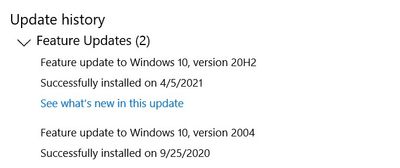
i'm still getting, "An error occured whil printing."
any more ideas?
thanks!
Options
- Mark as New
- Bookmark
- Subscribe
- Mute
- Subscribe to RSS Feed
- Permalink
- Report Inappropriate Content
04-05-2021 04:38 PM
Check to see if any windows updates are still left to do as a full update has since been released, other than that try to install update again.

Announcements
07/22/2026: New firmware updates are available.
EOS R6 Mark III - Version 1.1.0
05/13/2026: New firmware updates are available.
EOS R5 Mark II - Version 1.3.0
EOS R6 Mark II - Version 1.7.0
04/28/2026: Service Notice: Caution Concerning use of Lithium Batteries
03/17/2026: New firmware updates are available.
SELPHY CP1500 - Version 1.0.7.0
02/23/2026: New firmware update is available for EOS C50- Version 1.0.3.1
01/23/2026: New firmware update is available for RF 24-105mm F4 IS USM- Version 2.0.7
01/20/2026: New firmware updates are available.
10/21/2025: Service Notice: To Users of the Compact Digital Camera PowerShot V1
10/15/2025: New firmware updates are available.
Speedlite EL-5 - Version 1.2.0
Speedlite EL-1 - Version 1.1.0
Speedlite Transmitter ST-E10 - Version 1.2.0
07/28/2025: Notice of Free Repair Service for the Mirrorless Camera EOS R50 (Black)
05/21/2025: New firmware update available for EOS C500 Mark II - Version 1.1.5.1
Related Content
- Latest Photo Printer Software for TR8620 Printer, or 3rd party suggestions in Desktop Inkjet Printers
- Canon Easy-PhotoPrint Editor says "no printers available" in Printer Software & Networking
- Canon G3470 / G7000 – Intermittent Magenta Halo Around 100% K Black Text on Glossy Printable Vinyl in Desktop Inkjet Printers
- Canon MF663CDW error code: E196-0001 in Office Printers
- Easy PhotoPrint Editor: How to transfer my items to new computer in Printer Software & Networking

Ⓒ 2026
Canon U.S.A Inc. All Rights Reserved. Reproduction in whole or part without permission is prohibited.
