Turn on suggestions
Auto-suggest helps you quickly narrow down your search results by suggesting possible matches as you type.
- Canon Community
- Discussions & Help
- Printer
- Printer Software & Networking
- Re: Canon TR8620 printer connection issue.
Options
- Subscribe to RSS Feed
- Mark Topic as New
- Mark Topic as Read
- Float this Topic for Current User
- Bookmark
- Subscribe
- Mute
- Printer Friendly Page
Canon TR8620 printer connection issue.

Options
- Mark as New
- Bookmark
- Subscribe
- Mute
- Subscribe to RSS Feed
- Permalink
- Report Inappropriate Content
07-26-2022 07:54 PM
Hi,
Several months back I bought a Canon TR8620 printer w/ scanner, etc and just recently have had issues adding it to my computer's devices. When I first bought it it worked, but now after a removal of the device, I can't add it to my computer. I clicked on the "Wi-Fi Settings" on the printer's display screen and it has my router listed and it says connected, so that's good, but it's not listed in my computer's devices. I looked for a solution online and on one forum someone mentioned that the problem might be that the printer's IP Address keeps changing. I'm not terribly tech-savvy, so I didn't want to get into changing its IP address to a fixed one. Any ideas what could be wrong or suggestions?
Thanks,
E.K.
3 REPLIES 3


Options
- Mark as New
- Bookmark
- Subscribe
- Mute
- Subscribe to RSS Feed
- Permalink
- Report Inappropriate Content
07-27-2022 09:15 AM
Hi,
So we can best assist you, please let us know if you using a Windows or Mac computer?
We look forward to your reply.
Note: If you would like help in real time via chat or phone, I recommend reaching out to Canon support for this issue. You will need to register your Canon gear HERE to access additional support options.


Options
- Mark as New
- Bookmark
- Subscribe
- Mute
- Subscribe to RSS Feed
- Permalink
- Report Inappropriate Content
07-27-2022 09:49 AM
Hi @E.K.,
"so I didn't want to get into changing its IP address to a fixed one."
This might be exactly what you want to do.
This is done on your router. It only needs to be done once. Depending on brand or model it will be called Address Reservation, static IP, etc. This also gives you the ability to print from any device that joins or is connected to your network, since the destination doesn't change.
One easy way to confirm your printer is connected and communicating on your network is to open an internet browser and enter in its IP address. If the printers webserver displays, you know the device is communicating. You can also ping it from a command prompt or terminal (if MAC).
Don't be frightened with the tech part. If you provide more info about your devices, and network, we can try to help and point you in the right direction.
~Rick
Bay Area - CA
~R5 C (1.1.3.1), ~RF Trinity, ~RF 100 Macro, ~RF 100~400, ~RF 100~500, ~RF 200-800, ~RF 1.4x TC, BG-R10, 430EX III-RT ~DxO PhotoLab Elite ~DaVinci Resolve Studio ~ImageClass MF644Cdw MF656Cdw ~Pixel 10 ~CarePaks Are Worth It
Options
- Mark as New
- Bookmark
- Subscribe
- Mute
- Subscribe to RSS Feed
- Permalink
- Report Inappropriate Content
08-04-2022 05:53 PM
Hi again,
Thanks for the quick replies.
My system info is as follows:
Dell XPS 8940
Edition Windows 11 Home
Version 21H2
OS build 22000.795
Processor Intel(R) Core(TM) i3-10105 CPU @ 3.70GHz 3.70 GHz
System type 64-bit operating system, x64-based processor
I logged into my router and followed the steps to assign a static IP address. When I reached the page to enter the IP address, I used the numbers that were already in the boxes (see pic):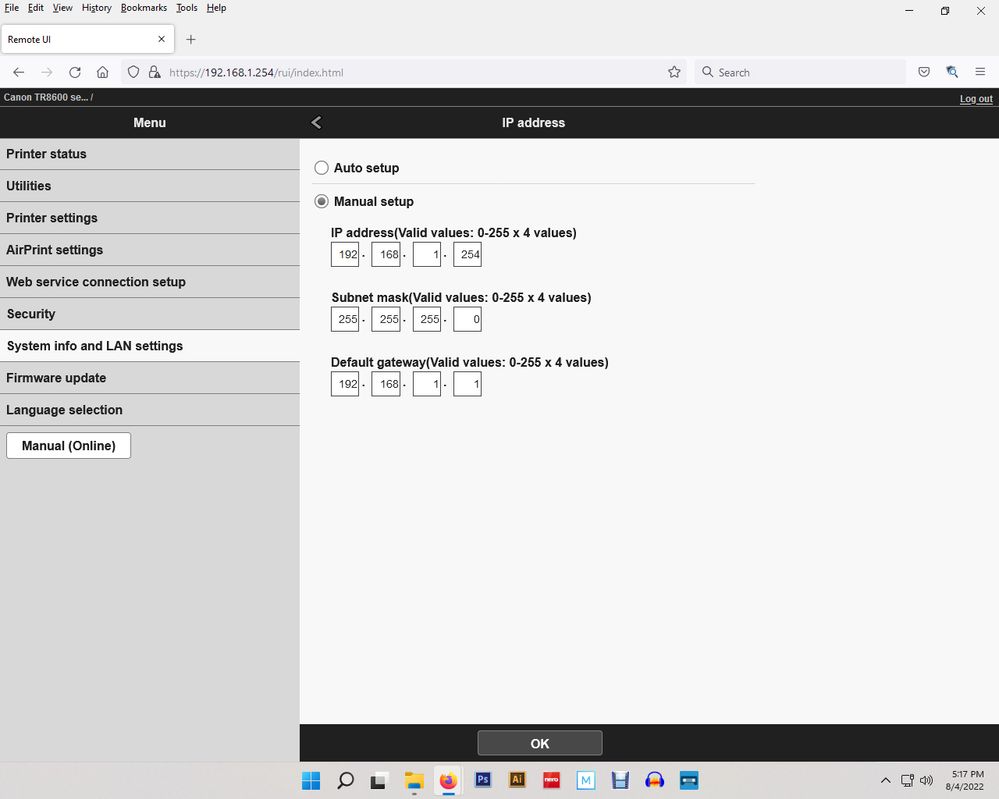
I tried printing a Photoshop document, but I got the following:
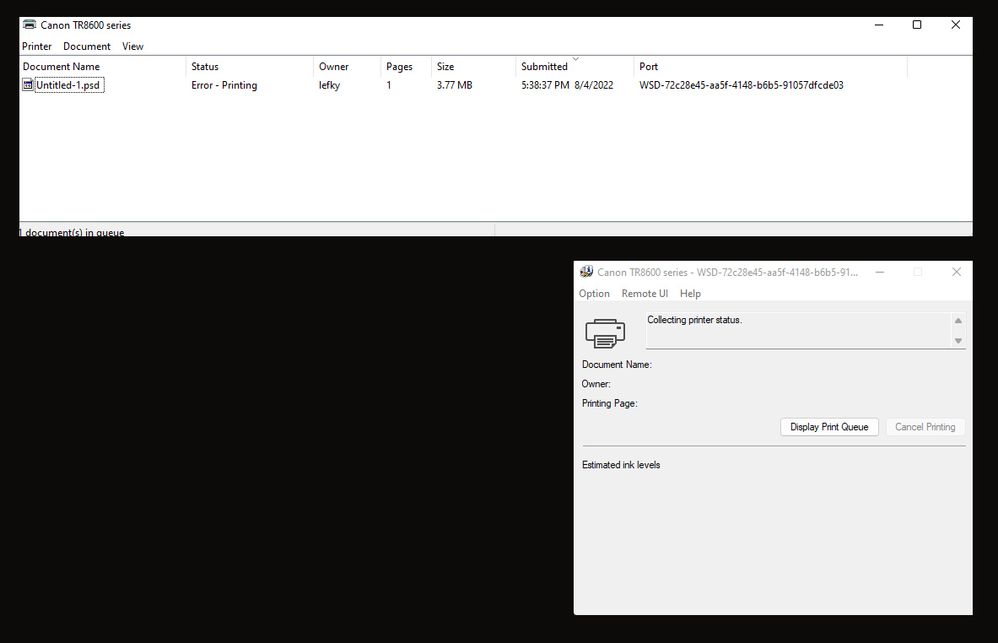
Not sure what to do next. When I checked the Printer's Wi-Fi settings, it was still connected to my router. I even restarted my printer just to refresh any changes.
Could you provide step-by-step instructions for assigning an IP address in case I missed something?


Announcements
07/22/2026: New firmware updates are available.
EOS R6 Mark III - Version 1.1.0
05/13/2026: New firmware updates are available.
EOS R5 Mark II - Version 1.3.0
EOS R6 Mark II - Version 1.7.0
04/28/2026: Service Notice: Caution Concerning use of Lithium Batteries
03/17/2026: New firmware updates are available.
SELPHY CP1500 - Version 1.0.7.0
02/23/2026: New firmware update is available for EOS C50- Version 1.0.3.1
01/23/2026: New firmware update is available for RF 24-105mm F4 IS USM- Version 2.0.7
01/20/2026: New firmware updates are available.
10/21/2025: Service Notice: To Users of the Compact Digital Camera PowerShot V1
10/15/2025: New firmware updates are available.
Speedlite EL-5 - Version 1.2.0
Speedlite EL-1 - Version 1.1.0
Speedlite Transmitter ST-E10 - Version 1.2.0
07/28/2025: Notice of Free Repair Service for the Mirrorless Camera EOS R50 (Black)
05/21/2025: New firmware update available for EOS C500 Mark II - Version 1.1.5.1
Related Content
- Selphy 1300 unable to connect to my iPhone and iPad in Mobile & Compact Printers
- Pixma MG 3620 Printer Connection Issues in Printer Software & Networking
- SELPHY CP1500 won't connect to phone or computer in Printer Software & Networking
- PIXMA G3670 Printer pausing and unable to delete queue in Desktop Inkjet Printers
- PIXMA TS6320 prints blank pages, but test pages and copies are fine in Desktop Inkjet Printers

Ⓒ 2026
Canon U.S.A Inc. All Rights Reserved. Reproduction in whole or part without permission is prohibited.
