Office Printers
cancel
Showing results for 
Show  only  | Search instead for 
Did you mean: 

Posts

ImageClass MF4880dw accepts only numeric wireless passwords

I tried to configure my ImageClass MF4880dw with an WPA/WPA2-PSK encyrption key that was alphanumeric.  The printer would not authenticate when all other devices could.  I then simplified the encryption key to be something simple like "aaaaaaaaaa" to...
benson by Apprentice
  • 4579 Views
  • 0 replies
  • 0 likes

Network scanner not found on Mac Mountain Lion - MF4370dn

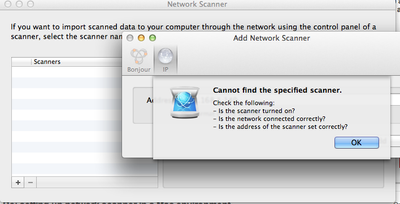
I have downloaded and installed the scan driver for my MF machine from canon USA, run MF toolbos and when I try to register my scanner under Network Scanner Settings..., clicking the +, and entering my IP address I get the following.  I can print to ...

Screen Shot 2013-07-15 at 3.28.57 PM.png

iMAGE CLASS 4350d

Anyone else have a problem with paper jam message not clearing even though  there is NO paper jam ... Called Customer Support who offered an address to service printer...seems that I should be able to get more than a few months use before requiring r...

Change document feed direction

Hi -I am printing from a 5035. I have a document (portrait 5.5 x 7.5) that is perforated in the middle. When I try to feed the document through the MF tray the perforation causes the document to jam. The document is fed through at the 5.5 edge. For t...

Rebe333 by Apprentice
  • 4491 Views
  • 0 replies
  • 0 likes

Re: Can't use Canon DR3060C

I would swear I saw a SCSI2 to USB adapter at Fry's.  What the heck, let me check online and get back to you. EDIT: TigerDirect and Newegg have them oniine.

fyigmo63 by Enthusiast
  • 4060 Views
  • 0 replies
  • 0 likes

Can't use Canon DR3060C

Have a Canon DR3060C I can't use because I no longer have an IDE slot for SCSI 2. I can't find a non ide SCSI2 Card.  I can't find any kind of adapter (USB, Firewire) to scsi2.  Do I have a $4000 paper weight?

Canon iPF 8000s imagePROGRAF

Hi! So I have a Canon iPF 8000s imagePROGRAF, and I want to get it back to its fully functional state. My problem is that whenver I turn it on I get an "!Multi-Sensor error" "Turn off printer, wait a while, then turn it on again". I do as the printer...

Getting started

New to the community? Here's some information to help you get acquainted:

Announcements
