Turn on suggestions
Auto-suggest helps you quickly narrow down your search results by suggesting possible matches as you type.
- Canon Community
- Discussions & Help
- Printer
- Office Printers
- Re: MF 628cw how to scan multiple pages to one PDF...
Options
- Subscribe to RSS Feed
- Mark Topic as New
- Mark Topic as Read
- Float this Topic for Current User
- Bookmark
- Subscribe
- Mute
- Printer Friendly Page
MF 628cw how to scan multiple pages to one PDF file

Options
- Mark as New
- Bookmark
- Subscribe
- Mute
- Subscribe to RSS Feed
- Permalink
- Report Inappropriate Content
04-24-2019 06:22 PM
Hello,
I install MF Scan Utility Ver.1.9.0.0 on my laptop. Everytime when I scan documents from MF 628cw, they show on my laptop as separate JPEG format. how to scan multiple pages to one PDF file? Every time I need to convert them. It is annoying.
Thank you!
Tab
2 REPLIES 2


Options
- Mark as New
- Bookmark
- Subscribe
- Mute
- Subscribe to RSS Feed
- Permalink
- Report Inappropriate Content
04-28-2019 11:49 AM
Start here:
Read the MF Scan Utility User Guide
See pag 16 - Scanning with customized settings
Then Pg 30-34 for settings customization options
~Rick
Bay Area - CA
~R5 C (1.1.2.1), ~R50v (1.1.1) ~RF Trinity, ~RF 100 Macro, ~RF 100~400, ~RF 100~500, ~RF 200-800 +RF 1.4x TC, BG-R10, 430EX III-RT ~DxO PhotoLab Elite ~DaVinci Resolve Studio ~ImageClass MF644Cdw/MF656Cdw ~Pixel 10 ~CarePaks Are Worth It
Options
- Mark as New
- Bookmark
- Subscribe
- Mute
- Subscribe to RSS Feed
- Permalink
- Report Inappropriate Content
04-29-2019 12:22 PM
Hi tabalt2011.
From the main MF Scan Utility window, select Settings: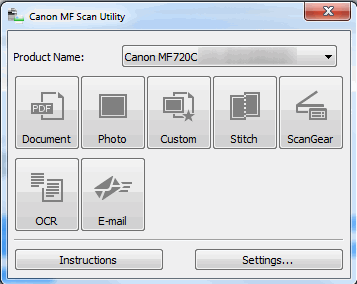
Next, select Document Scan in the left column, and then click the drop-down for Data Format: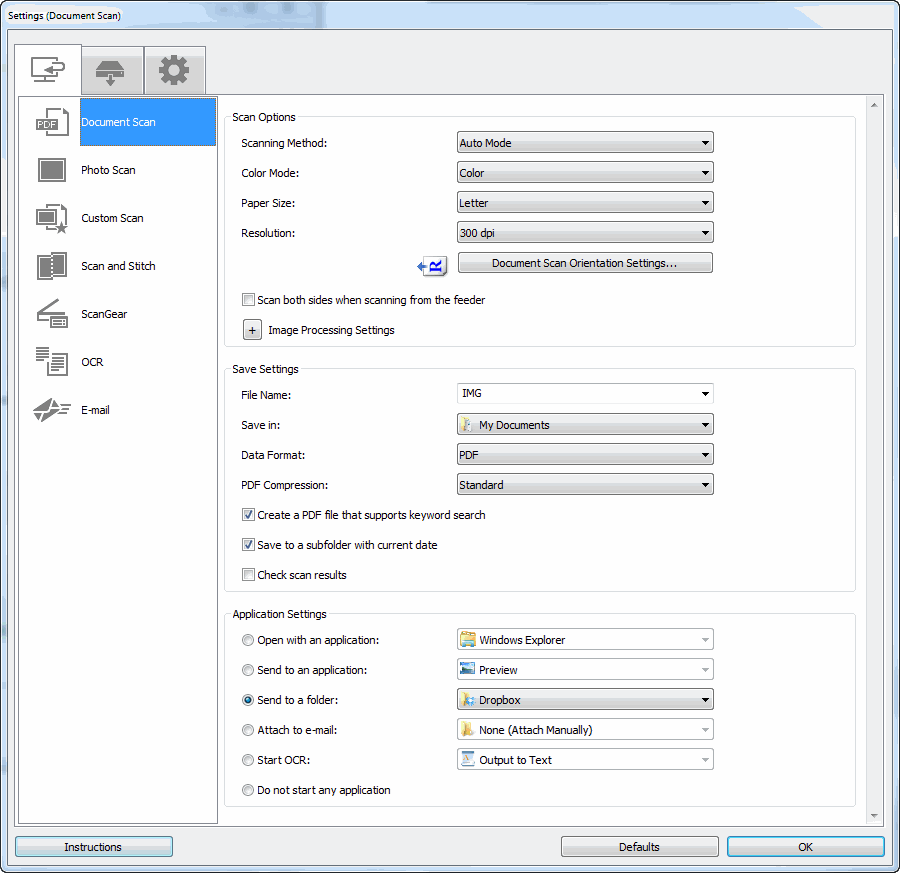
Verify that PDF is selected, and not PDF (Divide into Single Pages). Once you have confirmed that PDF is selected, click OK. Finally, click Document to scan the file.
If you are trying to set this option to scan from the Control Panel of the printer, please follow the steps at the link below:
Changing the Data Format Settings for the Operation Panel
If you continue to experience an issue, or require further assistance, please call us at 1-800-OK-CANON (652-2666), Monday - Friday 10:00 a.m. to 6:30 p.m. ET (excluding holidays).
Did this answer your question? Please click the Accept as Solution button so that others may find the answer as well.


Announcements
05/13/2026: New firmware updates are available.
EOS R5 Mark II - Version 1.3.0
EOS R6 Mark II - Version 1.7.0
04/28/2026: Service Notice: Caution Concerning use of Lithium Batteries
03/17/2026: New firmware updates are available.
SELPHY CP1500 - Version 1.0.7.0
02/23/2026: New firmware update is available for EOS C50- Version 1.0.3.1
01/23/2026: New firmware update is available for RF 24-105mm F4 IS USM- Version 2.0.7
01/20/2026: New firmware updates are available.
12/22/2025: New firmware update is available for EOS R6 Mark III- Version 1.0.2
10/21/2025: Service Notice: To Users of the Compact Digital Camera PowerShot V1
10/15/2025: New firmware updates are available.
Speedlite EL-5 - Version 1.2.0
Speedlite EL-1 - Version 1.1.0
Speedlite Transmitter ST-E10 - Version 1.2.0
07/28/2025: Notice of Free Repair Service for the Mirrorless Camera EOS R50 (Black)
05/21/2025: New firmware update available for EOS C500 Mark II - Version 1.1.5.1
Related Content
- PIXMA MX490 can't scan multiple pages in Desktop Inkjet Printers
- ImageClass MF753Cdw II – Error 853 on PCL6 & PS3 Test Pages After Firmware Reinstall (UFR II OK) in Office Printers
- PIXMA GX7021 Won't Scan Multiple Pages - Jams in Office Printers
- PIXMA TS6420a: Tray selection error, photos coming out darker than the originals in Desktop Inkjet Printers
- Unable to Scan from windows with imageCLASS MF462dw II in Printer Software & Networking

Ⓒ 2026
Canon U.S.A Inc. All Rights Reserved. Reproduction in whole or part without permission is prohibited.
