Turn on suggestions
Auto-suggest helps you quickly narrow down your search results by suggesting possible matches as you type.
- Canon Community
- Discussions & Help
- Camera
- EOS DSLR & Mirrorless Cameras
- Re: iMac doesn't recognize 6D via USB connection
Options
- Subscribe to RSS Feed
- Mark Topic as New
- Mark Topic as Read
- Float this Topic for Current User
- Bookmark
- Subscribe
- Mute
- Printer Friendly Page
iMac doesn't recognize 6D via USB connection

Options
- Mark as New
- Bookmark
- Subscribe
- Mute
- Subscribe to RSS Feed
- Permalink
- Report Inappropriate Content
09-13-2015 02:26 PM
Hello!
I am trying to connect my 6D to the Reikan FoCal software (calibration software) and i am required to connect my camera to the computer via USB. I am getting a message saying that no camera has been detected. I notice that the camera is not showing in my finder as being connected either, so i am assuming there is a problem with my camera being unabl eto communicate with my imac.
I have installed the lastest versio of EOS utility...i instealled the one available on the drivers section of the website.
I am runing Yosemiti 10.10.5
Any ideas on how to get the camera to be recognized via USB?
thank you so much in advanced!! I can't get a response from teh Reikan FoCal people...and i've been having this problem since i bought the license in 2013.
10 REPLIES 10


Options
- Mark as New
- Bookmark
- Subscribe
- Mute
- Subscribe to RSS Feed
- Permalink
- Report Inappropriate Content
09-13-2015 03:21 PM
Disable WiFi and the USB will work. The camera can have either it's USB connection or it's WiFi connection enabled -- but not both at the same time.
Tim Campbell
5D III, 5D IV, 60Da
5D III, 5D IV, 60Da
Options
- Mark as New
- Bookmark
- Subscribe
- Mute
- Subscribe to RSS Feed
- Permalink
- Report Inappropriate Content
09-13-2015 04:16 PM
Wifi is disabled...stilk wont work.
Options
- Mark as New
- Bookmark
- Subscribe
- Mute
- Subscribe to RSS Feed
- Permalink
- Report Inappropriate Content
09-13-2015 04:19 PM
Next up... the USB cable.
With so many cellphones (and other devices) that use a USB cable only to "charge" the battery, there are now "USB cables" on the market that are really just charging cables (the power pins are connected but there are no "data" pins).
What USB cable are you using? Do you have your factory-original Canon cable or a cable which is knownt to have working data pins?
Tim Campbell
5D III, 5D IV, 60Da
5D III, 5D IV, 60Da
Options
- Mark as New
- Bookmark
- Subscribe
- Mute
- Subscribe to RSS Feed
- Permalink
- Report Inappropriate Content
09-13-2015 04:38 PM
Yes, i have two original canon usb cables. One for my t3i and another for the 6D. I have tried them both and nothing works.
Shouldn't be this hard.
Shouldn't be this hard.
Options
- Mark as New
- Bookmark
- Subscribe
- Mute
- Subscribe to RSS Feed
- Permalink
- Report Inappropriate Content
09-13-2015 04:47 PM
Make sure the camera is powered up. Connect it DIRECTLY to the Mac (if you own a USB hub, do not use the hub -- disconnect it and attach the camera directly.)
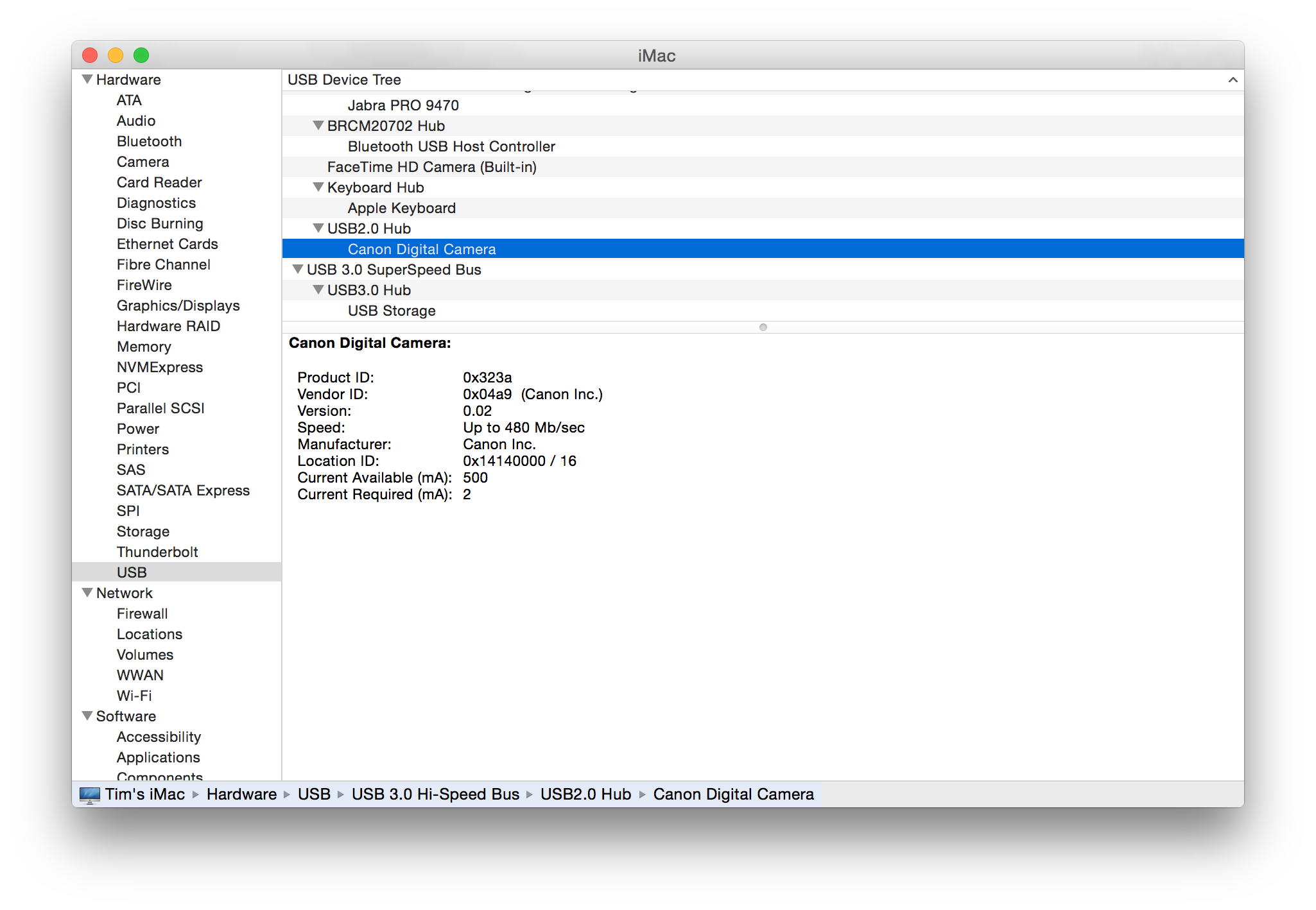
On the Mac, navigate to the upper-left corner and click the black apple on the menubar () and pick "About this Mac".
In the window that opens, click "System Report..." This opens the "System Information" utility.
In the "System Information" window, pick the "USB" category in the left margin (under the "Hardware" section and probably the last option listed in that section since it's alphabetical).
In the "USB Device Tree" on the right, do you see your camera listed? It will likely be named "Canon Digital Camera".
For example, here is mine:
Tim Campbell
5D III, 5D IV, 60Da
5D III, 5D IV, 60Da
Options
- Mark as New
- Bookmark
- Subscribe
- Mute
- Subscribe to RSS Feed
- Permalink
- Report Inappropriate Content
09-13-2015 04:52 PM
Thank you, T Campbell. I will check when I get home.
My set up was, usb connected to camera and also directly connected to usb ports o the back of my iMac. I turned on the camera, which was fully charged. Still nothing. Butni will see what happens when i go to the system report.
My set up was, usb connected to camera and also directly connected to usb ports o the back of my iMac. I turned on the camera, which was fully charged. Still nothing. Butni will see what happens when i go to the system report.
Options
- Mark as New
- Bookmark
- Subscribe
- Mute
- Subscribe to RSS Feed
- Permalink
- Report Inappropriate Content
09-13-2015 07:48 PM
And of course I tell you not to use a USB hub, but if you check my list you'll see my camera is connected via a USB hub.
But honestly, I've gone through about 3 unreliable hubs before I finally found a reliable product (which that vendor no longer makes). Consequently, I'm always suspicious that the hub may be the issue when there are connectivity problems.
Tim Campbell
5D III, 5D IV, 60Da
5D III, 5D IV, 60Da
Options
- Mark as New
- Bookmark
- Subscribe
- Mute
- Subscribe to RSS Feed
- Permalink
- Report Inappropriate Content
09-13-2015 09:00 PM
Yeah, but i don't have a hub....i mean, i have them in my home but they are not reliable, so theybare stored in a box in my closet. I am connecting the USB cable directly to the back of the imac...
Haven't gotten home yet. Went to the beach 🙂 i'll be home soon and try again!
Haven't gotten home yet. Went to the beach 🙂 i'll be home soon and try again!
Options
- Mark as New
- Bookmark
- Subscribe
- Mute
- Subscribe to RSS Feed
- Permalink
- Report Inappropriate Content
01-13-2018 04:46 PM
Thankyou!!! worked

Announcements
07/22/2026: New firmware updates are available.
EOS R6 Mark III - Version 1.1.0
05/13/2026: New firmware updates are available.
EOS R5 Mark II - Version 1.3.0
EOS R6 Mark II - Version 1.7.0
04/28/2026: Service Notice: Caution Concerning use of Lithium Batteries
03/17/2026: New firmware updates are available.
SELPHY CP1500 - Version 1.0.7.0
02/23/2026: New firmware update is available for EOS C50- Version 1.0.3.1
01/23/2026: New firmware update is available for RF 24-105mm F4 IS USM- Version 2.0.7
01/20/2026: New firmware updates are available.
10/21/2025: Service Notice: To Users of the Compact Digital Camera PowerShot V1
10/15/2025: New firmware updates are available.
Speedlite EL-5 - Version 1.2.0
Speedlite EL-1 - Version 1.1.0
Speedlite Transmitter ST-E10 - Version 1.2.0
07/28/2025: Notice of Free Repair Service for the Mirrorless Camera EOS R50 (Black)
05/21/2025: New firmware update available for EOS C500 Mark II - Version 1.1.5.1
Related Content
- EOS R50 will not connect to anything. Not phone, not computer, usb/bluetooth/wifi, ANYTHING. in EOS DSLR & Mirrorless Cameras
- EOS R5 Mk2 connecting to eos utility on win11, registered camera, utility says camera not recognized in Camera Software
- Rebel T6 Computer does not recognize the card reader in Camera Software
- HELP!!! EOS Utility not reading my Canon R6 Mii connection in Camera Software
- Registration doesn't recognize RF lens in EF & RF Lenses

Ⓒ 2026
Canon U.S.A Inc. All Rights Reserved. Reproduction in whole or part without permission is prohibited.
