Turn on suggestions
Auto-suggest helps you quickly narrow down your search results by suggesting possible matches as you type.
- Canon Community
- Discussions & Help
- Camera
- EOS DSLR & Mirrorless Cameras
- Re: EOS R5 How to Configure Dual Memory Slots
Options
- Subscribe to RSS Feed
- Mark Topic as New
- Mark Topic as Read
- Float this Topic for Current User
- Bookmark
- Subscribe
- Mute
- Printer Friendly Page

Options
- Mark as New
- Bookmark
- Subscribe
- Mute
- Subscribe to RSS Feed
- Permalink
- Report Inappropriate Content
08-03-2020 04:53 PM
I've just received my Canon R5 and cannot figure out how to configure the CFexpress card to store Raw and the SD card for JPG's? It keeps storing them together and I can't understand the printed manual or the expanded PDF manual?
I have a 128Gb CFexpress B card and a 64Gb SD card. I would like the RAWs on the CFexpress card and the JPG's on the SD card. A step by step would be nice!
Solved! Go to Solution.
14 REPLIES 14


Options
- Mark as New
- Bookmark
- Subscribe
- Mute
- Subscribe to RSS Feed
- Permalink
- Report Inappropriate Content
08-20-2021 05:38 PM
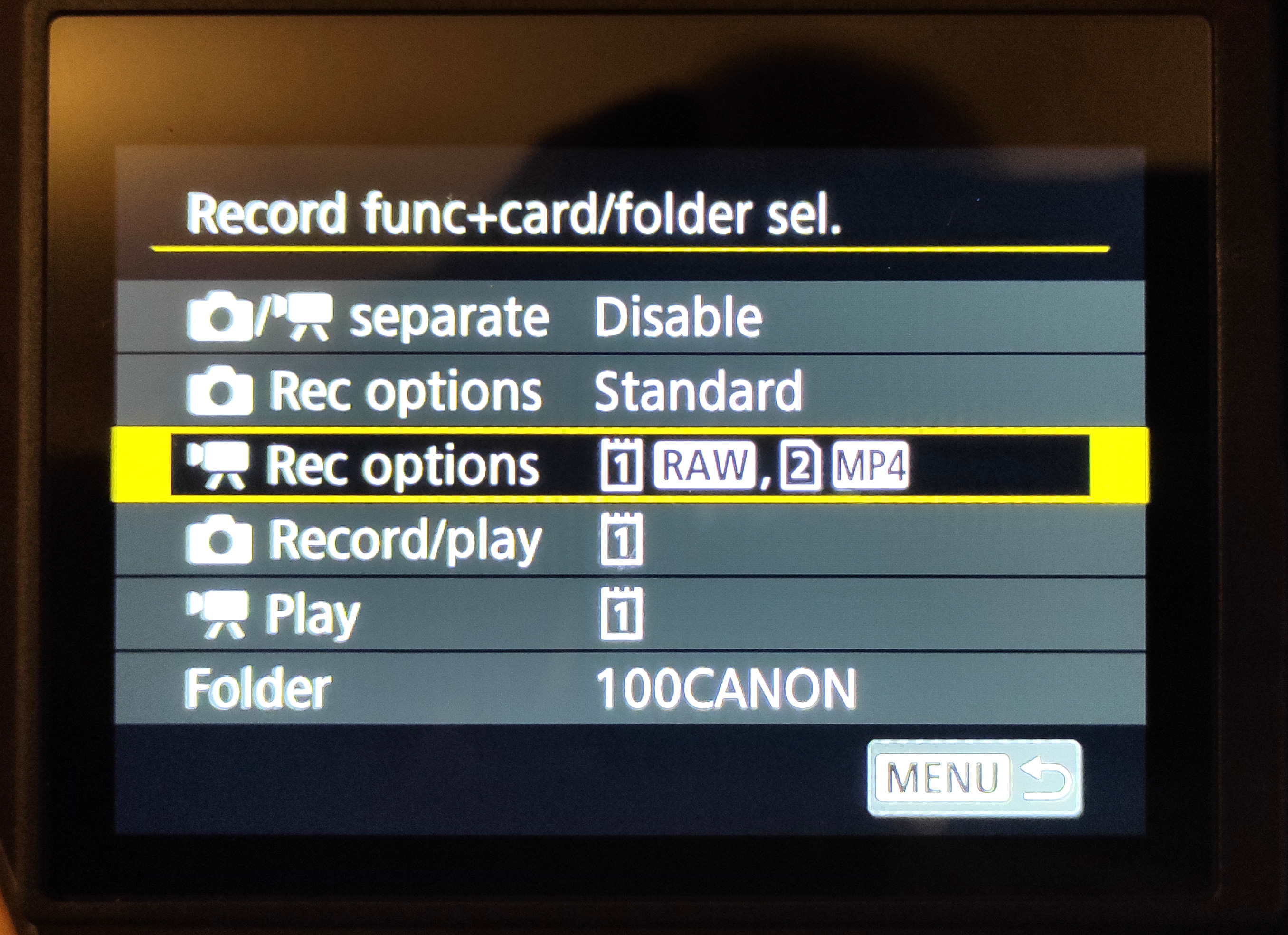
You need to make sure that "pics/movies separate" is set to DISABLE. This setting puts all your movies on card 1, which is not what you want. With that, you should be able to set "Rec Options" to split te raw and MP4 movies. This is with firmware 1.4. See manual version 1.4, pages 735 and 738.
Options
- Mark as New
- Bookmark
- Subscribe
- Mute
- Subscribe to RSS Feed
- Permalink
- Report Inappropriate Content
08-20-2021 06:11 PM
Thanks for the reply but the record options are still grayed out on my screen even after trying the settings you were kind enough to send. There must be anotyher setting somewhere that is causing this to happen. Checked out the pages you suggested in the updated manual but still grayed out. Something else must be set wrong somewhere in the system.
Options
- Mark as New
- Bookmark
- Subscribe
- Mute
- Subscribe to RSS Feed
- Permalink
- Report Inappropriate Content
08-21-2021 03:24 AM
Sorry to hear that it's still not working, but I'm stumped. I can't make this happen, even with no card, or an unsupported card, in slot 2 -- AS LONG AS "pics/movies separate" is set to DISABLE. I think you're right that some other setting is messing this up, but I don't know what it could be.
Options
- Mark as New
- Bookmark
- Subscribe
- Mute
- Subscribe to RSS Feed
- Permalink
- Report Inappropriate Content
08-21-2021 10:31 AM
Thanks for trying. I will try resettng the camera back to original default settings and see if that makes any difference. So far it has not.
Options
- Mark as New
- Bookmark
- Subscribe
- Mute
- Subscribe to RSS Feed
- Permalink
- Report Inappropriate Content
08-21-2021 12:33 PM
The reset did the trick. Now we are seeing both cards and saving pictures and video is different settings to each. FYI Had to set that setting first in the yellow menu and then go back to the image quality and set separate Raw to card 1 and JPEG to card 2.

- « Previous
-
- 1
- 2
- Next »
- « Previous
-
- 1
- 2
- Next »

Announcements
07/22/2026: New firmware updates are available.
EOS R6 Mark III - Version 1.1.0
05/13/2026: New firmware updates are available.
EOS R5 Mark II - Version 1.3.0
EOS R6 Mark II - Version 1.7.0
04/28/2026: Service Notice: Caution Concerning use of Lithium Batteries
03/17/2026: New firmware updates are available.
SELPHY CP1500 - Version 1.0.7.0
02/23/2026: New firmware update is available for EOS C50- Version 1.0.3.1
01/23/2026: New firmware update is available for RF 24-105mm F4 IS USM- Version 2.0.7
01/20/2026: New firmware updates are available.
10/21/2025: Service Notice: To Users of the Compact Digital Camera PowerShot V1
10/15/2025: New firmware updates are available.
Speedlite EL-5 - Version 1.2.0
Speedlite EL-1 - Version 1.1.0
Speedlite Transmitter ST-E10 - Version 1.2.0
07/28/2025: Notice of Free Repair Service for the Mirrorless Camera EOS R50 (Black)
05/21/2025: New firmware update available for EOS C500 Mark II - Version 1.1.5.1
Related Content
- EOS M10 "Memory Card Error" & Corrupted Files – Found a Bent Pin in the SD Slot. in EOS DSLR & Mirrorless Cameras
- EOS R5 Mark II firmware 1.30 notes in Camera Software
- R6 Mk ll: Erasing images from both cards in EOS DSLR & Mirrorless Cameras
- EOS 90D thoughts on battery grip and memory card slot in EOS DSLR & Mirrorless Cameras
- R5 Custom modes, save to different memory slots? in EOS DSLR & Mirrorless Cameras

Ⓒ 2026
Canon U.S.A Inc. All Rights Reserved. Reproduction in whole or part without permission is prohibited.
