Turn on suggestions
Auto-suggest helps you quickly narrow down your search results by suggesting possible matches as you type.
- Canon Community
- Discussions & Help
- Camera
- EOS DSLR & Mirrorless Cameras
- Canon EOS R8 WiFi connection with Android issue
Options
- Subscribe to RSS Feed
- Mark Topic as New
- Mark Topic as Read
- Float this Topic for Current User
- Bookmark
- Subscribe
- Mute
- Printer Friendly Page
Canon EOS R8 WiFi connection with Android issue

Options
- Mark as New
- Bookmark
- Subscribe
- Mute
- Subscribe to RSS Feed
- Permalink
- Report Inappropriate Content
01-14-2024 08:14 AM
Hello,
I have seen another contribution regarding this but it doesn't answer the real query.
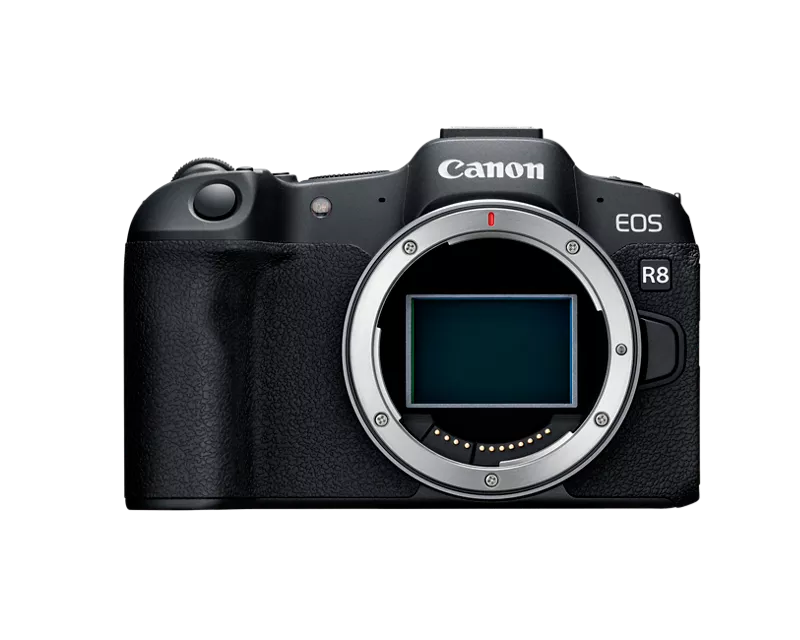
Issue: after following all the steps to connect android phone to EOS R8 (eos R8) the Bluetooth connection is established but WiFi isnt. Upon trying to connect to the access point of the camera on the phone it says password incorrect.
Have tried all the possible ways (including spending time with a photographer as well as the shop where I bought it).
Have used 6 phones in total for this purpose (2 Google pixels, 2 Samsungs, 1 one plus and another Chinese company). Did all the resets possible.
Have two other camera (d and m series) .. both connect to the three phones I have at home. The first try within secs.
Side note: Have managed to connect the phone and camera over a shared WiFi but that doesn't help as many times I need to use my camera as a remote outdoors where theres no shared WiFi. Also to transfer pics from camera to phone so I can do basic posting on Instagram or edits.
All this affects my work flow. Pls let me know if I should return the camera? Eos R8 seemed too good to be true anyway.. 😞
I don't think I can afford a more expensive camera. Though this could be my switch to a full frame.
Thanks.
16 REPLIES 16


Options
- Mark as New
- Bookmark
- Subscribe
- Mute
- Subscribe to RSS Feed
- Permalink
- Report Inappropriate Content
01-30-2024 09:39 PM
While I have not been able to reproduce the issue with my cameras or Android devices, there has to be something in common that is not obviously apparent. I don't have my 6D2 or Pixel 6 any longer. I am only using my R5 C and Pixel8 today. Still, Wi-Fi connection to the phone works 100% of the time with the Canon Connect App. I'd take Stephen's advice and contact support.
~Rick
Bay Area - CA
~R5 C (1.1.3.1), ~RF Trinity, ~RF 100 Macro, ~RF 100~400, ~RF 100~500, ~RF 200-800, ~RF 1.4x TC, BG-R10, 430EX III-RT ~DxO PhotoLab Elite ~DaVinci Resolve Studio ~ImageClass MF644Cdw MF656Cdw ~Pixel 10 ~CarePaks Are Worth It

Options
- Mark as New
- Bookmark
- Subscribe
- Mute
- Subscribe to RSS Feed
- Permalink
- Report Inappropriate Content
01-31-2024 12:32 AM
Benchley,
I just looked at the FAQs for the Camera Connect and Control app and the R8 is listed as one of the cameras that is supported.
I, myself, am using it on a T8i. When I bought it, it was $9.00. I think the price has gone up now to $22.00.
Steve Thomas
Options
- Mark as New
- Bookmark
- Subscribe
- Mute
- Subscribe to RSS Feed
- Permalink
- Report Inappropriate Content
02-03-2024 10:45 AM
Started having the same problem. Probably, after Android update on Google Pixel 7.
Looks like it is not resolved yet? Do not wish to pay for a side app for something that should be included.
Options
- Mark as New
- Bookmark
- Subscribe
- Mute
- Subscribe to RSS Feed
- Permalink
- Report Inappropriate Content
02-04-2024 03:30 PM
Try contacting our phone support so they can walk you through the process. They're at 1-800-OK-CANON (800-652-2666), Monday through Saturday.
Options
- Mark as New
- Bookmark
- Subscribe
- Mute
- Subscribe to RSS Feed
- Permalink
- Report Inappropriate Content
02-06-2024 07:32 PM
I posted this in another thread, but it worked for me. Have to make the camera the access point with no encryption, I stumbled across it in another thread somewhere.
I was having this issue on my R8, wouldn't connect to Pixel 6 on Android 14. I remember there was a security update for android a ways back that broke a lot of bluetooth connectivity with some devices, basically the OS locked out certain bluetooth functions that would have allowed it to joint the network but don't quote me on it.
Anyways, got it to work by going to the Wifi Connections menu page (purple), and then Advanced Connection > Connect to smartphone > Add a device to connect to > next > Camera access point mode > Manual Connection.
You have to manually connect to the Camera's SSID from the phone, don't use bluetooth at all for any of this or it won't work.
I created a custom SSID on the camera and set it to no encryption. On the phone I joined that network I just created and then opened Camera Connect and it worked.
This happened before once with my G7XII but Google eventually pushed out a patch that fixed that issue, looks like it's happening all over again. It's the camera firmware prioritizing bluetooth connection, presumably in the hope of simplifying the user experience, however the function calls are interpreted as a security threat by Google so it's locked out in the OS.
Connecting to the camera again after that is a matter of going into the advanced connection menu again and selecting your device that's now listed there and then joining the network with the camera's SSID and then opening Camera Connect on the phone.
Options
- Mark as New
- Bookmark
- Subscribe
- Mute
- Subscribe to RSS Feed
- Permalink
- Report Inappropriate Content
02-06-2024 08:14 PM
Perfect! Thank you - this works great. I assumed there couldn't have been something wrong with WiFi and the camera as this is a similar method used to connect to the third party app mentioned above. I guess the Bluetooth connection that then moves into WiFi is the unstable part of this process. Connecting manually like this has sorted it. Just gotta remember to join the Camera's network and then we're good.
Thanks so much, fixed now!
Options
- Mark as New
- Bookmark
- Subscribe
- Mute
- Subscribe to RSS Feed
- Permalink
- Report Inappropriate Content
05-24-2025 01:55 PM
So, it's May 2025 and I have the same issue on my R8.
I have a Pixel 9 Pro on Android 15, Camera Connect app v3.4.0.4.8 and an R8 on v1.4.0
The WiFi connectivity issue still exists. I can and do connect via Bluetooth and GPS tagging works fine but I cannot connect to WiFi so none of the related features work.
I just tried to connect my daughter's iPhone 15 and it worked first time. So as already established in this thread, it's an Android issue.
I'd really like a Canon representative to address what they're doing about this issue.
Thanks

- « Previous
-
- 1
- 2
- Next »
- « Previous
-
- 1
- 2
- Next »

Announcements
07/22/2026: New firmware updates are available.
EOS R6 Mark III - Version 1.1.0
05/13/2026: New firmware updates are available.
EOS R5 Mark II - Version 1.3.0
EOS R6 Mark II - Version 1.7.0
04/28/2026: Service Notice: Caution Concerning use of Lithium Batteries
03/17/2026: New firmware updates are available.
SELPHY CP1500 - Version 1.0.7.0
02/23/2026: New firmware update is available for EOS C50- Version 1.0.3.1
01/23/2026: New firmware update is available for RF 24-105mm F4 IS USM- Version 2.0.7
01/20/2026: New firmware updates are available.
10/21/2025: Service Notice: To Users of the Compact Digital Camera PowerShot V1
10/15/2025: New firmware updates are available.
Speedlite EL-5 - Version 1.2.0
Speedlite EL-1 - Version 1.1.0
Speedlite Transmitter ST-E10 - Version 1.2.0
07/28/2025: Notice of Free Repair Service for the Mirrorless Camera EOS R50 (Black)
05/21/2025: New firmware update available for EOS C500 Mark II - Version 1.1.5.1
Related Content
- Vertical banding on LCD when articulating screen — Canon R6 Mark II in EOS DSLR & Mirrorless Cameras
- R6 Mark II WiFi Connectivity Issues when pushing to SFTP in EOS DSLR & Mirrorless Cameras
- R7 Problem connecting to iOS via Camera Connect, but Android Works in Camera Software
- New Features Added For The C80 & C400 And Updates For The C50, C70 & R5C in Camera Software
- EOS M10 "Memory Card Error" & Corrupted Files – Found a Bent Pin in the SD Slot. in EOS DSLR & Mirrorless Cameras

Ⓒ 2026
Canon U.S.A Inc. All Rights Reserved. Reproduction in whole or part without permission is prohibited.
