03-21-2020 12:44 AM
Hi,
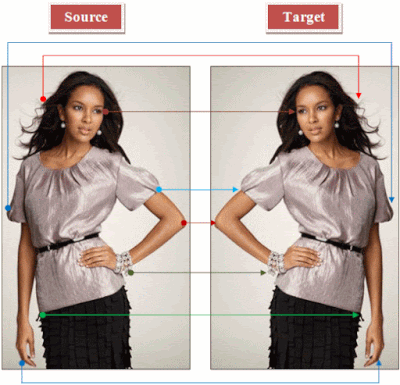
I have Canon EOS 200D Camera. It's working fine but whenever I click the image or shoot a video, the object is coming the opposite, like below
How to fix this? Please Help Me!
Thank You
Best Regards
Saurabh Rawat
03-21-2020 10:34 AM - edited 03-21-2020 10:40 AM
Cannot understand how the camera can be doing this, does the image appear reversed on the LCD before and after taking the picture ?
Have a look at this thread:
https://community.usa.canon.com/t5/EOS/EOS-60D-image-review-is-reversed/td-p/55999
03-21-2020 01:38 PM
Assuming this is LCD only, the LCD must think it is twisted forward in "selfie mode" All you can do is try to pull it out and twist it various ways to get it back into the correct mode.
07/22/2026: New firmware updates are available.
EOS R6 Mark III - Version 1.1.0
EOS R6 V - Version 1.1.0
05/13/2026: New firmware updates are available.
EOS R3 - Version 2.1.0
EOS R1 - Version 1.3.0
EOS R5 Mark II - Version 1.3.0
EOS R6 Mark II - Version 1.7.0
EOS R8 - Version 1.6.0
EOS R10 - Version 1.8.0
EOS R100 - Version 1.3.0
EOS R50V - Version 1.2.0
PowerShot V1 - Version 1.2.0
03/17/2026: New firmware updates are available.
EOS R7 - Version 1.8.0
EOS R50 - Version 1.5.0
SELPHY CP1500 - Version 1.0.7.0
PowerShot V10 - Version 1.5.0
01/20/2026: New firmware updates are available.
EOS C70 - Version 1.1.3.1
EOS C80 - Version 1.0.5.1
EOS C400 - Version 1.0.8.1
XF605 - Version 1.0.8.1
10/15/2025: New firmware updates are available.
Speedlite EL-5 - Version 1.2.0
Speedlite EL-1 - Version 1.1.0
Speedlite Transmitter ST-E10 - Version 1.2.0