Turn on suggestions
Auto-suggest helps you quickly narrow down your search results by suggesting possible matches as you type.
- Canon Community
- Discussions & Help
- Camera
- EOS DSLR & Mirrorless Cameras
- Black Lines in Canon 5D Mk IV photos, video + live...
Options
- Subscribe to RSS Feed
- Mark Topic as New
- Mark Topic as Read
- Float this Topic for Current User
- Bookmark
- Subscribe
- Mute
- Printer Friendly Page
Black Lines in Canon 5D Mk IV photos, video + live view

Options
- Mark as New
- Bookmark
- Subscribe
- Mute
- Subscribe to RSS Feed
- Permalink
- Report Inappropriate Content
12-01-2022 02:11 PM - edited 12-01-2022 02:22 PM
Hey community,
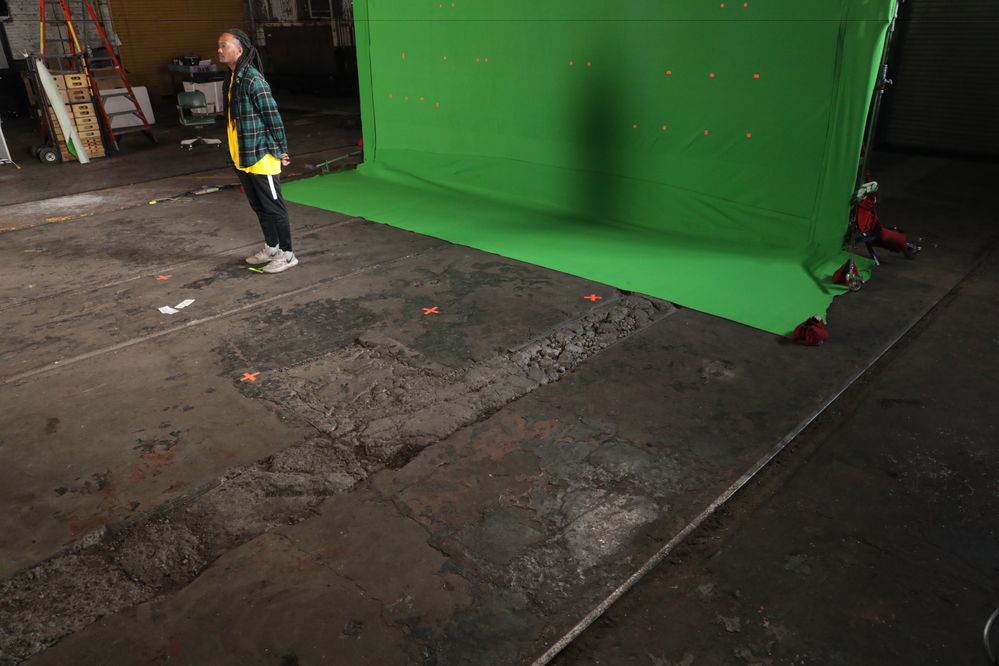
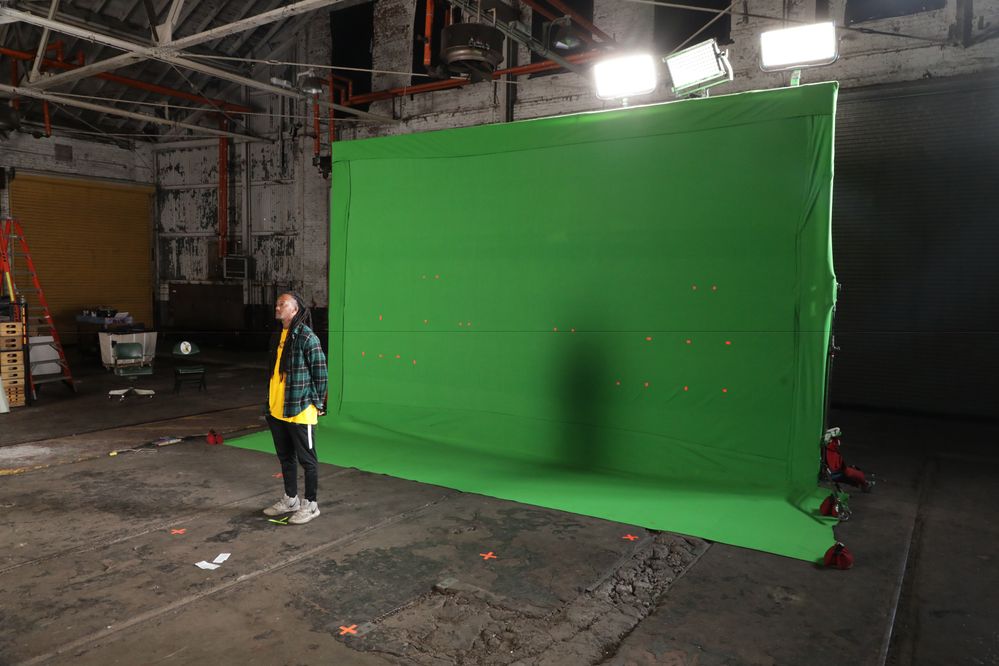
I've been experiencing an issue with one of my company cameras, Canon Mk IV, where thin horizontal black lines show up in images from time to time. Very randomly, can shoot 10 - 50 photos without and issue, and then there it will be again. It is seen in Live View every 1 - 3 seconds, and video every 1-3 seconds (so the defect / artifact) is seen in Live View is translating onto the captured video itself. Anyone know what this could be from? It's not like shutter speed + flash sync speed or banding. Just these THIN, black, horizontal lines at random.
I've attached two examples, one black line is at the top height of the photo, one is in the middle of the photo
9 REPLIES 9


Options
- Mark as New
- Bookmark
- Subscribe
- Mute
- Subscribe to RSS Feed
- Permalink
- Report Inappropriate Content
12-01-2022 02:21 PM
Hi, SasquatchLives!
So that the Community can help you better, we need to know exactly which Canon camera model you're using as we've made more than one camera with the "Mark IV" designation. That, and any other details you'd like to give will help the Community better understand your issue!
If this is a time-sensitive matter, click HERE search our knowledge base or find additional support options HERE.
Thanks and have a great day!
Options
- Mark as New
- Bookmark
- Subscribe
- Mute
- Subscribe to RSS Feed
- Permalink
- Report Inappropriate Content
12-01-2022 02:23 PM
Thanks Danny, updated the post to show "5D"

Options
- Mark as New
- Bookmark
- Subscribe
- Mute
- Subscribe to RSS Feed
- Permalink
- Report Inappropriate Content
12-02-2022 07:33 PM
Hello SasquatchLives,
It's really hard to determine exactly what is happening here. I lean toward a possible sensor issue, but the line isn't always in the same place. It doesn't appear to be a banding issue caused by lighting because it's a single line. You may want to try a few tests outdoors under strong daylight to see if it's present there. In any case, you may want to have the camera evaluated at our factory service center. I would include examples such as these images with the camera if you decide to send it in.


Options
- Mark as New
- Bookmark
- Subscribe
- Mute
- Subscribe to RSS Feed
- Permalink
- Report Inappropriate Content
12-02-2022 07:47 PM
Off the wall thought, but is there any significant electromagnetic equipment in the facility?
John Hoffman
Conway, NH
R6 Mark III, M200 (converted to infrared), RF lenses, Pixma PRO-100, Pixma TR8620a, Lr Classic
Conway, NH
R6 Mark III, M200 (converted to infrared), RF lenses, Pixma PRO-100, Pixma TR8620a, Lr Classic

Options
- Mark as New
- Bookmark
- Subscribe
- Mute
- Subscribe to RSS Feed
- Permalink
- Report Inappropriate Content
12-03-2022 12:03 PM
" I lean toward a possible sensor issue, ..."
I agree. It is possibly a dead pixel row or rows. As the sensor heats up it may trigger the dead row(s).
EB
EOS 1DX and many lenses.
EOS 1DX and many lenses.
Options
- Mark as New
- Bookmark
- Subscribe
- Mute
- Subscribe to RSS Feed
- Permalink
- Report Inappropriate Content
12-03-2022 12:05 PM
Hey! It's been happening in multiple different locations and scenarios, so I don't think that's a contributing factor, only happening with this camera body too.
Options
- Mark as New
- Bookmark
- Subscribe
- Mute
- Subscribe to RSS Feed
- Permalink
- Report Inappropriate Content
12-03-2022 12:06 PM
Thank you!
Options
- Mark as New
- Bookmark
- Subscribe
- Mute
- Subscribe to RSS Feed
- Permalink
- Report Inappropriate Content
12-03-2022 12:07 PM
Thanks for the suggest! It sounds like something that could only be fixed by taking it in for repairs, not troubleshooting in camera.
Options
- Mark as New
- Bookmark
- Subscribe
- Mute
- Subscribe to RSS Feed
- Permalink
- Report Inappropriate Content
12-03-2022 12:08 PM
Its unlikely any magnetic thing since the line is so perfectly straight. Exactly like a row of pixels.
EB
EOS 1DX and many lenses.
EOS 1DX and many lenses.


Announcements
05/13/2026: New firmware updates are available.
EOS R5 Mark II - Version 1.3.0
EOS R6 Mark II - Version 1.7.0
04/28/2026: Service Notice: Caution Concerning use of Lithium Batteries
03/17/2026: New firmware updates are available.
SELPHY CP1500 - Version 1.0.7.0
02/23/2026: New firmware update is available for EOS C50- Version 1.0.3.1
01/23/2026: New firmware update is available for RF 24-105mm F4 IS USM- Version 2.0.7
01/20/2026: New firmware updates are available.
12/22/2025: New firmware update is available for EOS R6 Mark III- Version 1.0.2
10/21/2025: Service Notice: To Users of the Compact Digital Camera PowerShot V1
10/15/2025: New firmware updates are available.
Speedlite EL-5 - Version 1.2.0
Speedlite EL-1 - Version 1.1.0
Speedlite Transmitter ST-E10 - Version 1.2.0
07/28/2025: Notice of Free Repair Service for the Mirrorless Camera EOS R50 (Black)
05/21/2025: New firmware update available for EOS C500 Mark II - Version 1.1.5.1
Related Content
- EOS R8 overheats after 60-120 seconds in EOS DSLR & Mirrorless Cameras
- Update Firmware on Powershot V1 with a blank screen? in Point & Shoot Digital Cameras
- R6 Mark ll Red Dot On LCD Screen in EOS DSLR & Mirrorless Cameras
- EOS R8 Turns Off in EOS DSLR & Mirrorless Cameras
- EOS R5 Mark II firmware 1.30 notes in Camera Software

Ⓒ 2026
Canon U.S.A Inc. All Rights Reserved. Reproduction in whole or part without permission is prohibited.
