Turn on suggestions
Auto-suggest helps you quickly narrow down your search results by suggesting possible matches as you type.
- Canon Community
- Discussions & Help
- Camera
- EF & RF Lenses
- Re: How to remove a stuck filter from front elemen...
Options
- Subscribe to RSS Feed
- Mark Topic as New
- Mark Topic as Read
- Float this Topic for Current User
- Bookmark
- Subscribe
- Mute
- Printer Friendly Page
How to remove a stuck filter from front element

Options
- Mark as New
- Bookmark
- Subscribe
- Mute
- Subscribe to RSS Feed
- Permalink
- Report Inappropriate Content
06-04-2018 08:49 PM
Hi Experts,
I was wondering if anyone could give me good suggestions on how to remove a tuck filter from the front element? Are there tools I should try to buy or send it to Canon shops to have it removed? Lens in question is 70-200 MK2.
Thanks,
LV
9 REPLIES 9


Options
- Mark as New
- Bookmark
- Subscribe
- Mute
- Subscribe to RSS Feed
- Permalink
- Report Inappropriate Content
06-04-2018 09:39 PM
There are “filter wrenches” (and they’re cheap). But I find that I can usually work a filter loose by using an orbital wobble while twisting it.
A filter only needs to be threaded on enough to prevent it from falling off (about one or two threads). I never full screw on a filter (having been burned by stuck filters once or twice myself).
Tim Campbell
5D III, 5D IV, 60Da
5D III, 5D IV, 60Da

Options
- Mark as New
- Bookmark
- Subscribe
- Mute
- Subscribe to RSS Feed
- Permalink
- Report Inappropriate Content
06-04-2018 10:22 PM
@limvo05 wrote:Hi Experts,
I was wondering if anyone could give me good suggestions on how to remove a tuck filter from the front element? Are there tools I should try to buy or send it to Canon shops to have it removed? Lens in question is 70-200 MK2.
Thanks,
LV
A lens wrench works. Sending it in to let Canon do a “Clean and Check” is best.
--------------------------------------------------------
"Enjoying photography since 1972."
"Enjoying photography since 1972."

Options
- Mark as New
- Bookmark
- Subscribe
- Mute
- Subscribe to RSS Feed
- Permalink
- Report Inappropriate Content
06-05-2018 12:44 AM
Big fluffy towel.. latex gloves. How stuck is it.
~Rick
Bay Area - CA
~R5 C (1.1.2.1), ~R50v (1.2.0) ~RF Trinity, ~RF 100 Macro, ~RF 100~400, ~RF 100~500, ~RF 200-800 +RF 1.4x TC, BG-R10, 430EX III-RT ~DxO PhotoLab Elite ~DaVinci Resolve Studio ~ImageClass MF644Cdw/MF656Cdw ~Pixel 10 ~CarePaks Are Worth It
Options
- Mark as New
- Bookmark
- Subscribe
- Mute
- Subscribe to RSS Feed
- Permalink
- Report Inappropriate Content
06-05-2018 08:03 AM
A rubber glove usually works but don't squeeze too hard otherwise the filter can deform slightly making it grip even tighter. The other easy way is to place the lens with the filter straight down onto a silicon mat, press down on the lens and twist.

Options
- Mark as New
- Bookmark
- Subscribe
- Mute
- Subscribe to RSS Feed
- Permalink
- Report Inappropriate Content
06-05-2018 08:54 AM
@Ray-uk wrote:A rubber glove usually works but don't squeeze too hard otherwise the filter can deform slightly making it grip even tighter. The other easy way is to place the lens with the filter straight down onto a silicon mat, press down on the lens and twist.
You do mean a silicone mat, right? I think a silicon mat might be the very last thing I'd recommend.
Bob
Philadelphia, Pennsylvania USA
Philadelphia, Pennsylvania USA

Options
- Mark as New
- Bookmark
- Subscribe
- Mute
- Subscribe to RSS Feed
- Permalink
- Report Inappropriate Content
06-05-2018 09:49 AM
I find that what works best is to put another filter on and tighten them together. Get a nice wide rubber band that fits snugly to help with grip. Small jerky effort also helps.
EB
EOS 1DX and many lenses.
EOS 1DX and many lenses.
Options
- Mark as New
- Bookmark
- Subscribe
- Mute
- Subscribe to RSS Feed
- Permalink
- Report Inappropriate Content
06-05-2018 05:47 PM
All,
Many thanks for the suggestions. FYI. I got this idea from a youtube and I was able to get it off. Zip ties. See photo
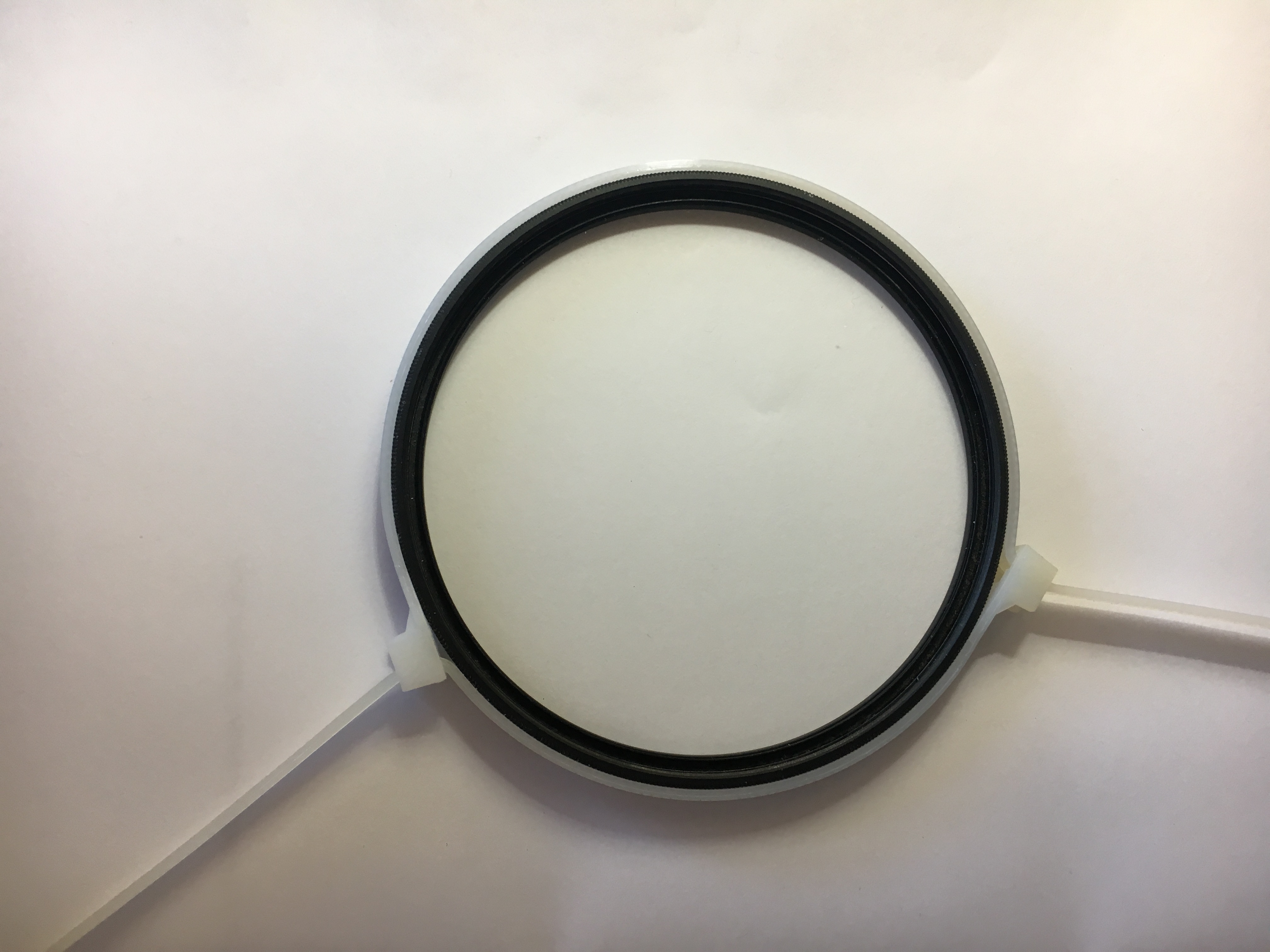
Thanks,
LV

Anonymous
Not applicable
Options
- Mark as New
- Bookmark
- Subscribe
- Mute
- Subscribe to RSS Feed
- Permalink
- Report Inappropriate Content
07-11-2018 12:50 PM
I realize this won't help after you got a stuck filter, but here's a hint to prevent it in the future. I understand that filters with a brass retaining ring are less likely to get stuck, compared to aluminum ones, since brass is harder and less likely to get bent or deformed, also due to what's called "galling" Also, I'd clean the threads just in case there's debris in there.
Options
- Mark as New
- Bookmark
- Subscribe
- Mute
- Subscribe to RSS Feed
- Permalink
- Report Inappropriate Content
07-11-2018 07:51 PM
While I couldn't agreed more with all the suggestions and comments regarding using filter to protect the lens. I can't help but wondering do you really need it? My experience of late seems to indicates filters can do more harm than good, ie. it distorts the image. Perhaps the distortion is not as visible with lessor pixel cameras? With the 5Ds, you can see them quite clearly. Hopefully, it's not my eyes playing tricks on me, but I do see differences when enlarged/zoom in at 100% on my imac.
Thanks,
Lim


Announcements
05/13/2026: New firmware updates are available.
EOS R5 Mark II - Version 1.3.0
EOS R6 Mark II - Version 1.7.0
04/28/2026: Service Notice: Caution Concerning use of Lithium Batteries
03/17/2026: New firmware updates are available.
SELPHY CP1500 - Version 1.0.7.0
02/23/2026: New firmware update is available for EOS C50- Version 1.0.3.1
01/23/2026: New firmware update is available for RF 24-105mm F4 IS USM- Version 2.0.7
01/20/2026: New firmware updates are available.
12/22/2025: New firmware update is available for EOS R6 Mark III- Version 1.0.2
10/21/2025: Service Notice: To Users of the Compact Digital Camera PowerShot V1
10/15/2025: New firmware updates are available.
Speedlite EL-5 - Version 1.2.0
Speedlite EL-1 - Version 1.1.0
Speedlite Transmitter ST-E10 - Version 1.2.0
07/28/2025: Notice of Free Repair Service for the Mirrorless Camera EOS R50 (Black)
05/21/2025: New firmware update available for EOS C500 Mark II - Version 1.1.5.1
Related Content
- Best way to remove ND color casts in DPP4? in Camera Software
- PL-C52(WIII) reference marks for filter max/min in Camera Accessories
- What are your thoughts or practises as it pertains to using filters on your lenses in EF & RF Lenses
- R5 MK II Hot shoe issue and EF-EOS R Adapter drop-in filter fit in EOS DSLR & Mirrorless Cameras
- Canon EF 100-400 IS damaged screw head in EF & RF Lenses

Ⓒ 2026
Canon U.S.A Inc. All Rights Reserved. Reproduction in whole or part without permission is prohibited.
