Desktop Inkjet Printers
cancel
Showing results for 
Show  only  | Search instead for 
Did you mean: 

Posts

Poor Quality Photos

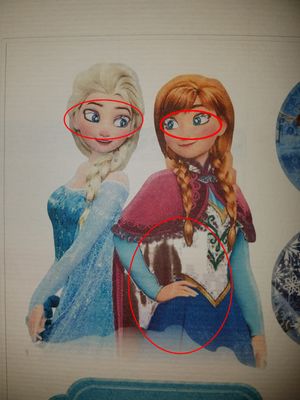
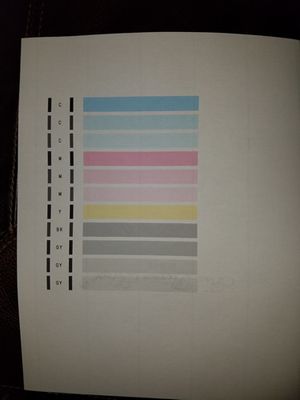
Hello, I have a Canon TS8050 that is a few years old.  It has been used for printing documents.  Today, I tried to print a photo and the results were terrible.  I used Canon Matte paper and double checked the settings.  The print is quite dark, color...

Engine44 by Apprentice
  • 1810 Views
  • 1 replies
  • 0 likes

Pixma MX922 Film Scanner

I cannot figure out for the life of me how to use the film strip on the scanner of my Canon Pixma MX922. The user manuals don't cover this piece I assume because it's not in the other model. Could someone please guide me how to use it on a Mac? I onl...

MX495 Prints Multiple Copies

Hello All, We have a Canon MX495 set up as a wireless printer.  Sometimes when we print (either via wireless from a laptop, or from our home PC that is connected to the router by cable), the printer will print multiple pages of the same print job, wi...

ag4mx495 by Contributor
  • 3745 Views
  • 5 replies
  • 0 likes

Resolved! PIXMA TS9120 - Can you put card stock in paper tray

I just set up my new PIXMA TS9120 and would like to know if I should put card stock in the paper tray, or in the rear tray like the photo paper. I create and print my own greeting cards and am not sure which area I should use for the card stock. TY.

Pixma MX922 printing problem

Prints all colors beautifully.  Problem is either with the PGL 250XL (black) or the PGL251 (black).It will print beautifully with  Windows photo, a perfect print.  If I try to print using  Adobe Photo Elements or with Word Perfect, the black makes ba...

Bigclyde by Apprentice
  • 2566 Views
  • 2 replies
  • 0 likes

TS8260 disc print tray

For over 15 years I have been using Nero Cover Designer to print discs on Canon' disc trays, like type J.TS8260 has a new type of multipurpose tray and I am unable to set paper size, disc position on the tray, etc. to set up a template so that the pr...

error code 1800

My MG 5420 will not print. It continuously gives an error code 1800, no paper in the bottom cassett. There IS paper. I have unplugged and replugged, realligned paper done everything I know how to do. Can anyone help?

lildot01 by Apprentice
  • 2631 Views
  • 1 replies
  • 0 likes

my printers model

hello canon I would like to know what model my printer is.The printer is a pixma 3200 and the model number is MG3220. The serial number is lpsa4****. Can you help me.

jlally4 by Apprentice
  • 1857 Views
  • 1 replies
  • 0 likes

Pixma MG5420 Error 6502

Had a bad paper jam on the mg5420 while printing. Received the 6502 code and cleared the jam. Tried to reset and has not worked since. I read the 6502 error could be problems with the ink cartridges and I did the steps to try and clear that with no l...

Canon pixma ts9550 making weird noise

Hello,I just bought a new CANON POXMA TS9550 A3 printer and it makes a noise that I am wondering if it's normal or not.It's kind of a high pitched grinding noise(not that loud) which happens AFTER I print. Sometimes like 1 minute after I print. The p...

Asger by Apprentice
  • 1900 Views
  • 0 replies
  • 0 likes
Getting started

New to the community? Here's some information to help you get acquainted:

Announcements