Turn on suggestions
Auto-suggest helps you quickly narrow down your search results by suggesting possible matches as you type.
- Canon Community
- Discussions & Help
- Printer
- Desktop Inkjet Printers
- Re: Pixma ix6820
Options
- Subscribe to RSS Feed
- Mark Topic as New
- Mark Topic as Read
- Float this Topic for Current User
- Bookmark
- Subscribe
- Mute
- Printer Friendly Page
PIXMA iX6820 overextending image for borderless printing

Options
- Mark as New
- Bookmark
- Subscribe
- Mute
- Subscribe to RSS Feed
- Permalink
- Report Inappropriate Content
01-25-2024
11:27 AM
- last edited on
01-25-2024
11:31 AM
by
 Danny
Danny
Hey there!
I'm having an issue with printing a borderless 8x10 on my ix6820 (on a mac, through photoshop). It's doing the borderless for me but the extension amount is too much and I want to suck it back in a little bit. Problem is, I seem to have absolutely no way to do this. I have seen Canon's screen shots of where there should be an option to adjust the extension, but I just simply to not have that in my print settings. I've included a screenshot of my print settings. I have the correct driver installed but I'm not sure what to do now! It's expanding the print WAY too much!
Thanks!
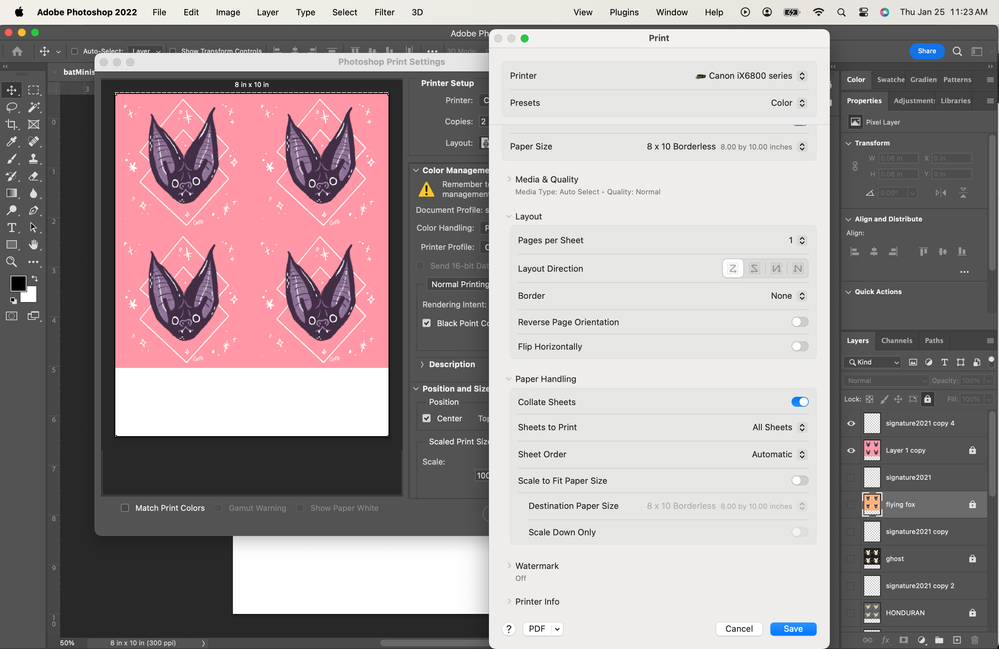
2 REPLIES 2


Options
- Mark as New
- Bookmark
- Subscribe
- Mute
- Subscribe to RSS Feed
- Permalink
- Report Inappropriate Content
01-25-2024 11:31 AM
Double-check that you have the Canon IJ Series driver installed and not the Apple AirPrint driver.
John Hoffman
Conway, NH
R6 Mark III, M200 (converted to infrared), RF lenses, Pixma PRO-100, Pixma TR8620a, Lr Classic
Conway, NH
R6 Mark III, M200 (converted to infrared), RF lenses, Pixma PRO-100, Pixma TR8620a, Lr Classic
Options
- Mark as New
- Bookmark
- Subscribe
- Mute
- Subscribe to RSS Feed
- Permalink
- Report Inappropriate Content
01-25-2024 11:39 AM
It's the one from Canon's website called "iX6800 series CUPS Printer Driver Ver.16.80.0.0 (Mac)" that it gave me when I put in my printer model and macOS version.


Announcements
07/22/2026: New firmware updates are available.
EOS R6 Mark III - Version 1.1.0
05/13/2026: New firmware updates are available.
EOS R5 Mark II - Version 1.3.0
EOS R6 Mark II - Version 1.7.0
04/28/2026: Service Notice: Caution Concerning use of Lithium Batteries
03/17/2026: New firmware updates are available.
SELPHY CP1500 - Version 1.0.7.0
02/23/2026: New firmware update is available for EOS C50- Version 1.0.3.1
01/23/2026: New firmware update is available for RF 24-105mm F4 IS USM- Version 2.0.7
01/20/2026: New firmware updates are available.
10/21/2025: Service Notice: To Users of the Compact Digital Camera PowerShot V1
10/15/2025: New firmware updates are available.
Speedlite EL-5 - Version 1.2.0
Speedlite EL-1 - Version 1.1.0
Speedlite Transmitter ST-E10 - Version 1.2.0
07/28/2025: Notice of Free Repair Service for the Mirrorless Camera EOS R50 (Black)
05/21/2025: New firmware update available for EOS C500 Mark II - Version 1.1.5.1
Related Content
- Pixma TR4720 printer not responding to Dell Inspiron Windows 11 Laptop in Desktop Inkjet Printers
- installing cord to wireless Pixima Printer TS 3720 in Office Printers
- TR8620 in idle mode and not printing in Desktop Inkjet Printers
- TR8620 in idle mode in Office Printers
- Looking for confirmation: Ink for Canon Pixma G7000 series in Desktop Inkjet Printers

Ⓒ 2026
Canon U.S.A Inc. All Rights Reserved. Reproduction in whole or part without permission is prohibited.
