Turn on suggestions
Auto-suggest helps you quickly narrow down your search results by suggesting possible matches as you type.
- Canon Community
- Discussions & Help
- Printer
- Desktop Inkjet Printers
- I have a pixma mp500 and I have stripes when I pri...
Options
- Subscribe to RSS Feed
- Mark Topic as New
- Mark Topic as Read
- Float this Topic for Current User
- Bookmark
- Subscribe
- Mute
- Printer Friendly Page
I have a pixma mp500 and I have stripes when I print. all cartridges are showing fine.

Options
- Mark as New
- Bookmark
- Subscribe
- Mute
- Subscribe to RSS Feed
- Permalink
- Report Inappropriate Content
10-23-2016 06:10 AM
I have a pixma mp500 and I have stripes when I print. all cartridges are showing fine.
3 REPLIES 3


Options
- Mark as New
- Bookmark
- Subscribe
- Mute
- Subscribe to RSS Feed
- Permalink
- Report Inappropriate Content
10-25-2016 10:10 AM
Hi hlcampbell56,
Please make sure that the installed ink tanks are correct and full of ink. The correct order is:
CLI-8BK Black
PGI-5 Black
CLI-8Y Yellow
CLI-8M Magenta
CLI-8C Cyan
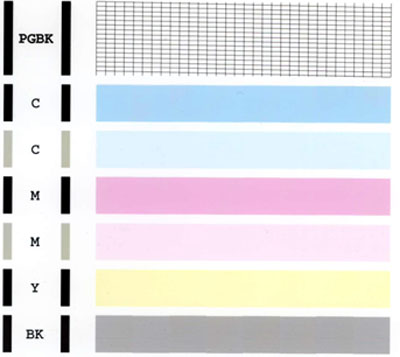
Next, a test should be performed of your PIXMA MP500. This test shows if each print head nozzle is operating properly. Perform the following steps to print a Nozzle Test Pattern:
1. Press the Open button on your PIXMA MP500 to open the output tray.
2. Load letter-sized plain paper in the auto sheet feeder or the cassette.
3. Press the Menu button on your PIXMA MP500.
4. Press the right cursor to select Maintenance/settings, then press OK.
5. Press OK to select Maintenance.
6. Press OK to select Nozzle check.
7. Press OK to select Yes.
The nozzle check pattern will print. Please compare your printout with the example that has been attached to the bottom of this post. If they differ, please perform printhead cleanings. To perform a Deep Cleaning, please follow these steps:
1. Press the Menu button on your PIXMA MP500.
2. Press the right cursor to select Maintenance/settings, then press OK.
3. Press OK to select Maintenance.
4. Press the down arrow to select Deep Cleaning and press OK.
5. Press OK to select Yes.
After performing a few cleanings, please print another test page. If there is no improvement in the Nozzle Check, it is recommended that you contact live technical support . There is NO charge for this call. Real time feedback of a live technical support call would be very beneficial in this case.
Please dial 1-866-261-9362, Monday - Friday 10:00 a.m. - 10:00 p.m. ET (excluding holidays). A Canon technical support representative will be able to resolve this issue faster.
Options
- Mark as New
- Bookmark
- Subscribe
- Mute
- Subscribe to RSS Feed
- Permalink
- Report Inappropriate Content
10-25-2016 11:35 PM
Had a similar issue (black only) on my MG5320. Took the print head out & set it in a shallow dish of Windex for 2-3 hours. Printing fine ever since.
Options
- Mark as New
- Bookmark
- Subscribe
- Mute
- Subscribe to RSS Feed
- Permalink
- Report Inappropriate Content
01-07-2021 02:55 PM
My head cleanning shows all the lines except the PBGK lines. It is a brand new cartridge. What might be wrong?


Announcements
12/15/2025: New firmware update available for EOS C50 - Version 1.0.1.1
10/21/2025: Service Notice: To Users of the Compact Digital Camera PowerShot V1
07/28/2025: Notice of Free Repair Service for the Mirrorless Camera EOS R50 (Black)
05/21/2025: New firmware update available for EOS C500 Mark II - Version 1.1.5.1
01/22/2024: Canon Supports Disaster Relief Efforts in California
01/14/2025: Steps to resolve still image problem when using certain SanDisk SD cards with the Canon EOS R5 Mark II
11/20/2025: New firmware updates are available.
EOS R6 Mark III - Version 1.0.1
EOS R5 Mark II - Version 1.2.0
PowerShot G7 X Mark III - Version 1.4.0
PowerShot SX740 HS - Version 1.0.2
10/21/2025: Service Notice: To Users of the Compact Digital Camera PowerShot V1
10/15/2025: New firmware updates are available.
Speedlite EL-5 - Version 1.2.0
Speedlite EL-1 - Version 1.1.0
Speedlite Transmitter ST-E10 - Version 1.2.0
07/28/2025: Notice of Free Repair Service for the Mirrorless Camera EOS R50 (Black)
07/24/2025: New firmware updates are available.
07/23/2025: New firmware updates are available.
7/17/2025: New firmware updates are available.
05/21/2025: New firmware update available for EOS C500 Mark II - Version 1.1.5.1
02/20/2025: New firmware updates are available.
RF70-200mm F2.8 L IS USM Z - Version 1.0.6
RF24-105mm F2.8 L IS USM Z - Version 1.0.9
RF100-300mm F2.8 L IS USM - Version 1.0.8
RF50mm F1.4 L VCM - Version 1.0.2
RF24mm F1.4 L VCM - Version 1.0.3
01/22/2024: Canon Supports Disaster Relief Efforts in California
01/14/2025: Steps to resolve still image problem when using certain SanDisk SD cards with the Canon EOS R5 Mark II
Related Content
- PIXMA MG7720 printing blank sheets on B&W in Desktop Inkjet Printers
- After Transport, Pro-1000 insisting on replacing all ink cartridges in Professional Photo Printers
- PIXMA MX492 scanner not available for use due to 1401 in Desktop Inkjet Printers
- I installed a Canon 054H black cartridge in my MF641CW but its showing as a 054 cartridge in Office Printers
- imagePROGRAF PRO-300 unboxed from 2020, not working - RED ink blocked in Professional Photo Printers

Ⓒ 2025
Canon U.S.A Inc. All Rights Reserved. Reproduction in whole or part without permission is prohibited.
