Turn on suggestions
Auto-suggest helps you quickly narrow down your search results by suggesting possible matches as you type.
- Canon Community
- Discussions & Help
- Printer
- Desktop Inkjet Printers
- Re: How to select paper source (for Pixma G7020) w...
Options
- Subscribe to RSS Feed
- Mark Topic as New
- Mark Topic as Read
- Float this Topic for Current User
- Bookmark
- Subscribe
- Mute
- Printer Friendly Page

Options
- Mark as New
- Bookmark
- Subscribe
- Mute
- Subscribe to RSS Feed
- Permalink
- Report Inappropriate Content
03-28-2023 10:40 PM
In general, I am familiar with choosing selecting the paper source based on my printing needs but I can not find an option to change the paper source after navigating to File -- Page Setup -- Paper -- Paper Source, where 'default' is my only option. I have installed the Canon printer drivers found here.
Please advise.
Thank you!
Solved! Go to Solution.
1 ACCEPTED SOLUTION
Accepted Solutions
Options
- Mark as New
- Bookmark
- Subscribe
- Mute
- Subscribe to RSS Feed
- Permalink
- Report Inappropriate Content
03-29-2023 12:30 PM
Okay, I figured it out. I should have mentioned that I am using Windows in a VM environment on a Macbook using Parallels. Thanks to the screenshot you posted, I was able to see that the printer dialogue that was being presented to me was not necessarily the dialogue that would be presented in a native Windows environment. I then realized that perhaps Parallels was sharing it's printers with Windows and because of the added complexity features were dropped off. This turned out to be true, as far as I could tell, because after disabling printer sharing through the Parallels VM settings I was able to see the 'default/standard' printer dialogue which included the option to choose more paper sources than just the default cassette.
5 REPLIES 5


Options
- Mark as New
- Bookmark
- Subscribe
- Mute
- Subscribe to RSS Feed
- Permalink
- Report Inappropriate Content
03-29-2023 09:16 AM
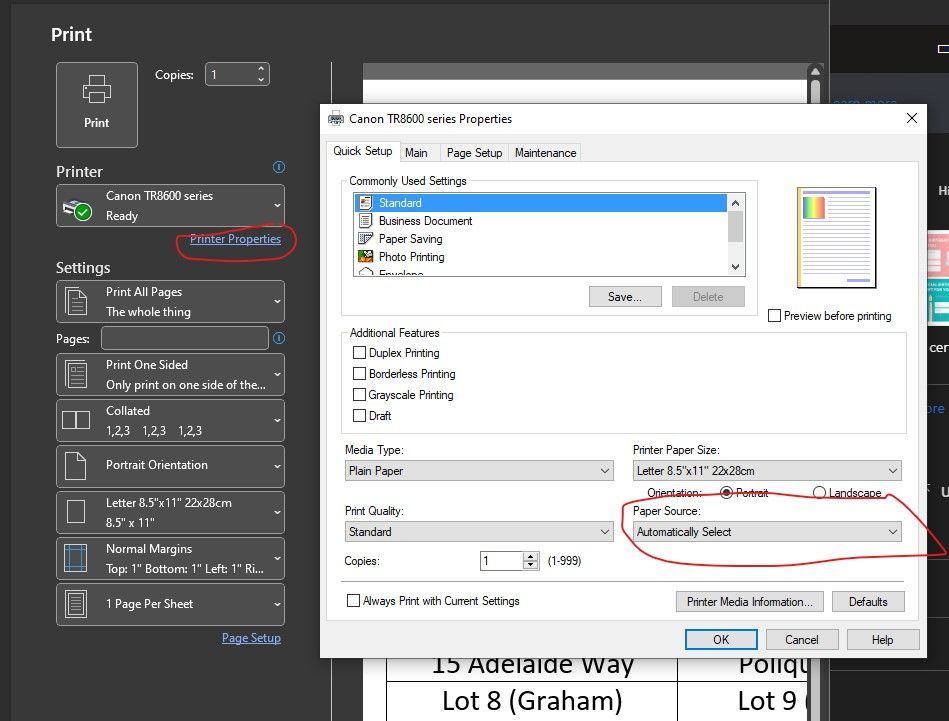
Do you see this print dialogue page?
John Hoffman
Conway, NH
R6 Mark III, M200 (converted to infrared), RF lenses, Pixma PRO-100, Pixma TR8620a, Lr Classic
Conway, NH
R6 Mark III, M200 (converted to infrared), RF lenses, Pixma PRO-100, Pixma TR8620a, Lr Classic
Options
- Mark as New
- Bookmark
- Subscribe
- Mute
- Subscribe to RSS Feed
- Permalink
- Report Inappropriate Content
03-29-2023 12:30 PM
Okay, I figured it out. I should have mentioned that I am using Windows in a VM environment on a Macbook using Parallels. Thanks to the screenshot you posted, I was able to see that the printer dialogue that was being presented to me was not necessarily the dialogue that would be presented in a native Windows environment. I then realized that perhaps Parallels was sharing it's printers with Windows and because of the added complexity features were dropped off. This turned out to be true, as far as I could tell, because after disabling printer sharing through the Parallels VM settings I was able to see the 'default/standard' printer dialogue which included the option to choose more paper sources than just the default cassette.

Options
- Mark as New
- Bookmark
- Subscribe
- Mute
- Subscribe to RSS Feed
- Permalink
- Report Inappropriate Content
06-30-2023 01:15 PM
Works great for my pc. Problem is I can't find a printer app for my phone or tablet that provides that option. Every time I forget to change the optionals menu from "photo" to "plain" and change borderless to normal, the print goes to the rear tray which I don't use. So I have to either open rear tray and insert paper, or cancel the print job and start again. Anything that assumes an object is a photo (real or not) goes through this process. Anybody got a better Android print utility? Samsung, Canon, Brother, etc. all fail this need.
Harris


Options
- Mark as New
- Bookmark
- Subscribe
- Mute
- Subscribe to RSS Feed
- Permalink
- Report Inappropriate Content
06-30-2023 02:42 PM
I'm not a tech, but Parallels was likely just using the Air Print standard, rather than the actual driver interface. I'm glad you were able to figure it out!
Options
- Mark as New
- Bookmark
- Subscribe
- Mute
- Subscribe to RSS Feed
- Permalink
- Report Inappropriate Content
07-04-2023 02:30 PM
I’m having the same problem printing from either an Android phone or iPad. It shouldn’t be this difficult to chose a paper source.

Announcements
07/22/2026: New firmware updates are available.
EOS R6 Mark III - Version 1.1.0
05/13/2026: New firmware updates are available.
EOS R5 Mark II - Version 1.3.0
EOS R6 Mark II - Version 1.7.0
04/28/2026: Service Notice: Caution Concerning use of Lithium Batteries
03/17/2026: New firmware updates are available.
SELPHY CP1500 - Version 1.0.7.0
02/23/2026: New firmware update is available for EOS C50- Version 1.0.3.1
01/23/2026: New firmware update is available for RF 24-105mm F4 IS USM- Version 2.0.7
01/20/2026: New firmware updates are available.
10/21/2025: Service Notice: To Users of the Compact Digital Camera PowerShot V1
10/15/2025: New firmware updates are available.
Speedlite EL-5 - Version 1.2.0
Speedlite EL-1 - Version 1.1.0
Speedlite Transmitter ST-E10 - Version 1.2.0
07/28/2025: Notice of Free Repair Service for the Mirrorless Camera EOS R50 (Black)
05/21/2025: New firmware update available for EOS C500 Mark II - Version 1.1.5.1
Related Content
- Bug Report: macOS Driver Conflict – Booklet Printing on Legal Paper (iR ADV DX C5840i / Finisher-AB1 in Production Printing
- Canon 2020 Duplex printing for Microsoft apps in Printer Software & Networking
- imageCLASS MF753Cdw II- Pages printing 6mm too short with thick paper in Office Printers
- PRO-300 IP address hardcoded into various files for drivers/apps in Printer Software & Networking
- imageCLASS MF642Cdw will not print no matter what I try. in Office Printers

Ⓒ 2026
Canon U.S.A Inc. All Rights Reserved. Reproduction in whole or part without permission is prohibited.
