converting RAW to Jpeg
WHAT software is IDEAL to convert RAW images to JPEG?
WHAT software is IDEAL to convert RAW images to JPEG?
Greetings, Can I use the wifi function on the 70D and EOS Utility function for take long exposures (1-5mins) without any cables on the camera. Meaning, can the EOS utility accept or set exposure times above 30 seconds via wifi and the utility softwa...
Hi I can't log & transfer mxf files from a c300 camera in FCP 7 even though I installed the xf plugin.When I looked at canon's website this link comes up but it doesn't work. http://usa.canon.com/nw3s/CanonUSA/DownloadContents/English/0200206002EN.h...
I've fooled around a little with the new DPP V4, and its behavior wrt recipes seems more than a little strange. I found that if I edited a RAW image with both V3 and V4, both recipes would be retained (with separate functionality; they don't interact...
CameraWindow ((7.11.0.1) will not start on my MacBook Pro 17 inch Early 2011 running OS 10.9.3, so I cannot access the camera. I have verified that the cable works because it the camera shows up on the list of USB devices. Also, if I try to start C...
I am on a macbook pro running mavericks. The software installer seems to mount correctly, but when I click on the CanonDCS32M application it says "Extracting files" and then nothing else seems to happen after that. I am using a Powershot Elph 340 HS...
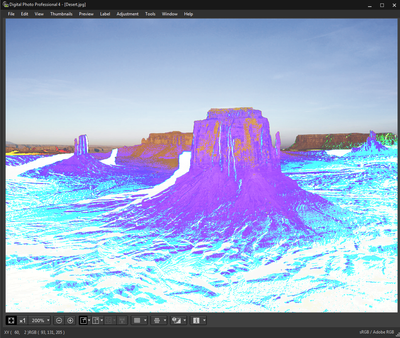
I can't find any info on this problem, so I have come to the forum to see if anyone can figure this out. My images when preview while downloading with the Eos Utility and now in DPP look like negarives. Here is an example, taken from DPP 4 as I have ...
I need driver of CanoScan 3000ex for my home computer with Windows 8 64 bits. Until know I do not know where I can find it.Would you pls. to heplp me to download the driver ?Thank you. Regards,Andreas L
I purchased a 70D bundle including software, I've tried downloading the software on my 6 month old Mac but have failed to do so. I even tried downloading it from Canon, and still does the same thing. I've changed from Mavericks to Mountain Lion as ...
My image browser always quits on me. It is at random times also. Sometimes I can use it for 10 minutes, and other times only 1 minute. Very frustrating. Any advice?
I was thinking if there would be any technical reason preventing EOS Remote to have velometer functionality.That would be marvelous addition to excellent application. I have never tried to make actual time lapse, and purchasing actual velometer will ...
my scanner was work pretty well without any problembut yesterday i just find out that my scanner won't work,every time i try to scan with CanoScan Toolbox 4.9 it always not workingits on Windows 64-bitplease respond

I installed ImagBrowser EX so I can view my raw images. It works fine for viewing but I can't find how to convert them to raw images. The manual and help file says to go to Edit > Process RAW Images but when I go to the edit menu, there is no such ...
When I try to use 'ImageBrowser EX' I get the message "Displaying only the first 1000 images. To view the rest scroll to bottom of page and press the [Show next 1000 images] button". As I cannot find this I am unable to carry out this instrruc...
| Subject | Author | Posted |
|---|---|---|
| 08-20-2026 09:11 AM | ||
| 07-23-2026 09:07 AM | ||
| 05-16-2026 06:48 PM | ||
| 05-14-2026 08:26 AM | ||
| 05-13-2026 08:46 PM |
New to the community? Here's some information to help you get acquainted:
07/22/2026: New firmware updates are available.
EOS R6 Mark III - Version 1.1.0
05/13/2026: New firmware updates are available.
EOS R5 Mark II - Version 1.3.0
EOS R6 Mark II - Version 1.7.0
03/17/2026: New firmware updates are available.
SELPHY CP1500 - Version 1.0.7.0
01/20/2026: New firmware updates are available.
10/15/2025: New firmware updates are available.
Speedlite EL-5 - Version 1.2.0
Speedlite EL-1 - Version 1.1.0
Speedlite Transmitter ST-E10 - Version 1.2.0
Canon U.S.A Inc. All Rights Reserved. Reproduction in whole or part without permission is prohibited.


