Turn on suggestions
Auto-suggest helps you quickly narrow down your search results by suggesting possible matches as you type.
- Canon Community
- Discussions & Help
- Camera
- Camera Software
- Imported RAW files from EOS R/R5/R6 have always le...
Options
- Subscribe to RSS Feed
- Mark Topic as New
- Mark Topic as Read
- Float this Topic for Current User
- Bookmark
- Subscribe
- Mute
- Printer Friendly Page
Imported RAW files from EOS R/R5/R6 have always lens correction enabled

Options
- Mark as New
- Bookmark
- Subscribe
- Mute
- Subscribe to RSS Feed
- Permalink
- Report Inappropriate Content
11-06-2023 10:13 PM
Why did I just buy the above 3 models?
When I import the RAW file directly or I convert it to DNG
By default, Lens Configuration is always turned on, which makes me very uncomfortable when I have to adjust photos and reset
The software I use is Lightroom and Camera Raw
I have attached a picture sample to the article
It's honestly a sad feature if it can't be turned off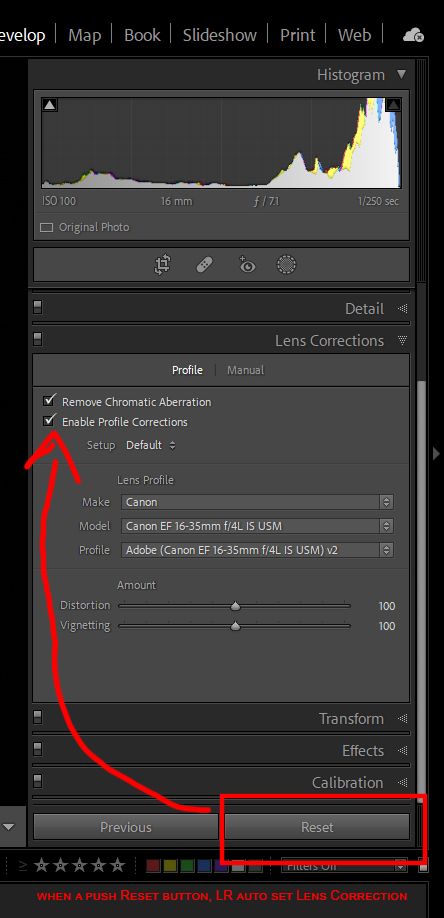
9 REPLIES 9


Options
- Mark as New
- Bookmark
- Subscribe
- Mute
- Subscribe to RSS Feed
- Permalink
- Report Inappropriate Content
11-06-2023 10:59 PM - edited 11-06-2023 11:01 PM
Greetings,
I am not a Lr user, but you appear to be using a lens profile (Adobe Canon 16-35mm f4L IS USM) v2 which includes Remove CA and apply lens geometry, etc. I suggest you make your own recipe and turn these off if you don't like them.
~Rick
Bay Area - CA
~R5 C (1.1.3.1), ~RF Trinity, ~RF 100 Macro, ~RF 100~400, ~RF 100~500, ~RF 200-800, ~RF 1.4x TC, BG-R10, 430EX III-RT ~DxO PhotoLab Elite ~DaVinci Resolve Studio ~ImageClass MF644Cdw MF656Cdw ~Pixel 10 ~CarePaks Are Worth It
Options
- Mark as New
- Bookmark
- Subscribe
- Mute
- Subscribe to RSS Feed
- Permalink
- Report Inappropriate Content
11-06-2023 11:15 PM
This is the default RAW file I imported from the camera, I did not apply any presets

Options
- Mark as New
- Bookmark
- Subscribe
- Mute
- Subscribe to RSS Feed
- Permalink
- Report Inappropriate Content
11-07-2023 06:39 AM
Which version of Lightroom are you running?
What happens when try to you change “Setup”? Right now it says “Default”.
--------------------------------------------------------
"Enjoying photography since 1972."
"Enjoying photography since 1972."

Options
- Mark as New
- Bookmark
- Subscribe
- Mute
- Subscribe to RSS Feed
- Permalink
- Report Inappropriate Content
11-07-2023 09:25 AM - edited 11-07-2023 09:32 AM
@Davidken1982 wrote:Why did I just buy the above 3 models?
When I import the RAW file directly or I convert it to DNG
By default, Lens Configuration is always turned on, which makes me very uncomfortable when I have to adjust photos and reset
The software I use is Lightroom and Camera Raw
I have attached a picture sample to the article
It's honestly a sad feature if it can't be turned off
I do not have any R-series cameras, but I do have a 1D X Mark III DSLR and an M200 mirrorless camera. I have also had many bodies before these.
Never has the lens correction feature been automatically on by default.
1. do you have lens corrections turned on in your camera bodies?
2. Have you configured LrC to apply lens corrections during import?
3. Have you configured LrC to apply Camera Settings to the RAW files during import? I don't know if that feature also applies in-camera lens corrections since i never turn them on in camera. I will run a test and see.
4. I just tested my M200. Turned on in-camera lens correction. Imported RAW file into LrC. lens corrections in LrC not turned on.
I am guessing that it is either a "feature" of the R-series combined with LrC or an inadvertent import preset setting. Hopefully a forum member with an R-series can pipe in.
John Hoffman
Conway, NH
R6 Mark III, M200 (converted to infrared), RF lenses, Pixma PRO-100, Pixma TR8620a, Lr Classic
Conway, NH
R6 Mark III, M200 (converted to infrared), RF lenses, Pixma PRO-100, Pixma TR8620a, Lr Classic

Options
- Mark as New
- Bookmark
- Subscribe
- Mute
- Subscribe to RSS Feed
- Permalink
- Report Inappropriate Content
11-07-2023 10:07 PM
@jrhoffman75 wrote:
I am guessing that it is either a "feature" of the R-series combined with LrC or an inadvertent import preset setting. Hopefully a forum member with an R-series can pipe in.
Hello, John.
I haven't used LR for a few years, but I use other Raw editors, primarily DPP 4 as it does almost everything I need for wildlife and macro.
With that said, the R5, R6 and R6II all allow lens corrections to be disabled in camera and upon import to DPP it's all disabled but can be applied. Same applies for my other Raw editors unless I use a custom camera or lens profile. My wife applies some lens correction on her R6II when using the non L RF 100-400 and some of her lighter EF converted glass. I haven't found the need to use LC of any sort with my RF L lenses.
Newton
Options
- Mark as New
- Bookmark
- Subscribe
- Mute
- Subscribe to RSS Feed
- Permalink
- Report Inappropriate Content
11-08-2023 08:22 AM
@FloridaDrafter wrote:
@jrhoffman75 wrote:I am guessing that it is either a "feature" of the R-series combined with LrC or an inadvertent import preset setting. Hopefully a forum member with an R-series can pipe in.
Hello, John.
I haven't used LR for a few years, but I use other Raw editors, primarily DPP 4 as it does almost everything I need for wildlife and macro.
With that said, the R5, R6 and R6II all allow lens corrections to be disabled in camera and upon import to DPP it's all disabled but can be applied. Same applies for my other Raw editors unless I use a custom camera or lens profile. My wife applies some lens correction on her R6II when using the non L RF 100-400 and some of her lighter EF converted glass. I haven't found the need to use LC of any sort with my RF L lenses.
Newton
Hi Newton. Thanks for that info.
OP must have an inadvertent preset configured and applied during import.
John Hoffman
Conway, NH
R6 Mark III, M200 (converted to infrared), RF lenses, Pixma PRO-100, Pixma TR8620a, Lr Classic
Conway, NH
R6 Mark III, M200 (converted to infrared), RF lenses, Pixma PRO-100, Pixma TR8620a, Lr Classic

Options
- Mark as New
- Bookmark
- Subscribe
- Mute
- Subscribe to RSS Feed
- Permalink
- Report Inappropriate Content
11-11-2023 03:33 PM
Since I do not use any Adobe software and have EF lenses instead of RF, this second hand information may or may not be helpful. I speculate that Adobe might follow the Canon practice of not permitting distortion correction to be turned off for some lenses.
https://opticallimits.com/canon_eos_ff/1113-canonrf24105f471?start=1
"However, in all fairness, Canon doesn't even allow disabling distortion correction for in-camera JPEGs. If we follow this guidance, the results are actually more "normal". There's still some very heavy vignetting at 24mm at f/4 but one stop down, it's quite acceptable actually."
Options
- Mark as New
- Bookmark
- Subscribe
- Mute
- Subscribe to RSS Feed
- Permalink
- Report Inappropriate Content
11-11-2023 03:38 PM
That was my initial thought, but then I saw that OP was showing a screenshot with the EF 16-35 f/4.
John Hoffman
Conway, NH
R6 Mark III, M200 (converted to infrared), RF lenses, Pixma PRO-100, Pixma TR8620a, Lr Classic
Conway, NH
R6 Mark III, M200 (converted to infrared), RF lenses, Pixma PRO-100, Pixma TR8620a, Lr Classic
Options
- Mark as New
- Bookmark
- Subscribe
- Mute
- Subscribe to RSS Feed
- Permalink
- Report Inappropriate Content
11-11-2023 04:01 PM - edited 11-11-2023 04:06 PM
I suspect John has the right idea. The “default” setting is probably the “As Shot” configuration from the camera. I use Color Checker software, so that [Setup] box always comes up with the camera model or whatever name I wish to type in.
Color Checker is a godsend, especially when you shooting with multiple bodies. Different models or even the same model can have slightly different colors. Once you calibrate the image sensors with Color Checker, all cameras will have the nearly identical colors.
--------------------------------------------------------
"Enjoying photography since 1972."
"Enjoying photography since 1972."


Announcements
07/22/2026: New firmware updates are available.
EOS R6 Mark III - Version 1.1.0
05/13/2026: New firmware updates are available.
EOS R5 Mark II - Version 1.3.0
EOS R6 Mark II - Version 1.7.0
04/28/2026: Service Notice: Caution Concerning use of Lithium Batteries
03/17/2026: New firmware updates are available.
SELPHY CP1500 - Version 1.0.7.0
02/23/2026: New firmware update is available for EOS C50- Version 1.0.3.1
01/23/2026: New firmware update is available for RF 24-105mm F4 IS USM- Version 2.0.7
01/20/2026: New firmware updates are available.
10/21/2025: Service Notice: To Users of the Compact Digital Camera PowerShot V1
10/15/2025: New firmware updates are available.
Speedlite EL-5 - Version 1.2.0
Speedlite EL-1 - Version 1.1.0
Speedlite Transmitter ST-E10 - Version 1.2.0
07/28/2025: Notice of Free Repair Service for the Mirrorless Camera EOS R50 (Black)
05/21/2025: New firmware update available for EOS C500 Mark II - Version 1.1.5.1
Related Content
- EOS R5 Mark II firmware 1.30 notes in Camera Software
- EOS R5 Mark II When to use Distortion Correction? in EOS DSLR & Mirrorless Cameras
- Searching for: Lightroom Classic lens correction profile for Canon RF 45 F 1.2 STM in Camera Software
- EOS R6 Mark II - Lens aberration correction, should I switch this feature off? in EOS DSLR & Mirrorless Cameras
- Thoughts on the EOS VR Utility a macOS perspective - Support processing ProRes RAW in Camera Software

Ⓒ 2026
Canon U.S.A Inc. All Rights Reserved. Reproduction in whole or part without permission is prohibited.
