Turn on suggestions
Auto-suggest helps you quickly narrow down your search results by suggesting possible matches as you type.
- Canon Community
- Discussions & Help
- Camera
- Camera Software
- EOS VR Utility Error When Trying To Export
Options
- Subscribe to RSS Feed
- Mark Topic as New
- Mark Topic as Read
- Float this Topic for Current User
- Bookmark
- Subscribe
- Mute
- Printer Friendly Page
EOS VR Utility Error When Trying To Export
Options
- Mark as New
- Bookmark
- Subscribe
- Mute
- Subscribe to RSS Feed
- Permalink
- Report Inappropriate Content
08-01-2022 01:15 AM
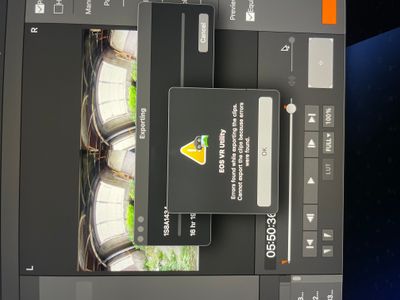
I keep getting this error message on multiple files that I have tried to export. Each file plays fine and has no issues, but every time I try to export, this message pops up. Any advice would be greatly appreciated, thank you!
7 REPLIES 7


Options
- Mark as New
- Bookmark
- Subscribe
- Mute
- Subscribe to RSS Feed
- Permalink
- Report Inappropriate Content
08-02-2022 02:25 AM
Greetings K-Jerzyk-Photo
I'm unsure of which settings you're using to export the file with the EOS VR Utility but let's try H.264 4:2:0 MP4 8-bit to see if this helps with the export issue you're experiencing.

Options
- Mark as New
- Bookmark
- Subscribe
- Mute
- Subscribe to RSS Feed
- Permalink
- Report Inappropriate Content
10-23-2022 11:01 AM
I am also having this problem when trying to export to any of the ProRes codecs. When will Canon have a fix for this?
Options
- Mark as New
- Bookmark
- Subscribe
- Mute
- Subscribe to RSS Feed
- Permalink
- Report Inappropriate Content
11-03-2022 11:21 AM
I'm also having the same issue. After my tenth call, I was finally notified that even though I'm paying for a subscription for this software, it WILL NOT work with any Apple Silicon computers. Meaning all the new mac computers. Nice to know. So, now I have purchased a $2000 lens and am being forced to pay a monthly subscription for a software that won't work and they have no timeline for when they'll update it. Would be super to know before you buy. a $2000 product that it's not compatible with new Macs. Maybe a sticker would help? Argggg....
Options
- Mark as New
- Bookmark
- Subscribe
- Mute
- Subscribe to RSS Feed
- Permalink
- Report Inappropriate Content
01-09-2025 04:42 AM
did you found a solution for this??

Options
- Mark as New
- Bookmark
- Subscribe
- Mute
- Subscribe to RSS Feed
- Permalink
- Report Inappropriate Content
01-09-2025 05:37 PM
Hello AmadeusHiller,
Are you using the latest version of the software? It should be 1.5.10 for Windows or 1.5.11 for MAC.
Options
- Mark as New
- Bookmark
- Subscribe
- Mute
- Subscribe to RSS Feed
- Permalink
- Report Inappropriate Content
01-09-2025 08:20 PM
I did. It was waiting for a long period of time until Canon finally got around to supporting the format that their camera captures. As of fairly recently the VR Utility will support RAW ProRes.
Options
- Mark as New
- Bookmark
- Subscribe
- Mute
- Subscribe to RSS Feed
- Permalink
- Report Inappropriate Content
01-11-2025 05:40 AM
Hey John, thank you for your message. I’ve double-checked, and I am indeed using version 1.5.11 for Mac, as recommended. The issue has never occurred before, and all clips are in RAW format, ranging between 600GB and 1TB. The problem arises with just two specific clips. In DaVinci Resolve, the files play back as RAW without any issues. Stitching initially works fine, but the error occurs during the final seconds of rendering. Let me know if you have any insights or recommendations to resolve this. Best regards, Amadeus

Announcements
07/22/2026: New firmware updates are available.
EOS R6 Mark III - Version 1.1.0
05/13/2026: New firmware updates are available.
EOS R5 Mark II - Version 1.3.0
EOS R6 Mark II - Version 1.7.0
04/28/2026: Service Notice: Caution Concerning use of Lithium Batteries
03/17/2026: New firmware updates are available.
SELPHY CP1500 - Version 1.0.7.0
02/23/2026: New firmware update is available for EOS C50- Version 1.0.3.1
01/23/2026: New firmware update is available for RF 24-105mm F4 IS USM- Version 2.0.7
01/20/2026: New firmware updates are available.
10/21/2025: Service Notice: To Users of the Compact Digital Camera PowerShot V1
10/15/2025: New firmware updates are available.
Speedlite EL-5 - Version 1.2.0
Speedlite EL-1 - Version 1.1.0
Speedlite Transmitter ST-E10 - Version 1.2.0
07/28/2025: Notice of Free Repair Service for the Mirrorless Camera EOS R50 (Black)
05/21/2025: New firmware update available for EOS C500 Mark II - Version 1.1.5.1
Related Content
- Best way to transfer/back up photo and video files to external SSD in EOS DSLR & Mirrorless Cameras
- Canon EOS Utility download for 5D Mk III and IV in Camera Software
- Image Transfer Utility 2 doesn't work if G7X M3 is plugged into USB power in Camera Software
- EOS Utility Launcher not detecting EOS R7 in Camera Software
- How to synch Canon DPP with photo files on Windows 11, without using Onedrive in Camera Software

Ⓒ 2026
Canon U.S.A Inc. All Rights Reserved. Reproduction in whole or part without permission is prohibited.
