Turn on suggestions
Auto-suggest helps you quickly narrow down your search results by suggesting possible matches as you type.
- Canon Community
- Discussions & Help
- Camera
- Camera Software
- Re: EOS Utility App options are greyed out
Options
- Subscribe to RSS Feed
- Mark Topic as New
- Mark Topic as Read
- Float this Topic for Current User
- Bookmark
- Subscribe
- Mute
- Printer Friendly Page
EOS Utility App options are greyed out

Options
- Mark as New
- Bookmark
- Subscribe
- Mute
- Subscribe to RSS Feed
- Permalink
- Report Inappropriate Content
01-18-2024 06:49 AM
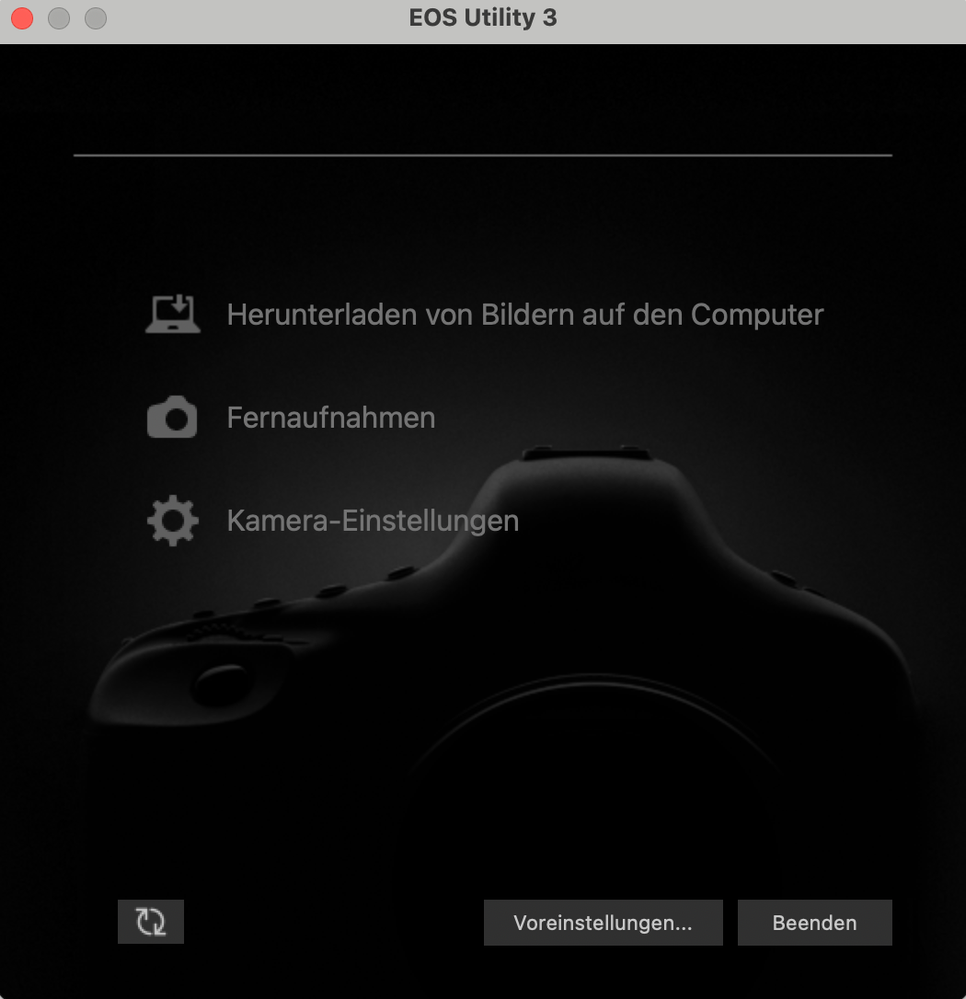
Today I was trying to connect my Canon M50 Mark ii with my MacBook Pro M1 Max. I wanted to add a filter like cinestyle on my camera. Unfortunately when I connected (with wifi and cable) my camera with my laptop, I was not able to select any of the giving setting (view picture). It's strange because I did it once already. I deleted the App and installed it again, doesn't work. Turned off my camera and then back on, doesn't work. I also made sure im in Manuel Picture mode (I also tried every other mode) but it doesn't work....
Im getting frustrated
Please help
Thanks in advance
7 REPLIES 7


Options
- Mark as New
- Bookmark
- Subscribe
- Mute
- Subscribe to RSS Feed
- Permalink
- Report Inappropriate Content
01-18-2024 09:25 AM
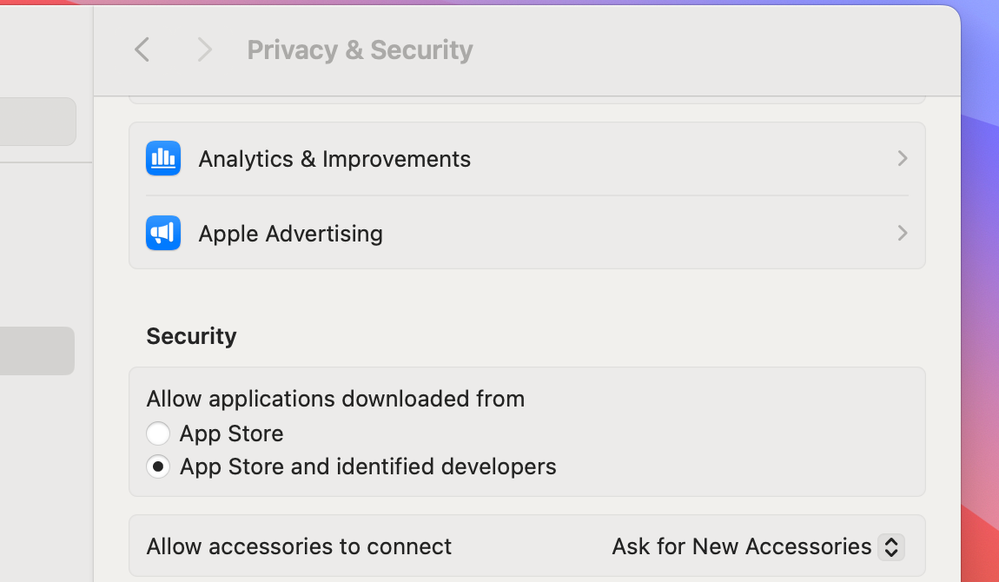
See if the computer is asking permission to connect with your camera:
Can you connect to Apple Image Capture app?
John Hoffman
Conway, NH
R6 Mark III, M200 (converted to infrared), RF lenses, Pixma PRO-100, Pixma TR8620a, Lr Classic
Conway, NH
R6 Mark III, M200 (converted to infrared), RF lenses, Pixma PRO-100, Pixma TR8620a, Lr Classic
Options
- Mark as New
- Bookmark
- Subscribe
- Mute
- Subscribe to RSS Feed
- Permalink
- Report Inappropriate Content
01-18-2024 05:01 PM
Yes my computer is asking for permission..
I can not connect to Apple Image Capture app, because in can't download app from the App Store. I connected my camera once already with the same laptop....
Options
- Mark as New
- Bookmark
- Subscribe
- Mute
- Subscribe to RSS Feed
- Permalink
- Report Inappropriate Content
01-18-2024 05:38 PM
Image Capture comes with the OS. It is in the Applications folder.
Did you authorize access?
John Hoffman
Conway, NH
R6 Mark III, M200 (converted to infrared), RF lenses, Pixma PRO-100, Pixma TR8620a, Lr Classic
Conway, NH
R6 Mark III, M200 (converted to infrared), RF lenses, Pixma PRO-100, Pixma TR8620a, Lr Classic
Options
- Mark as New
- Bookmark
- Subscribe
- Mute
- Subscribe to RSS Feed
- Permalink
- Report Inappropriate Content
02-13-2024 08:38 PM
This suddenly happened to me too. It works fine on my other 13" MacBook Air. But on the 15" it connects to wifi on the EOS Utility 3 interface just fine, but all three options are greyed out and I can't do anything.
USB connection works just fine.
Options
- Mark as New
- Bookmark
- Subscribe
- Mute
- Subscribe to RSS Feed
- Permalink
- Report Inappropriate Content
02-24-2024 08:48 PM
Using Image Capture and a card reader, get an error Preview can't open CR3 files. Any other ideas for importing CR3 files using a card reader onto a Mac Power Book. EOS Utility 3 doesn't work as everything is greyed out and security has been set to accept from identified developers.
Options
- Mark as New
- Bookmark
- Subscribe
- Mute
- Subscribe to RSS Feed
- Permalink
- Report Inappropriate Content
02-24-2024 09:46 PM
Did you check if macOS recognizes your camera yet? You can check the Apple site.
John Hoffman
Conway, NH
R6 Mark III, M200 (converted to infrared), RF lenses, Pixma PRO-100, Pixma TR8620a, Lr Classic
Conway, NH
R6 Mark III, M200 (converted to infrared), RF lenses, Pixma PRO-100, Pixma TR8620a, Lr Classic

Options
- Mark as New
- Bookmark
- Subscribe
- Mute
- Subscribe to RSS Feed
- Permalink
- Report Inappropriate Content
06-20-2025 11:52 AM - edited 06-20-2025 11:54 AM
All,
Please help us by not co-mingling different hardware, different operating systems that utilize different connection methods.
Thread hijacking is not proper forum ediqiette. 🙂
Every users issue deserves its own topic and visibility. It also makes it easier for those of us helping to provide solutions and in turn helps others also seeking solutions. Please note a topic cannot be marked as resolved unless it is your own.
To start your own new topic, please follow this link. Thanks in advance.
~Rick
Bay Area - CA
~R5 C (1.1.3.1), ~RF Trinity, ~RF 100 Macro, ~RF 100~400, ~RF 100~500, ~RF 200-800, ~RF 1.4x TC, BG-R10, 430EX III-RT ~DxO PhotoLab Elite ~DaVinci Resolve Studio ~ImageClass MF644Cdw MF656Cdw ~Pixel 10 ~CarePaks Are Worth It

Announcements
07/22/2026: New firmware updates are available.
EOS R6 Mark III - Version 1.1.0
05/13/2026: New firmware updates are available.
EOS R5 Mark II - Version 1.3.0
EOS R6 Mark II - Version 1.7.0
04/28/2026: Service Notice: Caution Concerning use of Lithium Batteries
03/17/2026: New firmware updates are available.
SELPHY CP1500 - Version 1.0.7.0
02/23/2026: New firmware update is available for EOS C50- Version 1.0.3.1
01/23/2026: New firmware update is available for RF 24-105mm F4 IS USM- Version 2.0.7
01/20/2026: New firmware updates are available.
10/21/2025: Service Notice: To Users of the Compact Digital Camera PowerShot V1
10/15/2025: New firmware updates are available.
Speedlite EL-5 - Version 1.2.0
Speedlite EL-1 - Version 1.1.0
Speedlite Transmitter ST-E10 - Version 1.2.0
07/28/2025: Notice of Free Repair Service for the Mirrorless Camera EOS R50 (Black)
05/21/2025: New firmware update available for EOS C500 Mark II - Version 1.1.5.1
Related Content
- How to synch Canon DPP with photo files on Windows 11, without using Onedrive in Camera Software
- Can't update firmware on EOS R50 in EOS DSLR & Mirrorless Cameras
- EOS R50, EOS Utility Download Not Showing as Available Option in Camera Software
- EOS 5D Mark IV Encryption key greyed out -unable to reset wifi code in EOS DSLR & Mirrorless Cameras
- EOS Utility options all grayed out in Camera Software

Ⓒ 2026
Canon U.S.A Inc. All Rights Reserved. Reproduction in whole or part without permission is prohibited.
