Turn on suggestions
Auto-suggest helps you quickly narrow down your search results by suggesting possible matches as you type.
- Canon Community
- Discussions & Help
- Camera
- Camera Software
- Re: EOS Utility 3 file saving
Options
- Subscribe to RSS Feed
- Mark Topic as New
- Mark Topic as Read
- Float this Topic for Current User
- Bookmark
- Subscribe
- Mute
- Printer Friendly Page

Options
- Mark as New
- Bookmark
- Subscribe
- Mute
- Subscribe to RSS Feed
- Permalink
- Report Inappropriate Content
10-14-2023
03:00 PM
- last edited on
10-17-2023
09:10 AM
by
 Danny
Danny
I am using EOS Utility 3 for live view on the computer and remote shutter release. I would like to know if there is a way to save the images to the camera rather than the computer with EOS Utility 3, as I have been unable to do so.
Solved! Go to Solution.
2 ACCEPTED SOLUTIONS
Accepted Solutions


Options
- Mark as New
- Bookmark
- Subscribe
- Mute
- Subscribe to RSS Feed
- Permalink
- Report Inappropriate Content
10-14-2023 09:56 PM
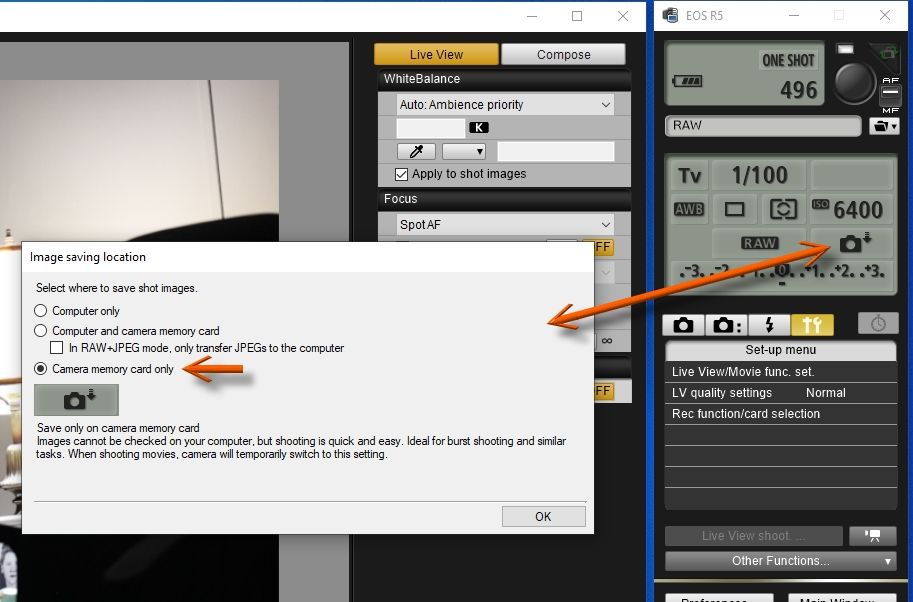
I've solved this before, but couldn't remember how. I just know that my shots always stay on camera. So, I dug around a little tonight and found the solution, and, although it's in plain sight, it's still illusive. Just click the little camera with the down arrow beside it (see attached image), and there ya go.
Newton
Options
- Mark as New
- Bookmark
- Subscribe
- Mute
- Subscribe to RSS Feed
- Permalink
- Report Inappropriate Content
10-15-2023 11:52 AM - edited 10-15-2023 11:55 AM
Thanks FloridaDrafter, you made my day! I should have noticed that but my old eyes aren't what they used to be.
9 REPLIES 9

Options
- Mark as New
- Bookmark
- Subscribe
- Mute
- Subscribe to RSS Feed
- Permalink
- Report Inappropriate Content
10-14-2023 03:59 PM
Anomaly,
A Google search yielded this result:
"You can save the images taken both on the computer and on a memory card by shooting this way. To make this setting, click [Preferences] on the main window of EOS Utility to display the [Preferences] dialog box. Click the [Remote Shooting] tab, and then check [Save also on the camera's memory card]"
Steve Thomas.
Options
- Mark as New
- Bookmark
- Subscribe
- Mute
- Subscribe to RSS Feed
- Permalink
- Report Inappropriate Content
10-14-2023 05:21 PM
stevet1,
I want to save only on the memory card and not both the computer and the memory card. I don't see how to do this.
The problem is that I am trying to trigger the shutter up to 100 times at a rate of 1 trigger/sec. Downloading to the computer is a bottleneck and causes the process to stop before all images are taken. I suspect that saving the images only to the memory card would be faster.
Thanks,
Anomaly

Options
- Mark as New
- Bookmark
- Subscribe
- Mute
- Subscribe to RSS Feed
- Permalink
- Report Inappropriate Content
10-14-2023 06:01 PM
Slow USB connection?
What camera are you using? What type of USB port on the computer?
--------------------------------------------------------
"Enjoying photography since 1972."
"Enjoying photography since 1972."
Options
- Mark as New
- Bookmark
- Subscribe
- Mute
- Subscribe to RSS Feed
- Permalink
- Report Inappropriate Content
10-14-2023 06:49 PM
The camera is an R7 and the port is USB 3.0.
The problem may be a combination of camera buffering and download speed. I am going to experiment with taking EOS Utility 3 out of the setup and seeing if the camera can save the images to only the memory card before the buffering cuts off accepting external triggers.
Options
- Mark as New
- Bookmark
- Subscribe
- Mute
- Subscribe to RSS Feed
- Permalink
- Report Inappropriate Content
10-14-2023 09:56 PM
I've solved this before, but couldn't remember how. I just know that my shots always stay on camera. So, I dug around a little tonight and found the solution, and, although it's in plain sight, it's still illusive. Just click the little camera with the down arrow beside it (see attached image), and there ya go.
Newton
Options
- Mark as New
- Bookmark
- Subscribe
- Mute
- Subscribe to RSS Feed
- Permalink
- Report Inappropriate Content
10-15-2023 11:52 AM - edited 10-15-2023 11:55 AM
Thanks FloridaDrafter, you made my day! I should have noticed that but my old eyes aren't what they used to be.
Options
- Mark as New
- Bookmark
- Subscribe
- Mute
- Subscribe to RSS Feed
- Permalink
- Report Inappropriate Content
10-15-2023 03:14 PM
You are welcome. As for not noticing it, I've done it before and still missed it 🙂

Options
- Mark as New
- Bookmark
- Subscribe
- Mute
- Subscribe to RSS Feed
- Permalink
- Report Inappropriate Content
04-02-2024 10:04 PM
Grazie!
Options
- Mark as New
- Bookmark
- Subscribe
- Mute
- Subscribe to RSS Feed
- Permalink
- Report Inappropriate Content
04-03-2024 04:41 AM

Announcements
07/22/2026: New firmware updates are available.
EOS R6 Mark III - Version 1.1.0
05/13/2026: New firmware updates are available.
EOS R5 Mark II - Version 1.3.0
EOS R6 Mark II - Version 1.7.0
04/28/2026: Service Notice: Caution Concerning use of Lithium Batteries
03/17/2026: New firmware updates are available.
SELPHY CP1500 - Version 1.0.7.0
02/23/2026: New firmware update is available for EOS C50- Version 1.0.3.1
01/23/2026: New firmware update is available for RF 24-105mm F4 IS USM- Version 2.0.7
01/20/2026: New firmware updates are available.
10/21/2025: Service Notice: To Users of the Compact Digital Camera PowerShot V1
10/15/2025: New firmware updates are available.
Speedlite EL-5 - Version 1.2.0
Speedlite EL-1 - Version 1.1.0
Speedlite Transmitter ST-E10 - Version 1.2.0
07/28/2025: Notice of Free Repair Service for the Mirrorless Camera EOS R50 (Black)
05/21/2025: New firmware update available for EOS C500 Mark II - Version 1.1.5.1
Related Content
- Image Transfer Utility 2 doesn't work if G7X M3 is plugged into USB power in Camera Software
- How to synch Canon DPP with photo files on Windows 11, without using Onedrive in Camera Software
- Can't update firmware on EOS R50 in EOS DSLR & Mirrorless Cameras
- EOS R5 Mark II firmware 1.30 notes in Camera Software
- EOS Utility 3 and R6iii, image number always 0000 in Camera Software

Ⓒ 2026
Canon U.S.A Inc. All Rights Reserved. Reproduction in whole or part without permission is prohibited.
