Turn on suggestions
Auto-suggest helps you quickly narrow down your search results by suggesting possible matches as you type.
- Canon Community
- Discussions & Help
- Camera
- Camera Software
- Re: EOS 90D, EOS Utility 3 Failing to Import Direc...
Options
- Subscribe to RSS Feed
- Mark Topic as New
- Mark Topic as Read
- Float this Topic for Current User
- Bookmark
- Subscribe
- Mute
- Printer Friendly Page
EOS 90D, EOS Utility 3 Failing to Import Direct to OneDrive

Options
- Mark as New
- Bookmark
- Subscribe
- Mute
- Subscribe to RSS Feed
- Permalink
- Report Inappropriate Content
09-06-2023
08:10 PM
- last edited on
09-06-2023
08:49 PM
by
 Tiffany
I just moved to MacBook Pro, and trying to implement my workflow.
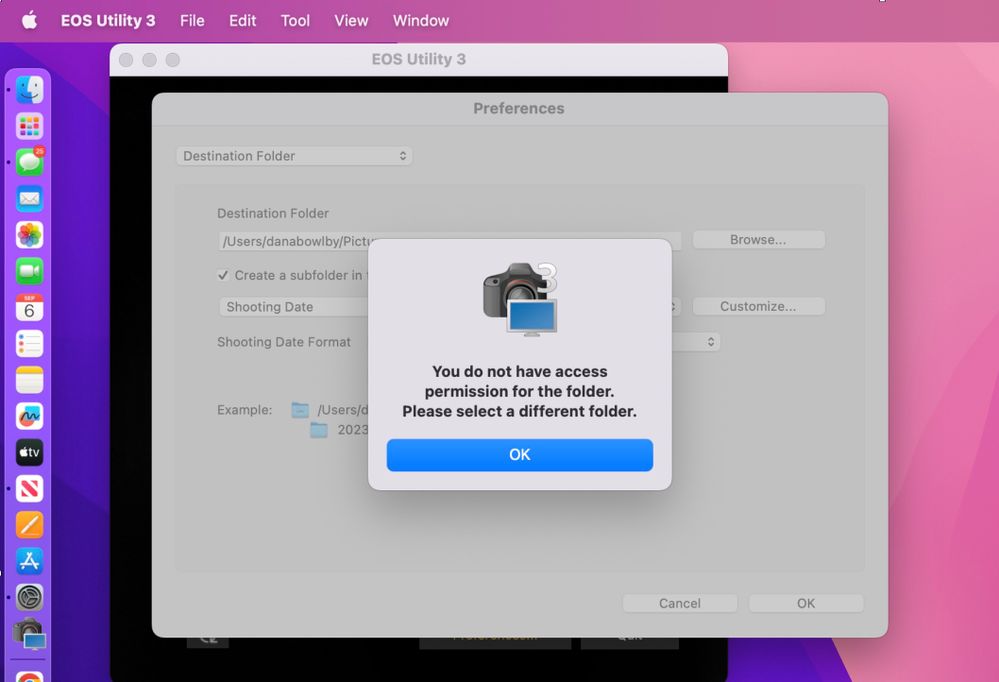
I install EOS Utility 3, latest version, made for my 90D and Macbook Pro running Ventura. When I try to choose my OneDrive, it gives this error of "You do not have access or permission for the folder. Please select a different folder."
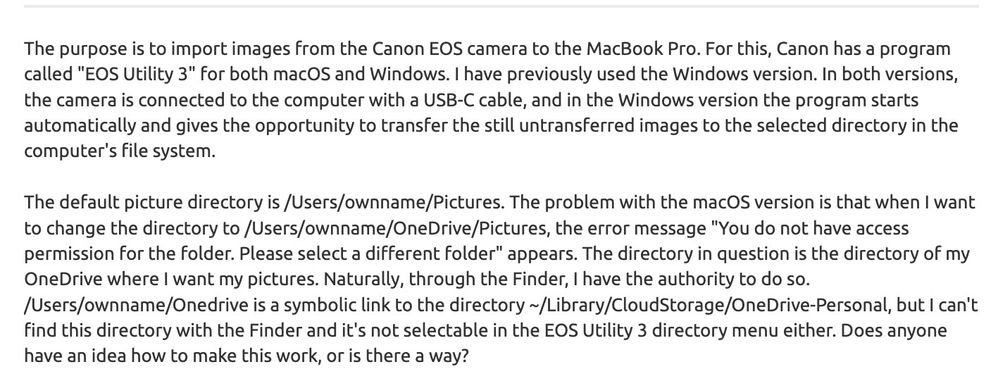
I have verified no access or permissions issues. I also included a snip from the closest thing I found online that describes the same issue I'm having. I unfortunately don't have an extra pc to keep for the sole purpose of EOS Utility workaround that this person had to do.
How do I resolve? I need the solution to utilize my macbook pro, and to directly upload to onedrive via EOS utility. How do I do this? Can anyone help?
5 REPLIES 5


Options
- Mark as New
- Bookmark
- Subscribe
- Mute
- Subscribe to RSS Feed
- Permalink
- Report Inappropriate Content
09-07-2023 02:00 AM
Greetings,
Does The EOS Utility have full disk access permissions in Mac > Security and Preferences?
I remember a similar issue with Google drive last year in DPP, but do not recall what the solution was. John may remember. I'll ping him.
~Rick
Bay Area - CA
~R5 C (1.1.3.1), ~RF Trinity, ~RF 100 Macro, ~RF 100~400, ~RF 100~500, ~RF 200-800, ~RF 1.4x TC, BG-R10, 430EX III-RT ~DxO PhotoLab Elite ~DaVinci Resolve Studio ~ImageClass MF644Cdw MF656Cdw ~Pixel 10 ~CarePaks Are Worth It

Options
- Mark as New
- Bookmark
- Subscribe
- Mute
- Subscribe to RSS Feed
- Permalink
- Report Inappropriate Content
09-07-2023 05:10 AM
I do not believe there is anything wrong with that behavior. I do not believe the EOS Utility has ever allowed you to download directly to a network connected drive.
I have always downloaded locally to my computer and later move/copy the files to network storage. You can download to any drive that is locally connected, like a USB hard drive.
--------------------------------------------------------
"Enjoying photography since 1972."
"Enjoying photography since 1972."

Options
- Mark as New
- Bookmark
- Subscribe
- Mute
- Subscribe to RSS Feed
- Permalink
- Report Inappropriate Content
09-07-2023 07:11 AM
Yes, do check out System Settings | Privacy & Security. Look at both the "Files and Folders" and "Full Disk Access" section. "Files and Folders" would give you more granular control if you don't want applications to have access to everything. e.g., under "Files and Folders", you can grant access to "Removable Volumes" independent of other access.
--
Ricky
Camera: EOS R5 II, RF 50mm f/1.2L, RF 135mm f/1.8L
Lighting: Profoto Lights & Modifiers
Ricky
Camera: EOS R5 II, RF 50mm f/1.2L, RF 135mm f/1.8L
Lighting: Profoto Lights & Modifiers

Options
- Mark as New
- Bookmark
- Subscribe
- Mute
- Subscribe to RSS Feed
- Permalink
- Report Inappropriate Content
09-07-2023 09:06 AM
I get the same error on my MacBook with Full Disk Access permission. No problem connecting on my PC. I don't recall the DPP issue.
John Hoffman
Conway, NH
R6 Mark III, M200 (converted to infrared), RF lenses, Pixma PRO-100, Pixma TR8620a, Lr Classic
Conway, NH
R6 Mark III, M200 (converted to infrared), RF lenses, Pixma PRO-100, Pixma TR8620a, Lr Classic
Options
- Mark as New
- Bookmark
- Subscribe
- Mute
- Subscribe to RSS Feed
- Permalink
- Report Inappropriate Content
09-07-2023 10:18 AM - edited 09-07-2023 10:22 AM
Based on others consensus, modifying the path might not be allowed.
One other thing I can think of trying. Enable the "Show Library Folder" option. Not sure if this provides any support to edit the path.
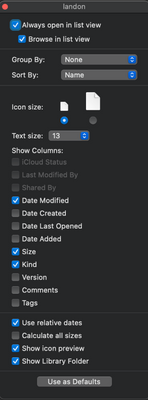
Another possibility is image.canon You must be running the latest version of FW on your 90D.
OneDrive is not listed, but might be supported.
image.canon | Forward images to other cloud storages

~Rick
Bay Area - CA
~R5 C (1.1.3.1), ~RF Trinity, ~RF 100 Macro, ~RF 100~400, ~RF 100~500, ~RF 200-800, ~RF 1.4x TC, BG-R10, 430EX III-RT ~DxO PhotoLab Elite ~DaVinci Resolve Studio ~ImageClass MF644Cdw MF656Cdw ~Pixel 10 ~CarePaks Are Worth It

Announcements
07/22/2026: New firmware updates are available.
EOS R6 Mark III - Version 1.1.0
05/13/2026: New firmware updates are available.
EOS R5 Mark II - Version 1.3.0
EOS R6 Mark II - Version 1.7.0
04/28/2026: Service Notice: Caution Concerning use of Lithium Batteries
03/17/2026: New firmware updates are available.
SELPHY CP1500 - Version 1.0.7.0
02/23/2026: New firmware update is available for EOS C50- Version 1.0.3.1
01/23/2026: New firmware update is available for RF 24-105mm F4 IS USM- Version 2.0.7
01/20/2026: New firmware updates are available.
10/21/2025: Service Notice: To Users of the Compact Digital Camera PowerShot V1
10/15/2025: New firmware updates are available.
Speedlite EL-5 - Version 1.2.0
Speedlite EL-1 - Version 1.1.0
Speedlite Transmitter ST-E10 - Version 1.2.0
07/28/2025: Notice of Free Repair Service for the Mirrorless Camera EOS R50 (Black)
05/21/2025: New firmware update available for EOS C500 Mark II - Version 1.1.5.1
Related Content
- EOS 5D Mark II - How to transfer photos from a computer to camera. in Camera Software
- eos vr utility error found while exporting converting failed in Camera Software
- USB Connection Failed to activate the EOS Utility 3 (Mac OS Ventura 13.5) - Canon 5D4 in Camera Software
- EOS 90D, EOS Utility 3 Failing to Import Direct to OneDrive in Camera Software
- R6 Firmware update crashing at the "Firmware update program" screen. in EOS DSLR & Mirrorless Cameras

Ⓒ 2026
Canon U.S.A Inc. All Rights Reserved. Reproduction in whole or part without permission is prohibited.
