Turn on suggestions
Auto-suggest helps you quickly narrow down your search results by suggesting possible matches as you type.
- Canon Community
- Discussions & Help
- Camera
- Camera Software
- Re: DPP Display
Options
- Subscribe to RSS Feed
- Mark Topic as New
- Mark Topic as Read
- Float this Topic for Current User
- Bookmark
- Subscribe
- Mute
- Printer Friendly Page
DPP Some Images Showing Grid Lines

Options
- Mark as New
- Bookmark
- Subscribe
- Mute
- Subscribe to RSS Feed
- Permalink
- Report Inappropriate Content
05-17-2023
06:20 PM
- last edited on
05-18-2023
08:46 AM
by
 Danny
Danny
Just started using an R6 and downloaded the first batch of photos to Canon DPP. Many frames on the screen look like this.
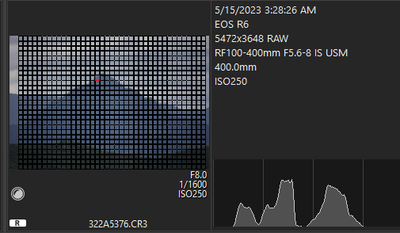
Any answers
5 REPLIES 5


Options
- Mark as New
- Bookmark
- Subscribe
- Mute
- Subscribe to RSS Feed
- Permalink
- Report Inappropriate Content
05-17-2023 07:01 PM - edited 05-17-2023 07:15 PM
Welcome to the forum.
Looks like you might have "Show focus points" setting switched on.
The red square is the one that actually focused.
John Hoffman
Conway, NH
R6 Mark III, M200 (converted to infrared), RF lenses, Pixma PRO-100, Pixma TR8620a, Lr Classic
Conway, NH
R6 Mark III, M200 (converted to infrared), RF lenses, Pixma PRO-100, Pixma TR8620a, Lr Classic

Options
- Mark as New
- Bookmark
- Subscribe
- Mute
- Subscribe to RSS Feed
- Permalink
- Report Inappropriate Content
05-17-2023 07:06 PM
It looks odd because the lines are so fat, but you may be displaying all focus points.
There is a toggle, with options, to turn them off or only display active points. Try clicking that to see if your screen clears.
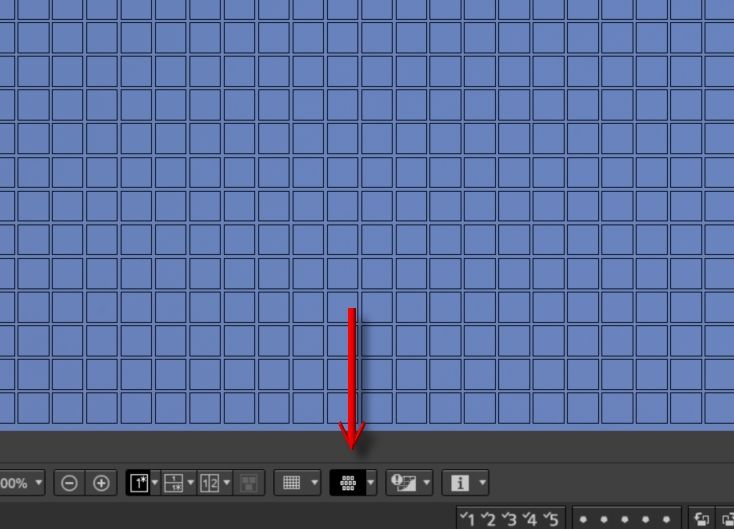
Newton
Options
- Mark as New
- Bookmark
- Subscribe
- Mute
- Subscribe to RSS Feed
- Permalink
- Report Inappropriate Content
05-17-2023 07:51 PM
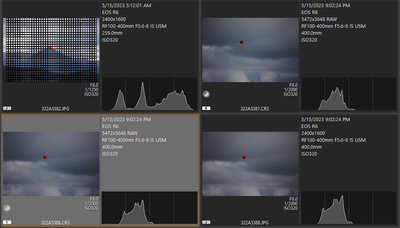
Thank You very much for the reply. I don't think that is it. I do have show focus points "on" but of 173 photos about 20 of the frames look they have a screen on them. The rest don't. I appreciate your help.
Options
- Mark as New
- Bookmark
- Subscribe
- Mute
- Subscribe to RSS Feed
- Permalink
- Report Inappropriate Content
05-17-2023 07:53 PM
@tinaco wrote:Thank You very much for the reply. I don't think that is it. I do have show focus points "on" but of 173 photos about 20 of the frames look they have a screen on them. The rest don't. I appreciate your help.
In that case maybe corruption during download. Do you still have the files on your card. If so, re-download and see if that resolves the issue.
John Hoffman
Conway, NH
R6 Mark III, M200 (converted to infrared), RF lenses, Pixma PRO-100, Pixma TR8620a, Lr Classic
Conway, NH
R6 Mark III, M200 (converted to infrared), RF lenses, Pixma PRO-100, Pixma TR8620a, Lr Classic
Options
- Mark as New
- Bookmark
- Subscribe
- Mute
- Subscribe to RSS Feed
- Permalink
- Report Inappropriate Content
05-18-2023 03:59 PM
Thank you John. I have erased them but I will watch for this as I load more. I very much appreciate the help.

Announcements
07/22/2026: New firmware updates are available.
EOS R6 Mark III - Version 1.1.0
05/13/2026: New firmware updates are available.
EOS R5 Mark II - Version 1.3.0
EOS R6 Mark II - Version 1.7.0
04/28/2026: Service Notice: Caution Concerning use of Lithium Batteries
03/17/2026: New firmware updates are available.
SELPHY CP1500 - Version 1.0.7.0
02/23/2026: New firmware update is available for EOS C50- Version 1.0.3.1
01/23/2026: New firmware update is available for RF 24-105mm F4 IS USM- Version 2.0.7
01/20/2026: New firmware updates are available.
10/21/2025: Service Notice: To Users of the Compact Digital Camera PowerShot V1
10/15/2025: New firmware updates are available.
Speedlite EL-5 - Version 1.2.0
Speedlite EL-1 - Version 1.1.0
Speedlite Transmitter ST-E10 - Version 1.2.0
07/28/2025: Notice of Free Repair Service for the Mirrorless Camera EOS R50 (Black)
05/21/2025: New firmware update available for EOS C500 Mark II - Version 1.1.5.1
Related Content
- Cannot batch-select / select all photos by date in Camera Connect App (IXUS 255 HS & iPhone 12) in Camera Software
- Vertical banding on LCD when articulating screen — Canon R6 Mark II in EOS DSLR & Mirrorless Cameras
- EOS R6 Mark III How to retain video settings like on EOS R6 in EOS DSLR & Mirrorless Cameras
- New Features Added For The C80 & C400 And Updates For The C50, C70 & R5C in Camera Software
- EOS R6 Mark III Firmware Version 1.1.0 available for download in Camera Software

Ⓒ 2026
Canon U.S.A Inc. All Rights Reserved. Reproduction in whole or part without permission is prohibited.
