- Meet Our Illuminaries
- Discussions & Help
- Gallery
- Learn With Canon
- About Our Community
- Meet Our Illuminaries
- Discussions & Help
- Gallery
- Learn With Canon
- About Our Community
Turn on suggestions
Auto-suggest helps you quickly narrow down your search results by suggesting possible matches as you type.
- Canon Community
- Discussions & Help
- Camera
- Camera Software
- Create a preset of exposure settings in EOS Utilit...
Options
- Subscribe to RSS Feed
- Mark Topic as New
- Mark Topic as Read
- Float this Topic for Current User
- Bookmark
- Subscribe
- Mute
- Printer Friendly Page
Create a preset of exposure settings in EOS Utility

Options
- Mark as New
- Bookmark
- Subscribe
- Mute
- Subscribe to RSS Feed
- Permalink
- Report Inappropriate Content
04-17-2022 01:35 PM
I am using a MK4 and I have an event I shoot entirely from my computer. My work station is not close to my camera and sometimes end up using about 40ft of tethering cable. There are several times a day that I need to very quickly ramp up my shutter & ISO and then very quickly ramp back down.
I understand the C1 ~ C3 settings but, keep in mind I am not near my camera to turn the dial on the camera. Can I access saved exposure settings from the EOS Utility software? I'm not talking picture style. I mean shutter & ISO.
My normal is 1/80 @ 1600 ISO. I ramp up to 1/200 @ 4000 ISO ..and then back down to 1/80 @ 1600 ISO. Aperture adjustments are +/- 1/3 so that is no big deal.
2 REPLIES 2


Options
- Mark as New
- Bookmark
- Subscribe
- Mute
- Subscribe to RSS Feed
- Permalink
- Report Inappropriate Content
04-17-2022 03:19 PM
I am not aware of any remote shooting app that allows for exposure presets like that.
--------------------------------------------------------
"Enjoying photography since 1972."
"Enjoying photography since 1972."

Options
- Mark as New
- Bookmark
- Subscribe
- Mute
- Subscribe to RSS Feed
- Permalink
- Report Inappropriate Content
04-17-2022 11:19 PM - edited 04-18-2022 12:17 AM
@JBird wrote:I am using a MK4 and I have an event I shoot entirely from my computer. My work station is not close to my camera and sometimes end up using about 40ft of tethering cable. There are several times a day that I need to very quickly ramp up my shutter & ISO and then very quickly ramp back down.
I understand the C1 ~ C3 settings but, keep in mind I am not near my camera to turn the dial on the camera. Can I access saved exposure settings from the EOS Utility software? I'm not talking picture style. I mean shutter & ISO.
My normal is 1/80 @ 1600 ISO. I ramp up to 1/200 @ 4000 ISO ..and then back down to 1/80 @ 1600 ISO. Aperture adjustments are +/- 1/3 so that is no big deal.
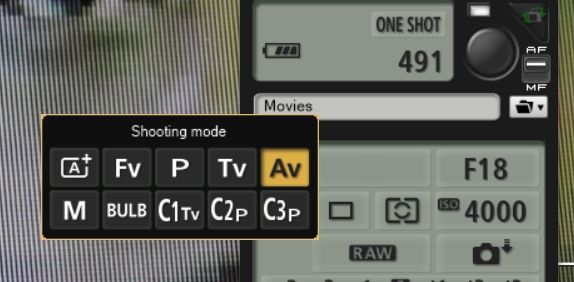
I understand that you are wanting a preset, but honestly you wouldn't be saving that much time. With just a few mouse clicks or taps, you can switch those settings in a matter of seconds in the EOSU. I do it quite a bit with my cameras.
What you want is available in the EOSU, but just for cameras that do not have a mode dial, like the R5 (see attached). As you probably know, shooting mode will be grayed out for cameras with a mode dial 😞
Newton

Announcements
07/22/2026: New firmware updates are available.
EOS R6 Mark III - Version 1.1.0
05/13/2026: New firmware updates are available.
EOS R5 Mark II - Version 1.3.0
EOS R6 Mark II - Version 1.7.0
04/28/2026: Service Notice: Caution Concerning use of Lithium Batteries
03/17/2026: New firmware updates are available.
SELPHY CP1500 - Version 1.0.7.0
02/23/2026: New firmware update is available for EOS C50- Version 1.0.3.1
01/23/2026: New firmware update is available for RF 24-105mm F4 IS USM- Version 2.0.7
01/20/2026: New firmware updates are available.
10/21/2025: Service Notice: To Users of the Compact Digital Camera PowerShot V1
10/15/2025: New firmware updates are available.
Speedlite EL-5 - Version 1.2.0
Speedlite EL-1 - Version 1.1.0
Speedlite Transmitter ST-E10 - Version 1.2.0
07/28/2025: Notice of Free Repair Service for the Mirrorless Camera EOS R50 (Black)
05/21/2025: New firmware update available for EOS C500 Mark II - Version 1.1.5.1
Related Content
- Best Portrait Photography Settings for EOS R5 Mark II in EOS DSLR & Mirrorless Cameras
- Your favorite EOS R5 Mark II exposure setting in EOS DSLR & Mirrorless Cameras
- EOS Utility Launcher not detecting EOS R7 in Camera Software
- EOS R6 Mark III Firmware Version 1.1.0 available for download in Camera Software
- EOS R5 Mark II minor Firmware Update, Version 1.3.1 in Camera Software

Ⓒ 2026
Canon U.S.A Inc. All Rights Reserved. Reproduction in whole or part without permission is prohibited.
