Turn on suggestions
Auto-suggest helps you quickly narrow down your search results by suggesting possible matches as you type.
- Canon Community
- Discussions & Help
- Video
- Camcorders
- Removing icons from G20 display not possible?
Options
- Subscribe to RSS Feed
- Mark Topic as New
- Mark Topic as Read
- Float this Topic for Current User
- Bookmark
- Subscribe
- Mute
- Printer Friendly Page

Options
- Mark as New
- Bookmark
- Subscribe
- Mute
- Subscribe to RSS Feed
- Permalink
- Report Inappropriate Content
05-16-2020 02:57 PM - edited 05-16-2020 05:40 PM
My teacher has an HF 620. He wants to use it for streaming his tai chi classes via Zoom. Be picked up an INOGENI capture card.
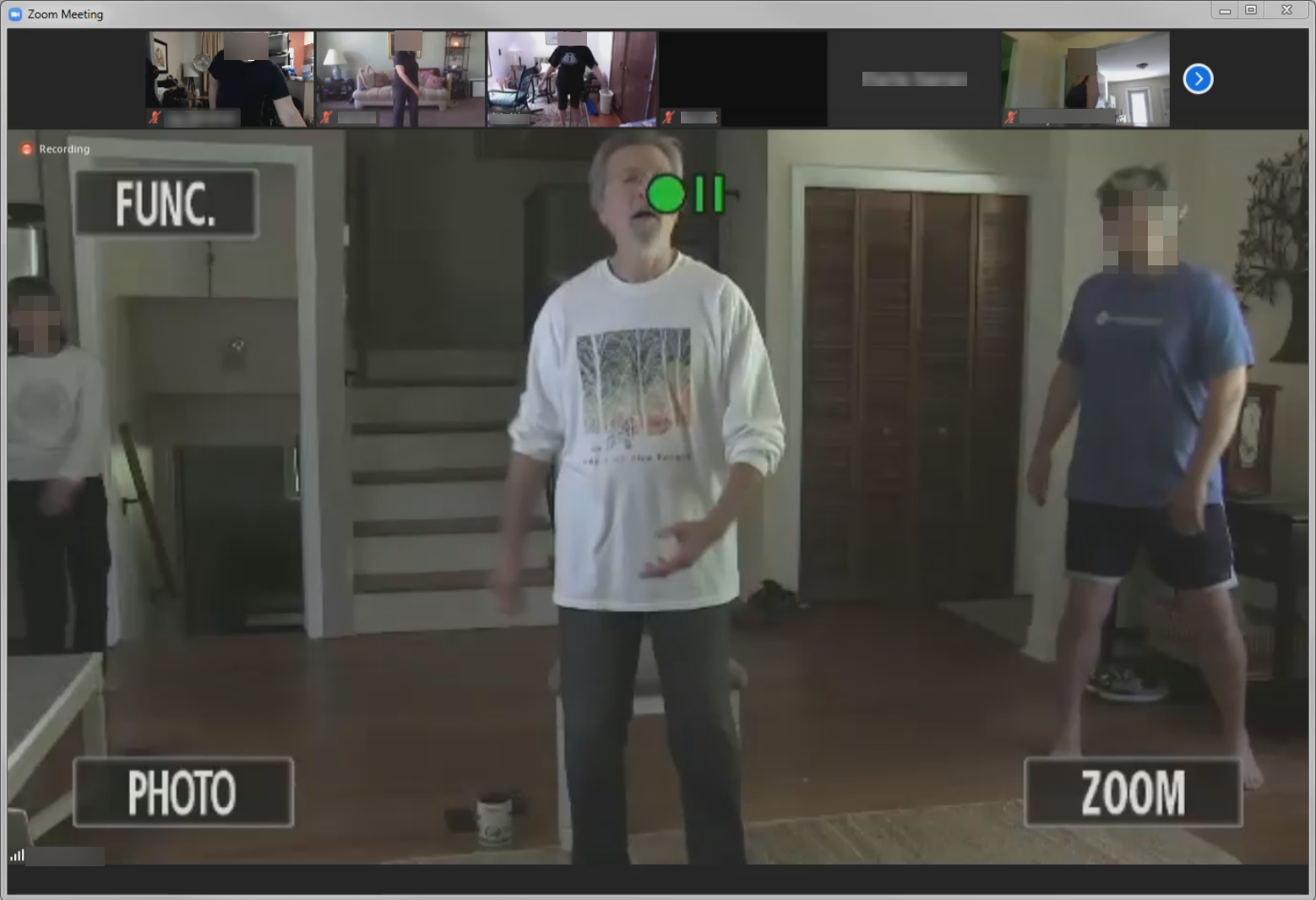
The problem is that there seems to be no way to remove "all" of the icons from the display when recording or, in this case, when streaming. He's getting this as a result:
The instruction manual makes it clear it can't be done:
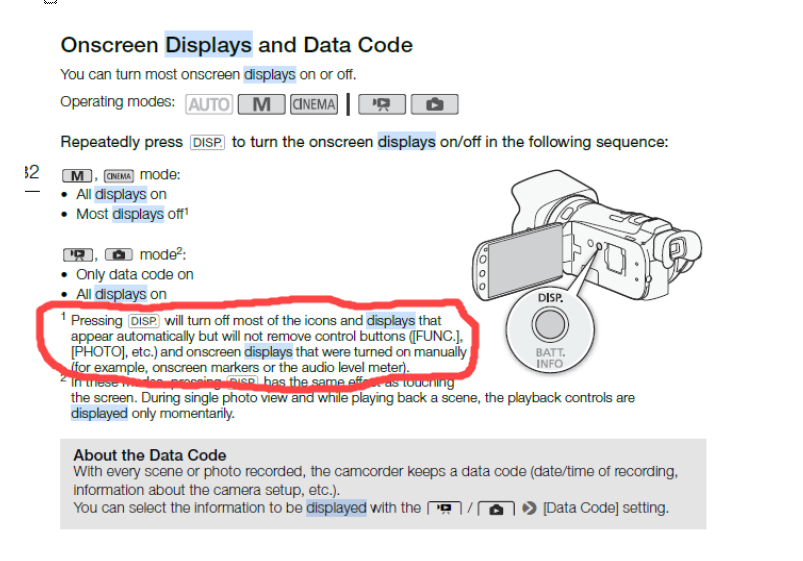
Yet I thought I'd ask here anyway, in case there's a workaround or hack that might accomplish it that someone might be aware of.
Thanks!
Solved! Go to Solution.
2 ACCEPTED SOLUTIONS
Accepted Solutions


Options
- Mark as New
- Bookmark
- Subscribe
- Mute
- Subscribe to RSS Feed
- Permalink
- Report Inappropriate Content
05-17-2020 08:15 AM - edited 05-17-2020 08:23 AM
I have a G40 which is similar in many ways to the G20. You can disable the menu screen from appearing on the HDMI out. Have a look here. This is from the G40 manual. See if you have a similar control on the G20.

__________________________________________________________________________________________
EOS C100 mk2 with a Canon EF-S 18-135mm IS STM, and a Sigma EF mount 10mm-20mm EX DC HSM wide angle - Zoom H2Essential - Dell 8700 i7-4790 3.6Ghz, 24GB Ram, Win 10, Nvidia GTX 1060 6GB - DaVinci Resolve Studio 20.3 - Blackmagic Speed Editor - Presonus Faderport 1.
EOS C100 mk2 with a Canon EF-S 18-135mm IS STM, and a Sigma EF mount 10mm-20mm EX DC HSM wide angle - Zoom H2Essential - Dell 8700 i7-4790 3.6Ghz, 24GB Ram, Win 10, Nvidia GTX 1060 6GB - DaVinci Resolve Studio 20.3 - Blackmagic Speed Editor - Presonus Faderport 1.
Options
- Mark as New
- Bookmark
- Subscribe
- Mute
- Subscribe to RSS Feed
- Permalink
- Report Inappropriate Content
05-19-2020 05:00 AM - edited 05-19-2020 05:03 AM
It turns out it can indeed be done, just as you said:
Menu > wrench icon > Output On-Screen Controls > turn Off.
Thanks!
5 REPLIES 5

Options
- Mark as New
- Bookmark
- Subscribe
- Mute
- Subscribe to RSS Feed
- Permalink
- Report Inappropriate Content
05-16-2020 04:25 PM
Most consumer camcorders will not have "clean" HDMI output while recording; just for playback. The Vixia HF G50 (and I believe the G60) will have clean HDMI output since they have features to work with external recorders. So will the the vast majority of professional camcorders.
--
Ricky
Camera: EOS R5 II, RF 50mm f/1.2L, RF 135mm f/1.8L
Lighting: Profoto Lights & Modifiers
Ricky
Camera: EOS R5 II, RF 50mm f/1.2L, RF 135mm f/1.8L
Lighting: Profoto Lights & Modifiers
Options
- Mark as New
- Bookmark
- Subscribe
- Mute
- Subscribe to RSS Feed
- Permalink
- Report Inappropriate Content
05-16-2020 05:29 PM
Thanks.
Any chance you can suggest something, even refurbed or just used, in say around the $300-ish range that might fit the bill?
Options
- Mark as New
- Bookmark
- Subscribe
- Mute
- Subscribe to RSS Feed
- Permalink
- Report Inappropriate Content
05-17-2020 07:27 AM
You'll have to do your own pricing research. Here's a list of products maintained by Canon that has clean HDMI out.
--
Ricky
Camera: EOS R5 II, RF 50mm f/1.2L, RF 135mm f/1.8L
Lighting: Profoto Lights & Modifiers
Ricky
Camera: EOS R5 II, RF 50mm f/1.2L, RF 135mm f/1.8L
Lighting: Profoto Lights & Modifiers
Options
- Mark as New
- Bookmark
- Subscribe
- Mute
- Subscribe to RSS Feed
- Permalink
- Report Inappropriate Content
05-17-2020 08:15 AM - edited 05-17-2020 08:23 AM
I have a G40 which is similar in many ways to the G20. You can disable the menu screen from appearing on the HDMI out. Have a look here. This is from the G40 manual. See if you have a similar control on the G20.
__________________________________________________________________________________________
EOS C100 mk2 with a Canon EF-S 18-135mm IS STM, and a Sigma EF mount 10mm-20mm EX DC HSM wide angle - Zoom H2Essential - Dell 8700 i7-4790 3.6Ghz, 24GB Ram, Win 10, Nvidia GTX 1060 6GB - DaVinci Resolve Studio 20.3 - Blackmagic Speed Editor - Presonus Faderport 1.
EOS C100 mk2 with a Canon EF-S 18-135mm IS STM, and a Sigma EF mount 10mm-20mm EX DC HSM wide angle - Zoom H2Essential - Dell 8700 i7-4790 3.6Ghz, 24GB Ram, Win 10, Nvidia GTX 1060 6GB - DaVinci Resolve Studio 20.3 - Blackmagic Speed Editor - Presonus Faderport 1.
Options
- Mark as New
- Bookmark
- Subscribe
- Mute
- Subscribe to RSS Feed
- Permalink
- Report Inappropriate Content
05-19-2020 05:00 AM - edited 05-19-2020 05:03 AM
It turns out it can indeed be done, just as you said:
Menu > wrench icon > Output On-Screen Controls > turn Off.
Thanks!

Announcements
07/22/2026: New firmware updates are available.
EOS R6 Mark III - Version 1.1.0
05/13/2026: New firmware updates are available.
EOS R5 Mark II - Version 1.3.0
EOS R6 Mark II - Version 1.7.0
04/28/2026: Service Notice: Caution Concerning use of Lithium Batteries
03/17/2026: New firmware updates are available.
SELPHY CP1500 - Version 1.0.7.0
02/23/2026: New firmware update is available for EOS C50- Version 1.0.3.1
01/23/2026: New firmware update is available for RF 24-105mm F4 IS USM- Version 2.0.7
01/20/2026: New firmware updates are available.
10/21/2025: Service Notice: To Users of the Compact Digital Camera PowerShot V1
10/15/2025: New firmware updates are available.
Speedlite EL-5 - Version 1.2.0
Speedlite EL-1 - Version 1.1.0
Speedlite Transmitter ST-E10 - Version 1.2.0
07/28/2025: Notice of Free Repair Service for the Mirrorless Camera EOS R50 (Black)
05/21/2025: New firmware update available for EOS C500 Mark II - Version 1.1.5.1
Related Content
- Legria HF G70 not going to battery after disconnecting mains power? in Camcorders
- XF605 Shutter Angle? in Professional Video
- Feature Request – Elapsed Recording Time Display (EOS C80) in Professional Video
- HF G70 - how do you remove the settings that display for a few seconds on the recording in Camcorders
- R5C: Firmware 1.1.2.1 released in Professional Video

Ⓒ 2026
Canon U.S.A Inc. All Rights Reserved. Reproduction in whole or part without permission is prohibited.
