Turn on suggestions
Auto-suggest helps you quickly narrow down your search results by suggesting possible matches as you type.
- Canon Community
- Discussions & Help
- Video
- Camcorders
- Re: Elura 60 xfer of images to computer.
Options
- Subscribe to RSS Feed
- Mark Topic as New
- Mark Topic as Read
- Float this Topic for Current User
- Bookmark
- Subscribe
- Mute
- Printer Friendly Page
Elura 60 xfer of images to computer.

Options
- Mark as New
- Bookmark
- Subscribe
- Mute
- Subscribe to RSS Feed
- Permalink
- Report Inappropriate Content
02-17-2022 01:10 PM
I am seeking info on transferring captured video from Canon Elura 60 to computer.
I have a cord with 3 RCA connectors and an A/V on the other end. When I hook it up according to the user manual directions, I do not get a signal from the Camcorder to the computer ((or TV when hooked up that .).
Yet, I can view it on the camcorder screen
What is preventing the transfer of video images?
8 REPLIES 8


Options
- Mark as New
- Bookmark
- Subscribe
- Mute
- Subscribe to RSS Feed
- Permalink
- Report Inappropriate Content
02-17-2022 01:29 PM
You need a video capture card. I am surprised you found 3 RCA connections on the computer! The video should play on a TV, however. Are you sure you did not hook into the video *input*
Usually, you transfer video from a camcorder with a Firewire connection.
Options
- Mark as New
- Bookmark
- Subscribe
- Mute
- Subscribe to RSS Feed
- Permalink
- Report Inappropriate Content
02-17-2022 01:35 PM
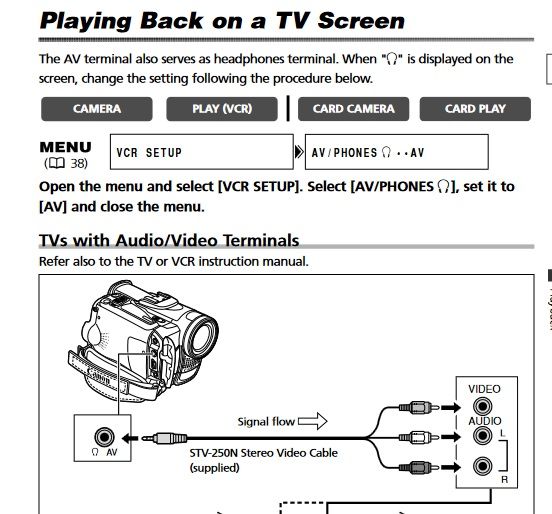
To get it to play on a TV you may need to switch from "Headphone" to "A/V" Note the top several lines.
Options
- Mark as New
- Bookmark
- Subscribe
- Mute
- Subscribe to RSS Feed
- Permalink
- Report Inappropriate Content
02-17-2022 10:09 PM
Thanks for your reply. I am trying to get the A/V signal from the camcorder into my computer via Roxio which explains the three RCA plugs which fit into the Roxio adapter and then a USB connection into the computer. I also tried your suggestion below about adjusting the Camcorder settings, but was not successful.
For some reason, the A/V signal is not being transmitted from the camcorder to the computer. Nor will it play thru a TV when I plug in the three RCA plugs to the TV.
Somehow, I don’t think the signal is being transmitted from the camcorder.
Any more ideas are welcomed. Thanks for your input.
Options
- Mark as New
- Bookmark
- Subscribe
- Mute
- Subscribe to RSS Feed
- Permalink
- Report Inappropriate Content
02-18-2022 08:04 AM
Did you read my other post? you have to turn off headphones.
Options
- Mark as New
- Bookmark
- Subscribe
- Mute
- Subscribe to RSS Feed
- Permalink
- Report Inappropriate Content
02-18-2022 11:45 AM
Yes, I did read everything you included. I believe that I turned off
headphones. When I hook everything up and play the tape in anticipation of recording, it plays on the Camcorder, but not on the TV or computer. Somewhere, I think there is a small adjustment that I am not making which will
route the video to the TV/computer. I will have to continue to experiment and adjust. Thanks again for your interest and recommendations.
Options
- Mark as New
- Bookmark
- Subscribe
- Mute
- Subscribe to RSS Feed
- Permalink
- Report Inappropriate Content
02-20-2022 03:02 PM
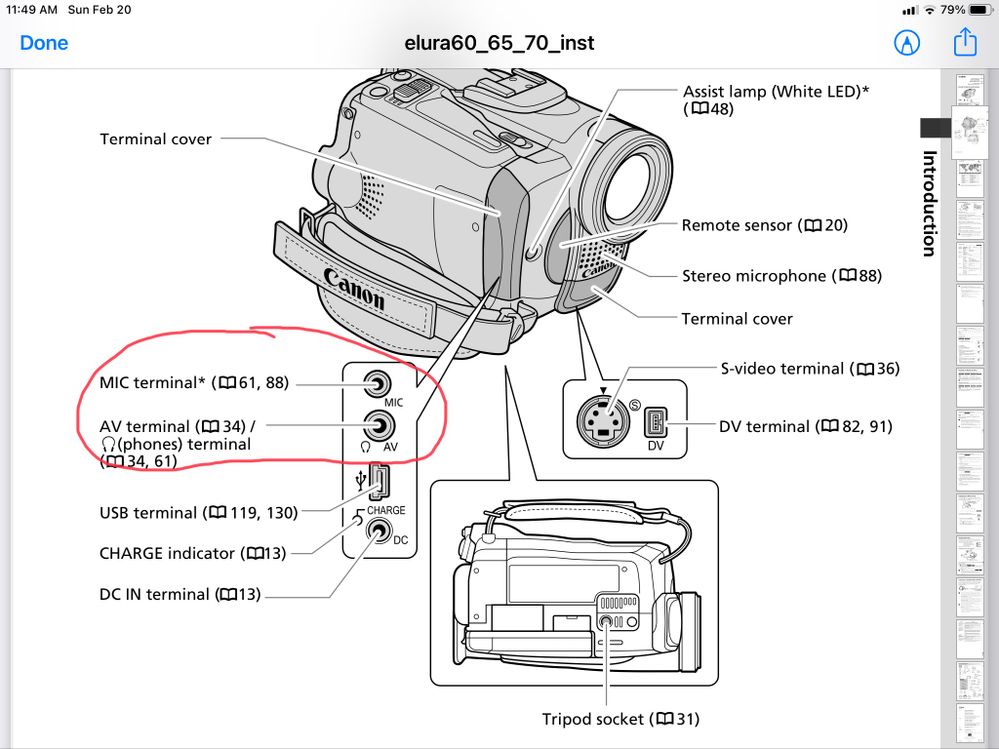
Thanks again for your response. I am attaching two images
which may explain the problem. The first is a portion of one you sent to
me. The second is a photo of my Canon Elura 60 depicting the same area.
It seems that my camera doesn’t have one of the outlets shown in the drawing
from the manual. At this point, I am looking to use the S-video connection which my camera does have to see if Incan extract sound and video. Thanks again. Ken

Options
- Mark as New
- Bookmark
- Subscribe
- Mute
- Subscribe to RSS Feed
- Permalink
- Report Inappropriate Content
02-20-2022 10:08 PM
Well, AV is the one you need, anyway.
Options
- Mark as New
- Bookmark
- Subscribe
- Mute
- Subscribe to RSS Feed
- Permalink
- Report Inappropriate Content
02-21-2022 08:13 AM
The problem is that despite making all the recommended connections, the camera is not transmitting through that port. I made the adjustments you suggested related to switching from headphones, but without any success. Today I will try connections through the S-video port and let you know. Thanks again.


Announcements
05/13/2026: New firmware updates are available.
EOS R5 Mark II - Version 1.3.0
EOS R6 Mark II - Version 1.7.0
04/28/2026: Service Notice: Caution Concerning use of Lithium Batteries
03/17/2026: New firmware updates are available.
SELPHY CP1500 - Version 1.0.7.0
02/23/2026: New firmware update is available for EOS C50- Version 1.0.3.1
01/23/2026: New firmware update is available for RF 24-105mm F4 IS USM- Version 2.0.7
01/20/2026: New firmware updates are available.
12/22/2025: New firmware update is available for EOS R6 Mark III- Version 1.0.2
10/21/2025: Service Notice: To Users of the Compact Digital Camera PowerShot V1
10/15/2025: New firmware updates are available.
Speedlite EL-5 - Version 1.2.0
Speedlite EL-1 - Version 1.1.0
Speedlite Transmitter ST-E10 - Version 1.2.0
07/28/2025: Notice of Free Repair Service for the Mirrorless Camera EOS R50 (Black)
05/21/2025: New firmware update available for EOS C500 Mark II - Version 1.1.5.1
Related Content
- Stumped trying to transfer still photos from VIXIA HF G20 to Mac in Camcorders
- Windows 10 won't recognize ZR85 Camcorder to copy Mini DV tapes to computer in Camcorders
- Elura 60 xfer of images to computer. in Camcorders
- Old Elura 100 camcorder advice in Camcorders
- Trouble copying movies from camera to computer via USB [Vixia G50] in Camcorders

Ⓒ 2026
Canon U.S.A Inc. All Rights Reserved. Reproduction in whole or part without permission is prohibited.
