Turn on suggestions
Auto-suggest helps you quickly narrow down your search results by suggesting possible matches as you type.
- Canon Community
- Discussions & Help
- Video
- Camcorders
- Re: Dont know how to add new topic
Options
- Subscribe to RSS Feed
- Mark Topic as New
- Mark Topic as Read
- Float this Topic for Current User
- Bookmark
- Subscribe
- Mute
- Printer Friendly Page
Dont know how to add new topic

Options
- Mark as New
- Bookmark
- Subscribe
- Mute
- Subscribe to RSS Feed
- Permalink
- Report Inappropriate Content
01-07-2015 02:56 PM
Hi Canon Forum.
I know this is a replay to a non related thread, but since it was not possible to make a new thread, I have to do it this way.
I have a serious connection problem with my MVX4i Canon Camcorder.
First my hardware:
O/S: Win7 64bit
What happens:
I've installed the drivers but I keep getting the error "cannot detect camera".
In my device manager it claims that the drivers cannot be installed and even though I manually search for them (on the installation CD or the installation directory) it refuses to install them.
What I have tried:
I've tried using different USB ports - no luck
Used different USB cables - no luck
Tried uninstalling EVERYTHING, disconnecting camcorder and installed drivers again - no luck
I've tried drivers from your website instead of the CD - no luck.
What in gods name can I do to get my PC to connect with my camcorder??
7 REPLIES 7


Options
- Mark as New
- Bookmark
- Subscribe
- Mute
- Subscribe to RSS Feed
- Permalink
- Report Inappropriate Content
01-08-2015 12:28 PM
I can't answer your question, but if you click the red NEW MESSAGE icon it will allow you to type a subject that is more closely related to your problem. That may get you more attention.
John Hoffman
Conway, NH
R6 Mark III, M200 (converted to infrared), RF lenses, Pixma PRO-100, Pixma TR8620a, Lr Classic
Conway, NH
R6 Mark III, M200 (converted to infrared), RF lenses, Pixma PRO-100, Pixma TR8620a, Lr Classic

Options
- Mark as New
- Bookmark
- Subscribe
- Mute
- Subscribe to RSS Feed
- Permalink
- Report Inappropriate Content
07-09-2016 12:12 PM
Hello, all -
I was glad to find this because I don't know my way around very well yet. In fact, I was trying to find out how to start a new topic. (The other day I found the way by sheer chance.) But when I read this, I had trouble finding the red New Message icon again, which in fact does not appear on every page.
It would help to add that you can find it at the head of any particular "board": on the "Canon Forum" page, under "Community", there's the list of the seven major areas of interest. Choose the appropriate forum (excuse me, "board") for your post, e.g., "Lenses", and the red New Message icon will appear in the upper left. Click and you're there, and your post will be where it belongs. (For me, this problem was a simple one for a change.)
regards, AlienAl
Options
- Mark as New
- Bookmark
- Subscribe
- Mute
- Subscribe to RSS Feed
- Permalink
- Report Inappropriate Content
07-09-2016 11:39 PM
I don't believe you can transfer video to the computer with that camcorder via the USB port. I think it is only for transferring pictures from a memory card. Do you have a FireWire (IEEE 1394) port on your computer? If yes, use this with the appropriate cable to connect the camcorder to the computer.
If you don't have a FireWire port then you will need a video capture device. It usually connect to the computer via a USB port. The camcorder connects to the video capture device via the supplied (should have come with the camcorder) MTC-100 Multi Cable.
Options
- Mark as New
- Bookmark
- Subscribe
- Mute
- Subscribe to RSS Feed
- Permalink
- Report Inappropriate Content
11-10-2017 11:24 AM
I do not see a red button to add a new topic anywhere.
Options
- Mark as New
- Bookmark
- Subscribe
- Mute
- Subscribe to RSS Feed
- Permalink
- Report Inappropriate Content
11-10-2017 11:54 AM
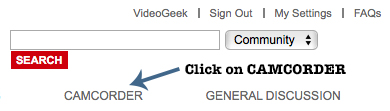
To post (create) a new message do the following:


Options
- Mark as New
- Bookmark
- Subscribe
- Mute
- Subscribe to RSS Feed
- Permalink
- Report Inappropriate Content
11-10-2017 12:16 PM
Thank you, found it!! Why do they make it so difficult to find? Why not put the start new topic button on ever page?
Options
- Mark as New
- Bookmark
- Subscribe
- Mute
- Subscribe to RSS Feed
- Permalink
- Report Inappropriate Content
11-10-2017 01:18 PM
Glad I could help and that is a good question. It took a little while for me to find it (new message button) before I could post the steps on how to do create a new message.


Announcements
05/13/2026: New firmware updates are available.
EOS R5 Mark II - Version 1.3.0
EOS R6 Mark II - Version 1.7.0
04/28/2026: Service Notice: Caution Concerning use of Lithium Batteries
03/17/2026: New firmware updates are available.
SELPHY CP1500 - Version 1.0.7.0
02/23/2026: New firmware update is available for EOS C50- Version 1.0.3.1
01/23/2026: New firmware update is available for RF 24-105mm F4 IS USM- Version 2.0.7
01/20/2026: New firmware updates are available.
12/22/2025: New firmware update is available for EOS R6 Mark III- Version 1.0.2
10/21/2025: Service Notice: To Users of the Compact Digital Camera PowerShot V1
10/15/2025: New firmware updates are available.
Speedlite EL-5 - Version 1.2.0
Speedlite EL-1 - Version 1.1.0
Speedlite Transmitter ST-E10 - Version 1.2.0
07/28/2025: Notice of Free Repair Service for the Mirrorless Camera EOS R50 (Black)
05/21/2025: New firmware update available for EOS C500 Mark II - Version 1.1.5.1
Related Content
- Getting started with XC15: How to record, how to find images, and more in Professional Video
- EOS R5 C Audio getting clipped in Professional Video
- CANON R5C: Manual Rec Level Issue (getting crazy here) in Professional Video
- XA45 Gain vs ISO in Professional Video
- Using the R5C as a webcam in Professional Video

Ⓒ 2026
Canon U.S.A Inc. All Rights Reserved. Reproduction in whole or part without permission is prohibited.
