Turn on suggestions
Auto-suggest helps you quickly narrow down your search results by suggesting possible matches as you type.
- Canon Community
- Discussions & Help
- Video
- Video Accessories
- Re: Cannot Update Remote Controller RC-IP100
Options
- Subscribe to RSS Feed
- Mark Topic as New
- Mark Topic as Read
- Float this Topic for Current User
- Bookmark
- Subscribe
- Mute
- Printer Friendly Page
Cannot Update Remote Controller RC-IP100

Options
- Mark as New
- Bookmark
- Subscribe
- Mute
- Subscribe to RSS Feed
- Permalink
- Report Inappropriate Content
03-12-2023 02:07 PM - edited 03-12-2023 02:24 PM
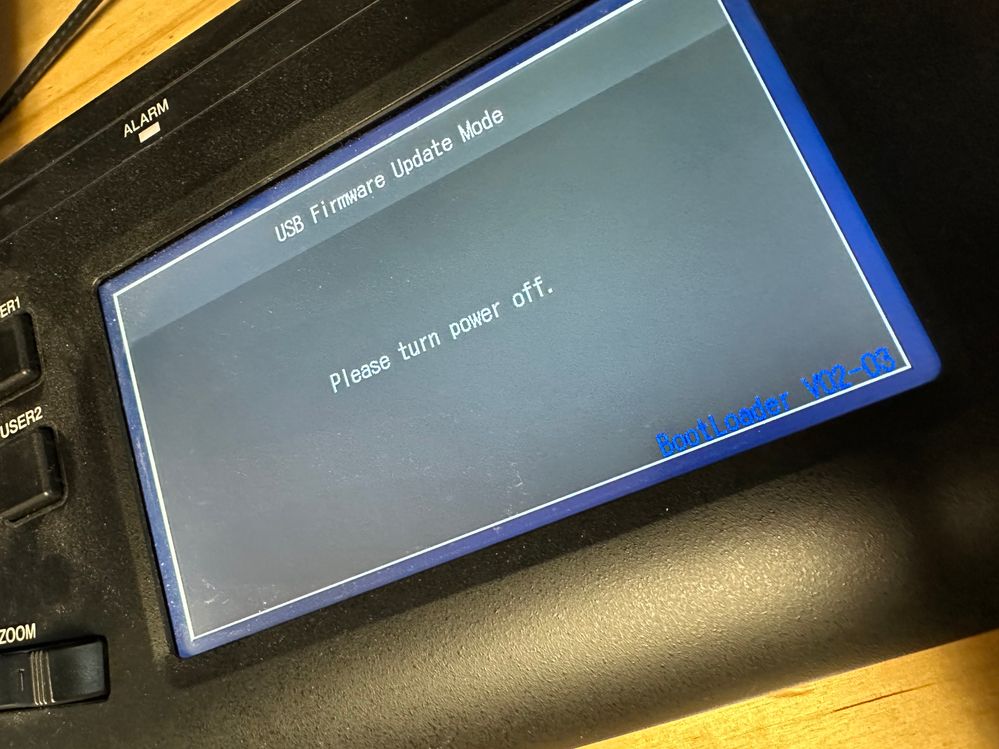
I'm following the firmware upgrade steps, but every time I just get this screen with NO upgrade.
- I load the bin file to to the root folder of the USB disk.
- I put it in the controller.
- I turn the unit off.
- I hold down the USER 1 and USER 2 buttons.
- I turn the controller on.
- Somewhere between 10-20 seconds I get this screen.
It says, "USB FIRMWARE UPDATE MODE", "Please Turn Power Off", "BootLoader V02-03".
It should be noted that this unit is still running v1.01. It has never been updated.
5 REPLIES 5


Options
- Mark as New
- Bookmark
- Subscribe
- Mute
- Subscribe to RSS Feed
- Permalink
- Report Inappropriate Content
03-14-2023 09:18 AM
Hi vinylfire,
Thanks for checking in with us. It does seem like you're going through the process properly. Since you're having issues with the latest version, try loading the prior version and then see if you can then load the new one. Try to download both again, just to make sure that the file itself didn't get corrupted during the download.
You can find both from the link below:
https://www.usa.canon.com/support/p/rc-ip100
Options
- Mark as New
- Bookmark
- Subscribe
- Mute
- Subscribe to RSS Feed
- Permalink
- Report Inappropriate Content
03-19-2023 12:30 PM
Thank you @Nick2020. I've already tried this and it makes no difference. Version 2 seems to respond the same as Version 3. And I don't have access to previous versions since I'm running 1.01.
Any other ideas?

Options
- Mark as New
- Bookmark
- Subscribe
- Mute
- Subscribe to RSS Feed
- Permalink
- Report Inappropriate Content
03-19-2023 05:57 PM
Greetings vinylfire,
Please check to ensure that the USB flash drive is formatted to the FAT32 format and not exFAT or NTFS, otherwise the controller will not recognize the contents of the flash drive. Test a different USB flash drive as well to determine if the original flash drive may not be functioning properly.
In case the issue persists then please call our phone support line at 1-855-246-3367, Monday through Friday between 9:00 am to 9:00 pm ET and Saturday between 9:00 am to 7:00 pm ET.
Options
- Mark as New
- Bookmark
- Subscribe
- Mute
- Subscribe to RSS Feed
- Permalink
- Report Inappropriate Content
03-20-2023 11:25 AM
I have been formatting FAT32, but I will try a different USB drive. Thanks for your help!

Options
- Mark as New
- Bookmark
- Subscribe
- Mute
- Subscribe to RSS Feed
- Permalink
- Report Inappropriate Content
07-17-2024 07:51 PM
Im having the same issues. Did you find a solution for this?

Announcements
07/22/2026: New firmware updates are available.
EOS R6 Mark III - Version 1.1.0
05/13/2026: New firmware updates are available.
EOS R5 Mark II - Version 1.3.0
EOS R6 Mark II - Version 1.7.0
04/28/2026: Service Notice: Caution Concerning use of Lithium Batteries
03/17/2026: New firmware updates are available.
SELPHY CP1500 - Version 1.0.7.0
02/23/2026: New firmware update is available for EOS C50- Version 1.0.3.1
01/23/2026: New firmware update is available for RF 24-105mm F4 IS USM- Version 2.0.7
01/20/2026: New firmware updates are available.
10/21/2025: Service Notice: To Users of the Compact Digital Camera PowerShot V1
10/15/2025: New firmware updates are available.
Speedlite EL-5 - Version 1.2.0
Speedlite EL-1 - Version 1.1.0
Speedlite Transmitter ST-E10 - Version 1.2.0
07/28/2025: Notice of Free Repair Service for the Mirrorless Camera EOS R50 (Black)
05/21/2025: New firmware update available for EOS C500 Mark II - Version 1.1.5.1
Related Content
- Control Zoom of PZ lens with DJI gimbal in Video Accessories
- EOS C80 & C400 Questions about USB controls and open gate in firmware updates in Professional Video
- EOS C50 won't stop recording via ARRI hand unit remote in Video Accessories
- Canon C80 and USB control with Remote Camera Control App in Professional Video
- EOS C80 remote port LANC compatibility in Professional Video

Ⓒ 2026
Canon U.S.A Inc. All Rights Reserved. Reproduction in whole or part without permission is prohibited.
