Turn on suggestions
Auto-suggest helps you quickly narrow down your search results by suggesting possible matches as you type.
- Canon Community
- Discussions & Help
- Camera
- Speedlite Flashes
- Using a Third Party Flash with only one pin on EOS...
Options
- Subscribe to RSS Feed
- Mark Topic as New
- Mark Topic as Read
- Float this Topic for Current User
- Bookmark
- Subscribe
- Mute
- Printer Friendly Page
Using a Third Party Flash with only one pin on EOS 70D

Options
- Mark as New
- Bookmark
- Subscribe
- Mute
- Subscribe to RSS Feed
- Permalink
- Report Inappropriate Content
12-13-2022
10:08 AM
- last edited on
12-13-2022
12:53 PM
by
 Danny
Danny
I have a Neewer PY-16 Transmitter that fires my flash but I can't workout how to set the camera to fire the transmitter It has a centre pin that connects to the hotshot. I can test fire the flash using the test button on the transmitter.
If anybody can assist it would be appreciated
5 REPLIES 5


Options
- Mark as New
- Bookmark
- Subscribe
- Mute
- Subscribe to RSS Feed
- Permalink
- Report Inappropriate Content
12-13-2022 11:54 AM
What camera? But off lacks the center pin on the hotshot, you can't fire the flash from this camera.
Options
- Mark as New
- Bookmark
- Subscribe
- Mute
- Subscribe to RSS Feed
- Permalink
- Report Inappropriate Content
12-13-2022 12:45 PM
The camera is a 70D Canon

Options
- Mark as New
- Bookmark
- Subscribe
- Mute
- Subscribe to RSS Feed
- Permalink
- Report Inappropriate Content
12-13-2022 04:17 PM
what is a Neewer PY-16? The Neewer website doesn’t recognize that product name.
John Hoffman
Conway, NH
R6 Mark III, M200 (converted to infrared), RF lenses, Pixma PRO-100, Pixma TR8620a, Lr Classic
Conway, NH
R6 Mark III, M200 (converted to infrared), RF lenses, Pixma PRO-100, Pixma TR8620a, Lr Classic

Options
- Mark as New
- Bookmark
- Subscribe
- Mute
- Subscribe to RSS Feed
- Permalink
- Report Inappropriate Content
12-13-2022 08:00 PM - edited 12-13-2022 08:04 PM
Are you using LiveView? If so, you must go into the menu and disable Silent LiveView shooting. 3rd party, non-ETTL flash units and triggers (with only one pin) will not fire in LiveView if Silent mode 1 or mode 2 is enabled.
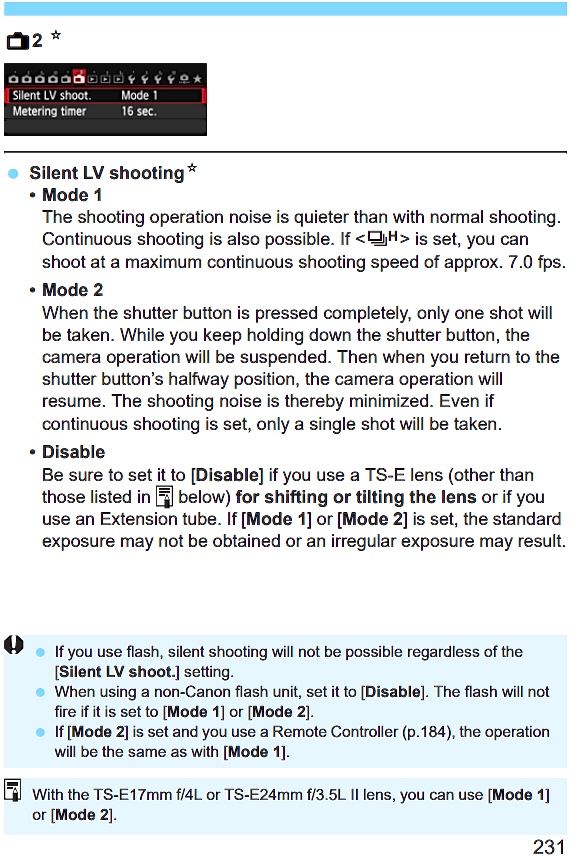
If you are not shooting in LiveView, then there must be a problem with your Neewer trigger.
.
Mike Sowsun
Options
- Mark as New
- Bookmark
- Subscribe
- Mute
- Subscribe to RSS Feed
- Permalink
- Report Inappropriate Content
09-03-2024 05:36 PM - edited 09-03-2024 05:37 PM
Thanks! This live view fix did the trick for me!

Announcements
07/22/2026: New firmware updates are available.
EOS R6 Mark III - Version 1.1.0
05/13/2026: New firmware updates are available.
EOS R5 Mark II - Version 1.3.0
EOS R6 Mark II - Version 1.7.0
04/28/2026: Service Notice: Caution Concerning use of Lithium Batteries
03/17/2026: New firmware updates are available.
SELPHY CP1500 - Version 1.0.7.0
02/23/2026: New firmware update is available for EOS C50- Version 1.0.3.1
01/23/2026: New firmware update is available for RF 24-105mm F4 IS USM- Version 2.0.7
01/20/2026: New firmware updates are available.
10/21/2025: Service Notice: To Users of the Compact Digital Camera PowerShot V1
10/15/2025: New firmware updates are available.
Speedlite EL-5 - Version 1.2.0
Speedlite EL-1 - Version 1.1.0
Speedlite Transmitter ST-E10 - Version 1.2.0
07/28/2025: Notice of Free Repair Service for the Mirrorless Camera EOS R50 (Black)
05/21/2025: New firmware update available for EOS C500 Mark II - Version 1.1.5.1
Related Content
- EOS R5 Mark II Hot shoe keeps failing in EOS DSLR & Mirrorless Cameras
- vertical line on my canon ixus 145 in Point & Shoot Digital Cameras
- Canon G7X Mark III flash not working in Point & Shoot Digital Cameras
- Are Godox Flashes compatiable with Cannon Rebel T7? in Speedlite Flashes
- EOS R5 Mark II sent in for repair and came back unrepaired in EOS DSLR & Mirrorless Cameras

Ⓒ 2026
Canon U.S.A Inc. All Rights Reserved. Reproduction in whole or part without permission is prohibited.
