Turn on suggestions
Auto-suggest helps you quickly narrow down your search results by suggesting possible matches as you type.
- Canon Community
- Discussions & Help
- Printer
- Scanners
- ImageFormula R10 Communication error
Options
- Subscribe to RSS Feed
- Mark Topic as New
- Mark Topic as Read
- Float this Topic for Current User
- Bookmark
- Subscribe
- Mute
- Printer Friendly Page
ImageFormula R10 Communication error

Options
- Mark as New
- Bookmark
- Subscribe
- Mute
- Subscribe to RSS Feed
- Permalink
- Report Inappropriate Content
05-12-2023 10:50 PM
Don't know why but my R10 scanner software will not start and gives a message "an error has occurred while communicating with scanner" and the program will not start.
I have tried the program that this website provide to fix registry issues but that did not work.
I do know it is my PC that is causing some sort of issue because the scanner works perfectly fine on other PC's. it use to work on my pc but now not at all and i cannot figure out the issue. i have also tried different USB cables and still no luck.
could someone help. if anything ill just keep posting until the issue is resolved.
Thank you
5 REPLIES 5


Options
- Mark as New
- Bookmark
- Subscribe
- Mute
- Subscribe to RSS Feed
- Permalink
- Report Inappropriate Content
05-12-2023 10:55 PM
Welcome to the Canon forum!
So that the Community can help you better, we will need to know which operating system is running on your computer (i.e. Windows or macOS and which version). What error message are you getting? Any other details you'd like to give will only help the Community better understand your issue. The forum is not intended for immediate support. If this is a time-sensitive matter, click HERE search our knowledge base or find additional support options HERE
Thank you!
Options
- Mark as New
- Bookmark
- Subscribe
- Mute
- Subscribe to RSS Feed
- Permalink
- Report Inappropriate Content
05-12-2023 11:18 PM
thank you for the reply. I am running it on windows 10 and when starting the program installed on the scanner. will recive a message saying failed to communicate with scanner, reconnect and try again.
which doesn't make sense because the computer sees that the device is connected

Options
- Mark as New
- Bookmark
- Subscribe
- Mute
- Subscribe to RSS Feed
- Permalink
- Report Inappropriate Content
05-16-2023 01:37 PM
Hi,
Did your computer run any updates before this issue happened? The reason I ask is because if the scanner works on other computers then there is something on your computer ( security program, firewall, etc) that is causing the issue.
At that point, you would need to reach out to Microsoft support to resolve the issue. I would let them know that the scanner works on other computers but not this one.
Did this answer your question? Please click the Accept as Solution button so that others may find the answer as well.
Options
- Mark as New
- Bookmark
- Subscribe
- Mute
- Subscribe to RSS Feed
- Permalink
- Report Inappropriate Content
09-25-2023 05:03 PM
Have similar problem, Macbook Air M2, Ventura OS R10 software opens but "Driver cannot be used" appears when scan button pressed.
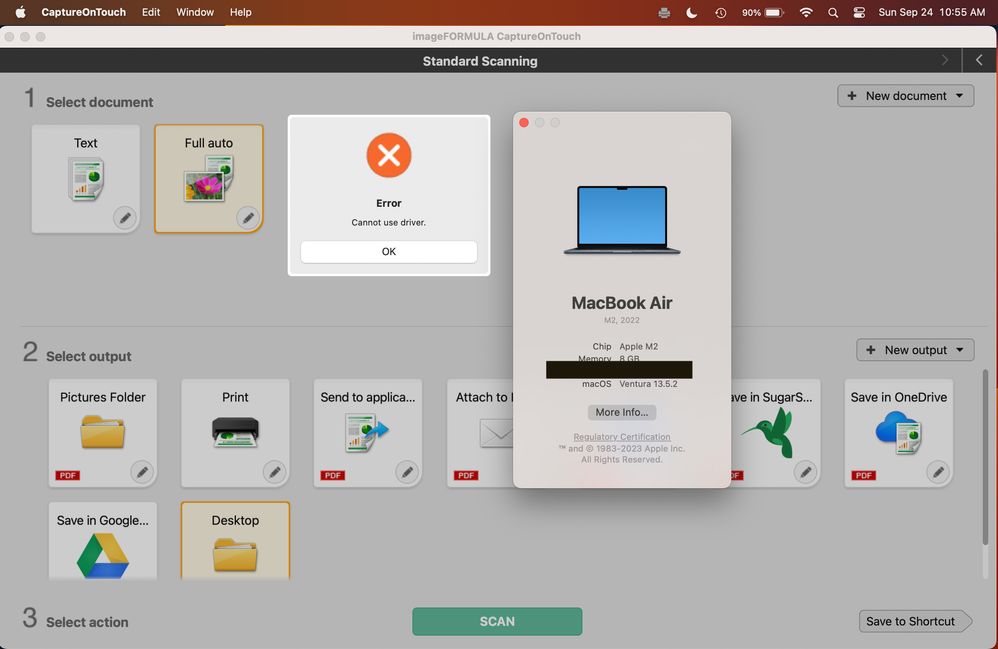
Options
- Mark as New
- Bookmark
- Subscribe
- Mute
- Subscribe to RSS Feed
- Permalink
- Report Inappropriate Content
12-24-2025 11:46 PM
I have the same issue with the same error message on a Mac. The scanner works find on my older Mac. Please advise. Both Macs did not download any driver or app from Canon.


Announcements
07/22/2026: New firmware updates are available.
EOS R6 Mark III - Version 1.1.0
05/13/2026: New firmware updates are available.
EOS R5 Mark II - Version 1.3.0
EOS R6 Mark II - Version 1.7.0
04/28/2026: Service Notice: Caution Concerning use of Lithium Batteries
03/17/2026: New firmware updates are available.
SELPHY CP1500 - Version 1.0.7.0
02/23/2026: New firmware update is available for EOS C50- Version 1.0.3.1
01/23/2026: New firmware update is available for RF 24-105mm F4 IS USM- Version 2.0.7
01/20/2026: New firmware updates are available.
10/21/2025: Service Notice: To Users of the Compact Digital Camera PowerShot V1
10/15/2025: New firmware updates are available.
Speedlite EL-5 - Version 1.2.0
Speedlite EL-1 - Version 1.1.0
Speedlite Transmitter ST-E10 - Version 1.2.0
07/28/2025: Notice of Free Repair Service for the Mirrorless Camera EOS R50 (Black)
05/21/2025: New firmware update available for EOS C500 Mark II - Version 1.1.5.1
Related Content
- imageCLASS MFC743Cdw - No scan, no print, not working and can't reach Canon support after months. in Office Printers
- PIXMA TR7120 keeps going offline from my network in Printer Software & Networking
- Canon imageFORMULA DR-C225 II: Error 80FD13A6 with CaptureOnTouch in Scanners
- Cannot reinstall drivers for the MF656Cdw in Office Printers
- CaptureOneTouch V5 + imageFORMULA DR-G2140 = Insert Pages Crash in Scanners

Ⓒ 2026
Canon U.S.A Inc. All Rights Reserved. Reproduction in whole or part without permission is prohibited.
