Turn on suggestions
Auto-suggest helps you quickly narrow down your search results by suggesting possible matches as you type.
- Canon Community
- Discussions & Help
- Video
- Professional Video
- Canon Vixia HF R52 does not recognize external mic...
Options
- Subscribe to RSS Feed
- Mark Topic as New
- Mark Topic as Read
- Float this Topic for Current User
- Bookmark
- Subscribe
- Mute
- Printer Friendly Page
Canon Vixia HF R52 does not recognize external microphone

Options
- Mark as New
- Bookmark
- Subscribe
- Mute
- Subscribe to RSS Feed
- Permalink
- Report Inappropriate Content
04-10-2017 07:21 PM
Hey,
My camcorder suddenly does not recognize external microphones (I have tried using several microphones with several audio cables, all of which worked previously). If I try to record a video with a microphone plugged in, the video does not play any sound. Thanks for your help
6 REPLIES 6


Options
- Mark as New
- Bookmark
- Subscribe
- Mute
- Subscribe to RSS Feed
- Permalink
- Report Inappropriate Content
04-10-2017 11:01 PM
Hi Tanyao,
Thanks for posting.
From your description, it sounds like your camcorder's Mic. Level setting may have been turned down.
You can adjust the audio recording level of the built-in or an external microphone. You can display the audio level indicator while recording.
IMPORTANT
- When the [Camera Mode] is set to [
] (Auto), or [
] (Baby) mode this setting cannot be made. Please make the setting in [
] (Cinema), [
] (Special Scene), or [
] (Program AE).
1. Turn on the camcorder.
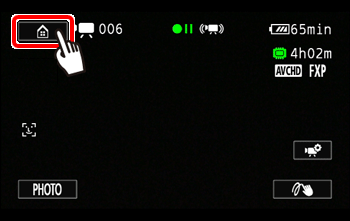
2.Touch [  ].
].
].
3. Drag your finger left/right to bring the [Main Functions] menu to the center,
  and then touch to open it.
Drag your finger left/right to bring the [Main Functions] menu to the center, and then touch to open it.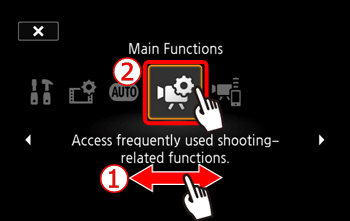
4. Drag your finger up and down to display the rest of the panel and then touch [Mic. Level].
Drag your finger up and down to display the rest of the panel and then touch [Mic. Level].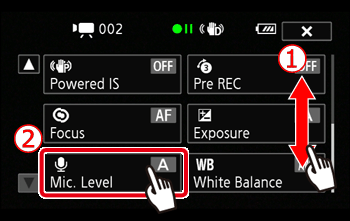
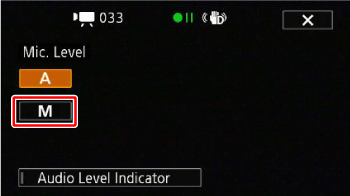
5. Touch [  ].
].
].
6. Touch and hold [  ] or [
  ] to adjust the audio recording level as necessary.
] or [ ] to adjust the audio recording level as necessary.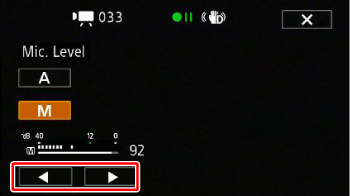
As a guideline, adjust the audio recording level so that the audio level meter will go to the right of the -12 dB mark (yellow area) only occasionally.
REFERENCETouch [] (automatic) to return the camcorder to automatic audio recording levels.
7.Touch [  ] to lock the audio recording level at the current level.
] to lock the audio recording level at the current level.REFERENCE
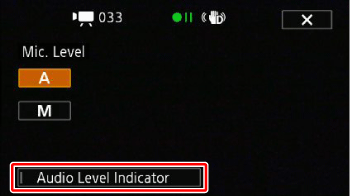
- To display the audio level indicator
Usually, the audio level indicator will be displayed only after activating the manual adjustment of the audio recording level. You can choose to display it also when the audio level is adjusted automatically.1.Touch [2. Touch [Audio Level Indicator].3.Touch [
NOTE
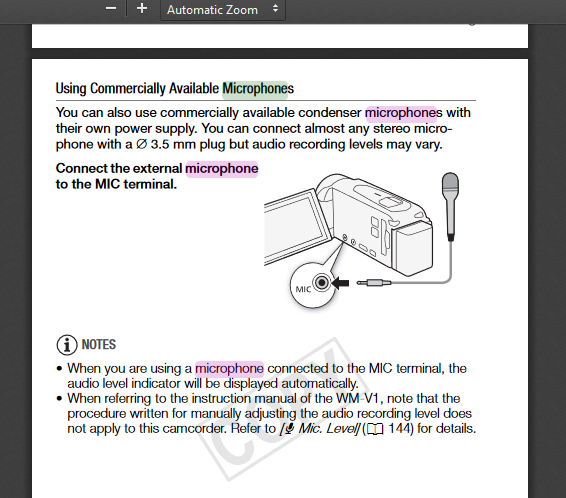
- When you are using a microphone connected to the MIC terminal, including the WM-V1 Wireless Microphone, the audio level indicator will be displayed automatically.
- When the audio level meter reaches the red point (0 dB), the sound may be distorted.
- We recommend using headphones to check the sound level while adjusting the audio recording level.
Did this answer your question? Please click the Accept as Solution button so that others may find the answer as well.
Options
- Mark as New
- Bookmark
- Subscribe
- Mute
- Subscribe to RSS Feed
- Permalink
- Report Inappropriate Content
11-28-2017 05:15 PM - edited 11-28-2017 05:18 PM
I have had this exact same issue; though I do not know if my mic imput ever worked as I just started trying to use it. I have tested multiple microphones and none of them work. I tried adjusting the level before I ever came across this post so that is not a solution.
(edit. It shows all the microphones as connected as the level meter shows up when I plug them in. They also work on other devices.)


Options
- Mark as New
- Bookmark
- Subscribe
- Mute
- Subscribe to RSS Feed
- Permalink
- Report Inappropriate Content
11-28-2017 07:39 PM
I think the Vixias all require a self-powered external microphone to work properly, just in case you're trying to use an unpowered mic. Plugging in any mic will disable the onboard microphone.
Options
- Mark as New
- Bookmark
- Subscribe
- Mute
- Subscribe to RSS Feed
- Permalink
- Report Inappropriate Content
10-05-2018 01:03 PM
My H52 does not "scroll" to the additional microphone settings. Firmware update?
Options
- Mark as New
- Bookmark
- Subscribe
- Mute
- Subscribe to RSS Feed
- Permalink
- Report Inappropriate Content
10-05-2018 01:50 PM
According to the user manual, it appears that it's just a matter of plugging in any self powered microphone with the right size jack. Are you trying to use an unpowered mic?
Options
- Mark as New
- Bookmark
- Subscribe
- Mute
- Subscribe to RSS Feed
- Permalink
- Report Inappropriate Content
10-05-2018 05:46 PM
Hello richard654,
We are sorry to hear that this has occured. There is an updated version of the firmware posted on the web site. We recommend updating at your earliest convenience.
Please Click Here for the VIXIA support page.
Did this answer your question? Please click the Accept as Solution button so that others may find the answer as well.

Announcements
07/22/2026: New firmware updates are available.
EOS R6 Mark III - Version 1.1.0
05/13/2026: New firmware updates are available.
EOS R5 Mark II - Version 1.3.0
EOS R6 Mark II - Version 1.7.0
04/28/2026: Service Notice: Caution Concerning use of Lithium Batteries
03/17/2026: New firmware updates are available.
SELPHY CP1500 - Version 1.0.7.0
02/23/2026: New firmware update is available for EOS C50- Version 1.0.3.1
01/23/2026: New firmware update is available for RF 24-105mm F4 IS USM- Version 2.0.7
01/20/2026: New firmware updates are available.
10/21/2025: Service Notice: To Users of the Compact Digital Camera PowerShot V1
10/15/2025: New firmware updates are available.
Speedlite EL-5 - Version 1.2.0
Speedlite EL-1 - Version 1.1.0
Speedlite Transmitter ST-E10 - Version 1.2.0
07/28/2025: Notice of Free Repair Service for the Mirrorless Camera EOS R50 (Black)
05/21/2025: New firmware update available for EOS C500 Mark II - Version 1.1.5.1
Related Content
- DM-100 mic compatibility with VIXIA HF M30? in Video Accessories
- Canon VIXIA HF G21 camcorder -audio in one channel only using external mic in Camcorders
- LEGRIA HF G70 external microphone recommendations in Video Accessories
- C70 mini XLR input level discrepancy in Professional Video
- XA60 Cable needed to turn mic's one audio track into two tracks in Video Accessories

Ⓒ 2026
Canon U.S.A Inc. All Rights Reserved. Reproduction in whole or part without permission is prohibited.
